Skip to content
Learning Site
Home

About

  • About Robotical
  • Case Studies
  • Meet the Team
  • Blog
  • Contact Us

Our Products

  • Marty the Robot
  • Axiom
  • Cog

Teach

  • Lessons & Resources
  • Marty for Educators
  • Funding & Grants
  • Professional Development
  • Why Teach STEM?
  • Coding Environments
  • Student Led Learning

Let's Code

  • Marty the Robot
  • Code Online
  • Marty Apple App
  • Marty Android App
  • Update your Marty
  • Cog
  • Code Online
  • Cog iOS App
  • Cog Android App
  • Axiom
  • Axiom Science

Support

  • Marty Get Started
  • Cog Quick Start Guide
  • Axiom Science Quick Start Guide
  • Support & FAQs
  • Marty V2 User Guides
  • Marty V1 Resources
  • Request Support
  • Request Top-Up Training

Shop

  • Marty the Robot and Physical Computing
  • Class Packs
  • Add Ons & Extras
  • Account
  • Shipping, Returns & Cancellations
  • Distributors
HomeLessonsUnits of workCurriculum standardsTutorials

Information

  • Lessons & Resources
  • Knowledge Base & User Guides
  • About Us
  • Shipping, Returns & Cancellation
  • Privacy Policy
  • Learning site privacy
  • Terms of Service
  • Partner Hub

Support & Help

  • Support & Help Center
  • Getting Started with Marty V2
  • Getting Started with Marty V1

Learning, Resources & Guides

  • Marty V2 Lessons Site
  • Marty V1 Lessons Site

Contact Us in the UK

Stanhope House,12 Stanhope Place,Edinburgh,United Kingdom,EH12 5HH
(+44) 0131 564 0922
hello@robotical.io
Contact Us

Contact Us in the US

2810N Church St, PMB 61694,Wilmington,Delaware,USA19802-4447
(+1) 833 886 1661
hello@robotical.io
Contact Us

Why not join our mailing list?

For News, New Products and Special Offers

Join mailing list

Copyright 2016-2026 © Robotical Ltd

All lessons
Marty app
CurrentPrevious

Sustainability and the Environment - Marty Sorts the Recycling

Help Marty see if we can organise the recycling

Sustainability and the Environment - Marty Sorts the Recycling
Age / stage
5 - 7
Estimated time
60 minutes
Difficulty
Intermediate
Products
Marty V2

On this page

  1. Lesson overview
  2. Before you begin
  3. Warm-up
  4. Get learning
  5. Further challenge ideas
  6. Cool down
  7. Additional reading
  8. Curriculum standards

Additional reading

Getting Ready for COP26

Curriculum standards

22
Choose your curriculum to see the relevant standards.

22 of 22 linked standards shown.

Australian CurriculumAustralia4
Curriculum areaLinked standards
Digital Technologies, Design & technologies: Design & Technologies
Digital Technologies, Design & technologies: Digital Technologies

Select a code to read the full standard.

Digital Technologies, Design & technologies: Design & Technologies

  • ACTDEP006Generate, develop and record design ideas through describing, drawing and modelling
  • ACTDEP007Use materials, components, tools, equipment and techniques to safely make designed solutions

Digital Technologies, Design & technologies: Digital Technologies

  • ACTDIP011Implement simple digital solutions as visual programs with algorithms involving branching (decisions) and user input
  • ACTDIP012Explain how student solutions and existing information systems meet common personal, school or community needs
CSTA Education StandardsUSA2
Curriculum areaLinked standards
General standards

Select a code to read the full standard.

  • 1A-CS-02Use appropriate terminology in identifying and describing the function of common physical components of computing systems (hardware).
  • 1A-AP-15Using correct terminology, describe steps taken and choices made during the iterative process of program development.
Curriculum for ExcellenceScotland12
Curriculum areaLinked standards
Health and Wellbeing: Mental, Emotional, Social and Physical Wellbeing
Literacy & English: Listening and Talking
Literacy & English: Reading
Literacy & English: Writing
Numeracy: Number, Money and Measure
Technologies: Computing Science
Technologies: Technological Developments in Society and Business

Select a code to read the full standard.

Health and Wellbeing: Mental, Emotional, Social and Physical Wellbeing

  • HWB 0-14a / HWB 1-14a / HWB 2-14a / HWB 3-14a / HWB 4-14aSocial wellbeing

Literacy & English: Listening and Talking

  • LIT 1-02aTools for listening and talking
  • LIT 1-09aCreating texts

Literacy & English: Reading

  • LIT 1-14aFinding and using information

Literacy & English: Writing

  • LIT 1-20a / LIT 2-20aEnjoyment and choice
  • LIT 1-23aTools for writing

Numeracy: Number, Money and Measure

  • MNU 1-01aEstimation and rounding
  • MNU 1-11aMeasurement

Technologies: Computing Science

  • TCH 1-14aUnderstanding and analysing computing technology
  • TCH 1-15aDesigning, building and testing computing solutions

Technologies: Technological Developments in Society and Business

  • TCH 1-06aImpact, contribution, and relationship of technologies on business, the economy, politics, and the environment.
  • TCH 1-07aImpact, contribution, and relationship of technologies on business, the economy, politics, and the environment.
England's National CurriculumEngland2
Curriculum areaLinked standards
Computing, Design and Technology: Computing
Computing, Design and Technology: Design and Technology

Select a code to read the full standard.

Computing, Design and Technology: Computing

  • ✔️Understand what algorithms are; how they are implemented as programs on digital devices; and that programs execute by following precise and unambiguous instructions

Computing, Design and Technology: Design and Technology

  • ✔️Design purposeful, functional, appealing products for themselves and other users based on design criteria
ISTEUSA2
Curriculum areaLinked standards
International Society for Technology in Education (ISTE)

Select a code to read the full standard.

International Society for Technology in Education (ISTE)

  • 3dStudents build knowledge by actively exploring real-world issues and problems, developing ideas and theories and pursuing answers and solutions.
  • 7dStudents explore local and global issues and use collaborative technologies to work with others to investigate solutions.

Resources

Learner resources

  • Workbook for Marty Disovers More About RecyclingFile links loading

Educator resources

  • Teacher GuideFile links loading
  • Presentation for Marty Disovers More About RecyclingFile links loading

Lesson overview

This lesson is used to have learners investigate which 'type' of recyclable an item is.

Learners will organize objects for recycling into a variety of different categories: glass, plastic, paper, metal or non-recyclable.

Then learners will estimate movements for Marty and code a reaction for one, or more, of the recyclable types.

Learning objectives

  • I can estimate distances with Marty
  • I can sort objects into different groups

Key vocabulary

  • Categories
  • Estimate
  • Glass
  • Plastic
  • Metal
  • Paper

Prior learning

Basic recycling and litter symbols

Cross-curricular links

Developments in Society and Business, Science

Before you begin

Equipment

  • Marty the Robot
  • Workbook
  • A range of clean recyclable materials or photos of recyclable materials

Warm-up

TimingActivityPossible adaptations
Timing—

Warm-up:

Share with learners the objectives and success criteria from the presentation.

Start by playing a game that involves sorting general classroom objects into categories, described or created by the learners: a variety of tools used for work like a ruler, scissors, crayons, pencils, etc; various items for an art lesson like a paint brush, water cup, clothing bib, paints, etc; a range of books like comic, magazine, fiction, class reader, non-fiction, dictionary, etc; coloured paper; construction toy pieces; etc.

Learners will, in their groups, organize the items they have into categories but they have to understand the categories they create and describe why one item belongs in a certain category.

Possible adaptations—

Get learning

TimingActivityPossible adaptations
Timing—

Get Learning:

Read the story that is in the presentation, with the images to support it. Following this, have learners complete the work page that asks them to put the describing words, or adjectives, with each item on the table; let learners know that it is possible to use an adjective more than once. You will notice that there is no row for non-recyclable items, feel free to ask learners why that row might not be there. The thinking was that all the adjectives could potentially be used to describe something that is not recyclable.

This is where learners need to sort the recyclable materials needed for this lesson. Once this is complete, line up the items against a wall, like the image below, mixing up the items so they are arranged in random order. If items were not gathered, images of recyclable items are a good substitute.

If you feel it would support, show learners the video below that shows items being organized into different categories, for recycling. It isn't necessary with the discussion during the presentation but could be a good support for some. Click on the 'Watch on YouTube' button at the bottom left of the video window to see it there.

Continue the presentation to see Marty inspecting several recyclable objects (the code is detailed in the teacher guide) and then share the starting code and video (on separate slides) for Marty to walk, and react, to one recyclable item (below). Learners will then engage with their groups to plan a sequence to get their Marty to walk, and react, to the recyclable item type that their group chose; so, stop the presentation after the second video of Marty reacting to the recycling. There are opportunities for learners to plan in their workbooks.
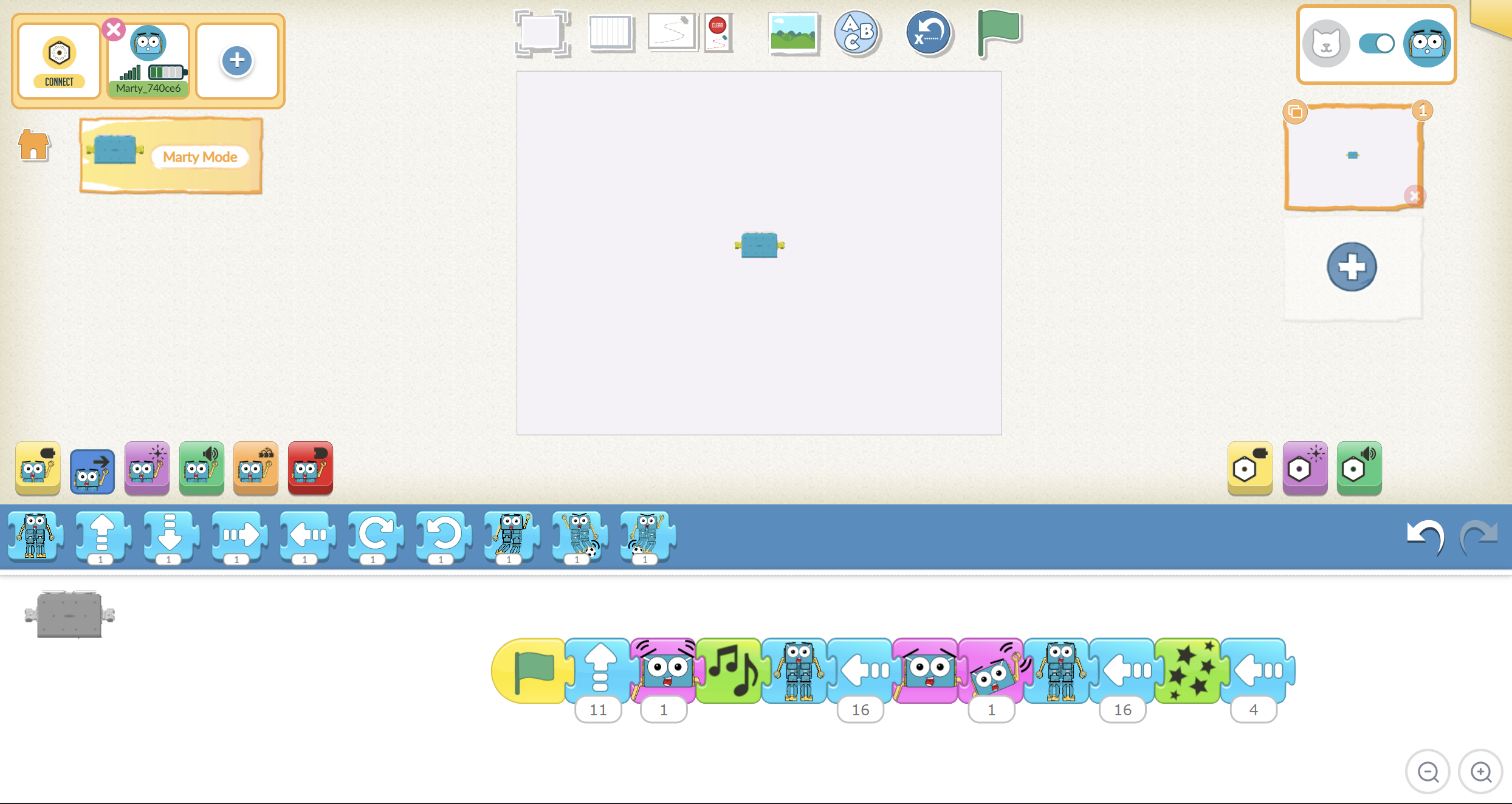
Cool down

TimingActivityPossible adaptations
Timing—

Cool Down

Celebrate the creative work that was accomplished: "You managed to get Marty to react to your group's recycling item. Fantastic work!"

Remind learners of the goals for the lesson, "Estimate distances with Marty; sort objects into different groups."

Ask learners if they think they did well with the lesson using a familiar formative assessment strategy: thumbs up for good, thumbs to the side for OK, thumbs down for not so good; a green, yellow or red card, indicating their thoughts; a one to one chat about the learning; whole class feedback using a PMI (plus, minus, interesting) approach; or some other strategy with which the learners are familiar. Ask them if there were any challenges they overcame or if there were any bugs they could not fix. Take time to discuss these

Read the closing part of the text to wrap up Marty's episode.

Carry out any end of lesson routines, and log off the devices.

Possible adaptations—
Timing—

Time for Practice

There will be plenty of time for trial and error at this point in the lesson: learners will need to do a lot of estimating and checking their work when it comes to having Marty accurately reach the first item and respond appropriately; learners will then need to estimate how many sidesteps it will take to reach the next item their group chose; this may need to be repeated with additional estimates. Feel free to share that the video in the presentation was not completed on the first estimate.

Strongly encourage that learners record their estimates on their planning page rather than just writing down the final attempt that was correct: it is worthwhile letting them see how they can quickly become more accurate with each estimate.

Possible adaptations

Support

Support learners with estimating distances:

  • use tape to mark each estimate, with a number recorded on it, to support the next estimate
  • question learners about if the next estimate needs to be more or less than the last one and then extend to, 'about how much' more or less

Further challenge ideas

Extend

  • Challenge learners to create code that has Marty react to all of the different recyclable materials and make the reaction to items of the same type the same.
Watch on YouTube