Skip to content
Learning Site
Home

About

  • About Robotical
  • Case Studies
  • Meet the Team
  • Blog
  • Contact Us

Our Products

  • Marty the Robot
  • Axiom
  • Cog

Teach

  • Lessons & Resources
  • Marty for Educators
  • Funding & Grants
  • Professional Development
  • Why Teach STEM?
  • Coding Environments
  • Student Led Learning

Let's Code

  • Marty the Robot
  • Code Online
  • Marty Apple App
  • Marty Android App
  • Update your Marty
  • Cog
  • Code Online
  • Cog iOS App
  • Cog Android App
  • Axiom
  • Axiom Science

Support

  • Marty Get Started
  • Cog Quick Start Guide
  • Axiom Science Quick Start Guide
  • Support & FAQs
  • Marty V2 User Guides
  • Marty V1 Resources
  • Request Support
  • Request Top-Up Training

Shop

  • Marty the Robot and Physical Computing
  • Class Packs
  • Add Ons & Extras
  • Account
  • Shipping, Returns & Cancellations
  • Distributors
HomeLessonsUnits of workCurriculum standardsTutorials

Information

  • Lessons & Resources
  • Knowledge Base & User Guides
  • About Us
  • Shipping, Returns & Cancellation
  • Privacy Policy
  • Learning site privacy
  • Terms of Service
  • Partner Hub

Support & Help

  • Support & Help Center
  • Getting Started with Marty V2
  • Getting Started with Marty V1

Learning, Resources & Guides

  • Marty V2 Lessons Site
  • Marty V1 Lessons Site

Contact Us in the UK

Stanhope House,12 Stanhope Place,Edinburgh,United Kingdom,EH12 5HH
(+44) 0131 564 0922
hello@robotical.io
Contact Us

Contact Us in the US

2810N Church St, PMB 61694,Wilmington,Delaware,USA19802-4447
(+1) 833 886 1661
hello@robotical.io
Contact Us

Why not join our mailing list?

For News, New Products and Special Offers

Join mailing list

Copyright 2016-2026 © Robotical Ltd

All activities

Activity

Check Learning - Variables

This is a check to see if learners can remember what variables are and how they can change

Duration
45 minutes
Difficulty
Intermediate
Age range
5 - 7
Products
Marty V2
Environment
Unplugged
Check Learning - Variables

Activity code and app tools

  • MartyBlocks preview
    Open in app
  • MartyBlocks starter project
    Open in appDownload

Lesson plans using this activity

  • 1.8 – Introduction to Variables

    Duration
    45 minutes
    Difficulty
    Beginner

Overview

What you will do:

Show what you remember about variables.

What you need to show:

What a variables is.

How variables are used.

How variables can change.

Vocabulary:

Variable - a named value that can be changed.

Remember this:

Variables need to be created before they can be used and variables are often given a value when they are created.

Task 1:

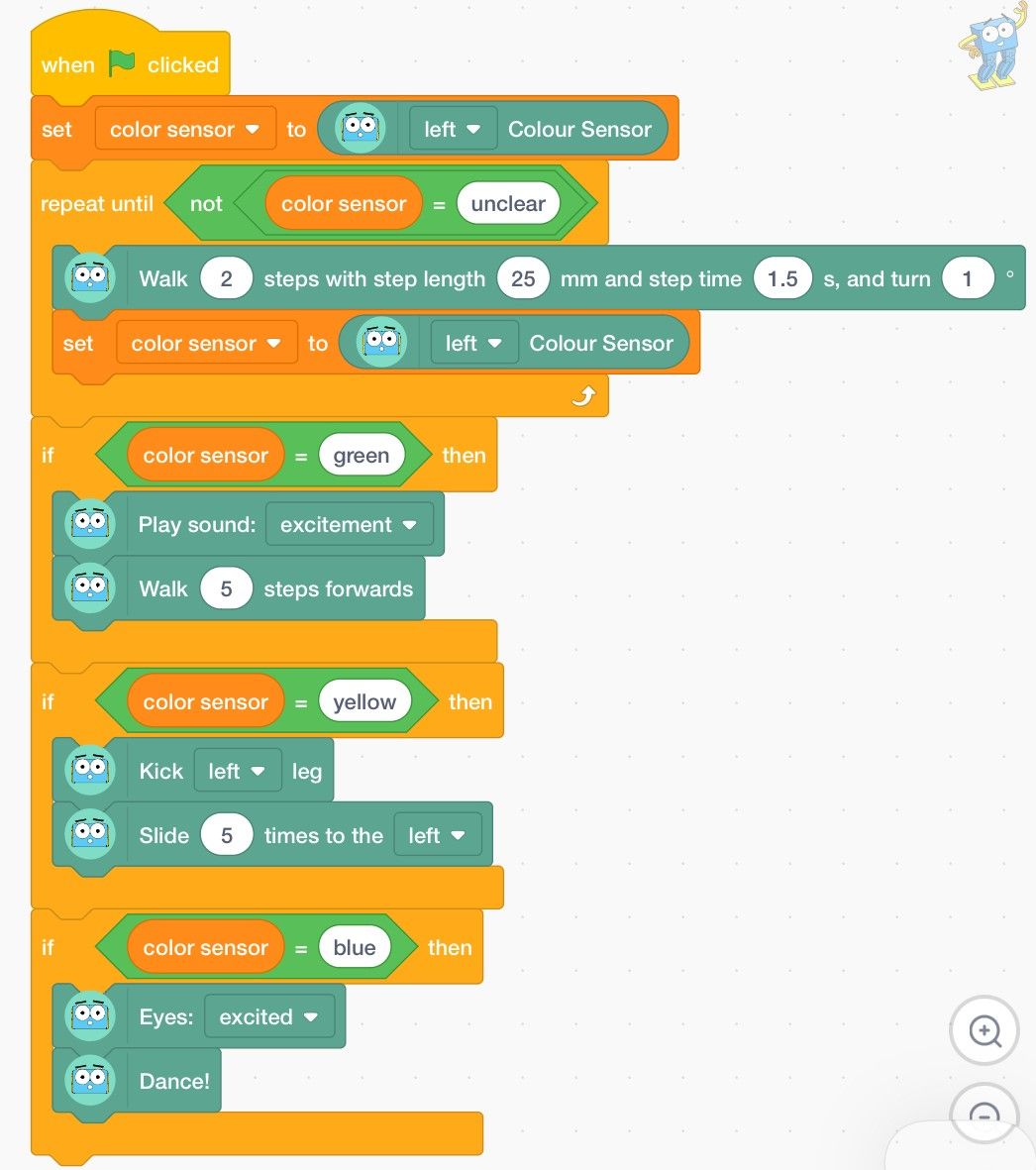
Here is a program from MartyBlocks. Which video shows how the code instructs Marty to act? Click under the one that you think is correct.

Is this the one?

In this video Marty kicks and sidesteps when the variable is green. That's not what is in the code. Try again.

Is this the one?

In this video, Marty dances when the variable is blue. You got it right, well done!

Is this the one?

In this video Marty makes a noise and walks forward when the variable is yellow. The code suggests that is what should happen when green is detected. Give it another try.

Task 2:

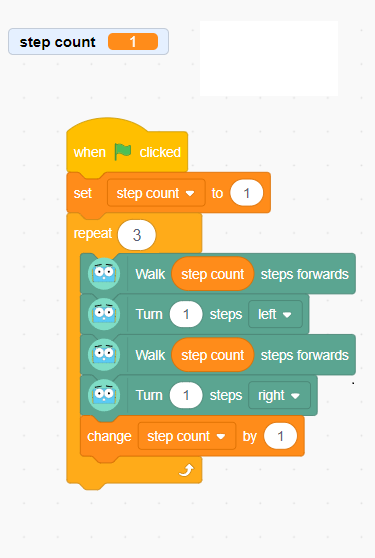
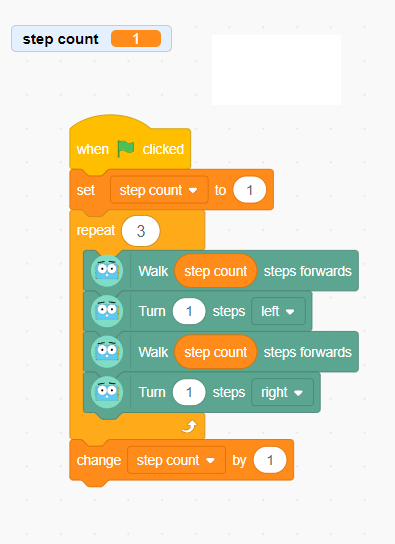
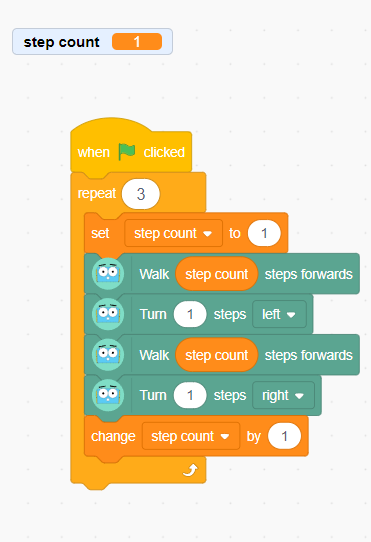
Click to watch a video of Marty performing several actions then select the block of code you think is correct for the actions Marty completes.

Is this the one?

This code sets the step count variable to one and then after each loop, the variable increases by one, so Marty takes one more steps when moving forward. This is what Marty does in the video, so well done!

Is this the one?

This code sets the step count variable to one and then Marty takes one step forward and turns with each loop. The variable value doesn't change until after the loop is finished. Nice try, but not quite.

Is this the one?

This code sets the step count variable to one and then after each loop, the variable increases by one, but then at the start of each loop, the variable is changed back to 1. So Marty will only ever take one step at a time, when moving forward. Good effort, but not quite.

Task 3:

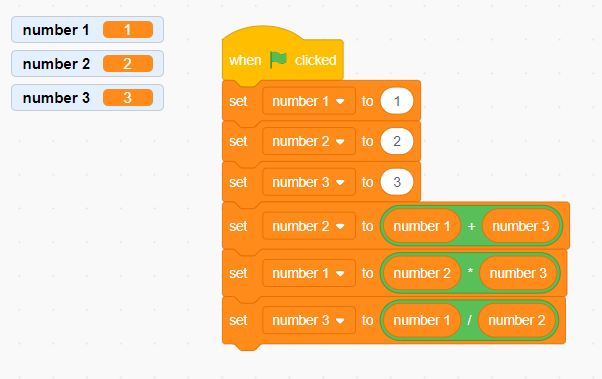
There are three variables used in this block of code. Click the option you think shows the correct value for each of the variables at the end of the program.

Number 1 is equal to 1.
Number 2 is equal to 2.
Number3 is equal to 3.

Is this the one?

These values are correct up to the fourth block of the code but then they change. Look again to see the amounts.

Number 1 is equal to 5.
Number 2 is equal to 15.
Number3 is equal to 1/3.

Is this the one?

You need to be careful with the order of the variables. You might have mixed up variables 1 and 2.

Number 1 is equal to 12.
Number 2 is equal to 4.
Number3 is equal to 3.

Is this the one?

This is exactly correct! Well done seeing which variable to use and well done with the math!.

Feedback (Here are some questions to think about):

Did you remember to that a variable needs a value before you start using it?

Did you remember that variable values can change?

Did you remember that variables don't have to be numbers?

View lesson plan