2: Learning to Code with Marty Blocks Jr
Step 1 of 4: 1.02: Getting Started with Blocks Jr
Using blocks to estimate how far
24 of 24 linked standards shown.
| Curriculum area | Linked standards |
|---|---|
| Digital Technologies, Design & technologies: Digital Technologies |
Select a code to read the full standard.
| Curriculum area | Linked standards |
|---|---|
| General standards |
Select a code to read the full standard.
| Curriculum area | Linked standards |
|---|---|
| Health and Wellbeing: Mental, Emotional, Social and Physical Wellbeing | |
| Literacy & English: Listening and Talking | |
| Literacy & English: Writing | |
| Numeracy: Number, Money and Measure | |
| Technologies: Computing Science |
Select a code to read the full standard.
| Curriculum area | Linked standards |
|---|---|
| Computing, Design and Technology: Computing | |
| Computing, Design and Technology: Design and Technology |
Select a code to read the full standard.
| Curriculum area | Linked standards |
|---|---|
| Computer Science: | |
| English Language Arts: Speaking and Listening | |
| English Language Arts: Writing | |
| Mathematics: |
Select a code to read the full standard.
| Curriculum area | Linked standards |
|---|---|
| International Society for Technology in Education (ISTE) |
Select a code to read the full standard.
| Curriculum area | Linked standards |
|---|---|
| Elementary Technology Applications: Kindergarten to Grade 2 |
Select a code to read the full standard.
In this lesson, learners will explore the new interface for Marty, where their instructions will stay on the device screen. Learners will be estimating how many steps they think Marty will need to reach a goal.
Direction symbols; ordering instructions
Position and direction, estimation
For this entire lesson, Marty should be on the ground, not on a table.
| Timing | Activity | Possible adaptations |
|---|---|---|
| — | Warm UpShare with learners the objectives and success criteria for today's lesson, from the presentation. Read the story text from the lesson. The presentation will contain video to support the day's learning. Have various starting points and goals for learners throughout the classroom. Green / red dots, or some other marker, will suffice. Learners need to think about, how far away is the goal from the start: how many steps do I need to get to the goal? Have learners estimate the number of steps and then have them test it. If they do not achieve the goal accurately, have them return to the start and estimate again; discourage learners from walking to the goal if they were incorrect, they should be thinking about, "I didn't go far enough, I need to take more steps," or vice versa. Showcase Marty walking forward to reach a goal. The code from Blocks Jr is below. The presentation does not have this. 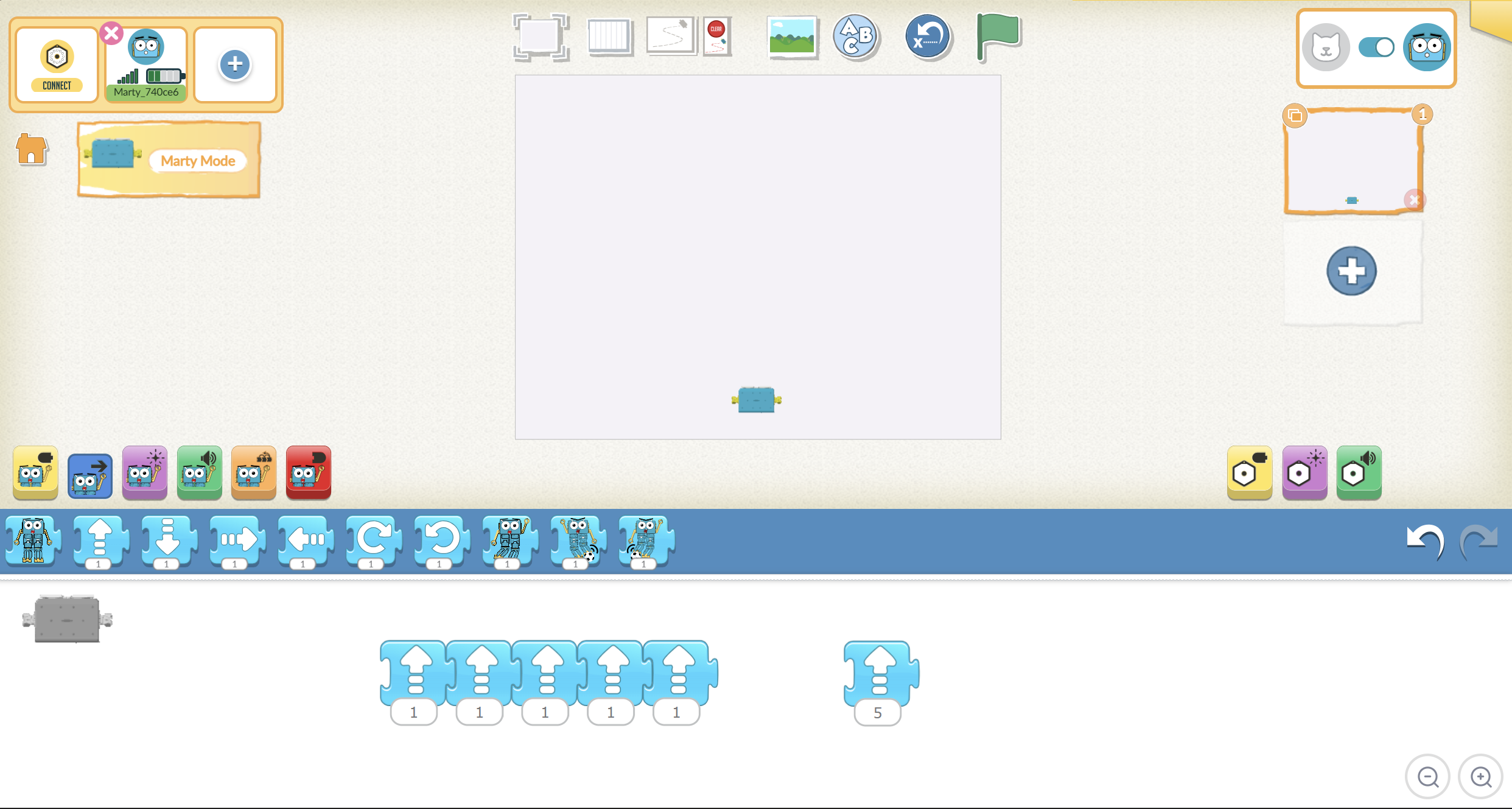 | — |
| Timing | Activity | Possible adaptations |
|---|---|---|
| — | Get LearningThe workbook has the four arrows from the Marty Controller. Learners need to draw a line from the symbol to the word. Before learners start, review the words, heavily emphasizing the first sound for those challenged by reading: fffffforward, lllllleft, rrrrrrrright and b b b b b back. The second activity presents a route that Marty has taken on the page. Learners need to draw the arrows in the empty squares and then horizontally, at the bottom, to symbolize the route Marty took. For any errors, use your finger to trace Marty's movements as the arrows progress along the route. Verbalize the direction that your finger is taking. Have learners repeat what you are saying. Have learners fill out the route Marty can take for the second illustration. Again, have them draw the arrow for the direction and the full instruction, at the bottom. Encourage discussion and sharing ideas. Let learners know that for today's lesson, we will be focusing mainly on the forward block, but not with the controller they already know. Additionally, it may take some time to get their instructions correct. Inform learners that this is OK and is, in fact, a big part of coding. | — |
| — | Time for PracticeModel how to access Blocks Jr and connect to Marty for learners. |
| Timing | Activity | Possible adaptations |
|---|---|---|
| — | Cool DownBring learners back together to discuss the challenges they faced and overcame. Have groups model their creations and explain what is happening, when. Encourage other groups to ask questions to deepen the understanding of the processes. Suggested questions you might ask:
Carry out any end of lesson routines. Log off devices and clear everything away. | — |
Once on-screen, show learners the effect that adding the forward movement block, and tapping the block, has on Marty. Ask learners if they saw how many steps Marty took with one of the blocks. Show again to check their thoughts. Once the number of steps per block has been established, ask how many blocks we would need for (fill in a number) steps.
Place an object on the ground that is a distance of about 25 cm from Marty. Have learners estimate about how many steps they think it would take for Marty to get to the object. Model this with learners watching you use that many blocks. Once Marty reaches the goal, which may take multiple attempts, have groups take their Marty and find a place where they can set them down with a goal to reach.
Learners should first mark, perhaps with tape, the starting point for Marty and the endpoint for the object, in case the object gets knocked over or multiple tests are required; additionally, this could be used to ensure that the tests are not changing with each attempt, an important consideration for science experiments. It is also a good idea to have a bit of a border around the object Marty is aiming to reach, to allow for a range of success. Challenge learners to estimate about how many steps it will take for Marty to get to the goal. Then, have them build the sequence in Blocks Jr with the arrow pointing upward (for forward): learners will engage in some trial and error in order to reach the goal. Emphasize that this isn't about getting it right the first, or even the second, time: this is about getting better with each attempt.
The presentation had an initial video of Marty trying to reach the goal. This clip also shows how to build the code with Blocks Jr. Remind learners that developers do not get their code right the first time: trial and error often occurs when writing code, it is through this process that code is improved. Feel free to show the video again, if it will support this.
Let learners experiment with the blocks to reach a goal that they have set on the floor. If one or two groups manage to reach the goal early, encourage them to move their goal to a different distance; alternatively, if the resource is available, have learners experiment on a different surface and discuss if this made a difference for Marty's movement; if it did, have learners discuss why this might be.
SupportAllow learners to put tape down after each estimate and record on the tape the number of steps that were taken. Use the information there, and talk about, 'about how many more steps do you think?' Model breaking up the work they have done to inform the next estimate: put one hand on the starting point and a second where the estimate stopped; maintain the distance between your hand and move your 'starting hand' to the place where Marty stopped; observe the new position of the 'stopping hand'; compare where the goal is to where the stopping hand is to inform the next estimate. Do we need a lot more steps or a few more steps? |
Have learners consider about how 'big' a Marty step is. Use Marty steps to estimate about how long other objects are.
Have learners create challenges for other groups by setting up start and end points and asking other groups to estimate the number of steps Marty will need to reach them.
