Trial Unit of Work - 30 Minute Lessons
Step 3 of 3: Trial Lesson Upper Elementary 30 minutes - Obstacles
Give Marty a reaction when something is in the way
Look at some of the lessons that use loops and conditional statements:
Choices with an If Statements
Using loops
Additionally, please consult the information for the IR (obstacle) sensor
19 of 19 linked standards shown.
| Curriculum area | Linked standards |
|---|---|
| Digital Technologies, Design & technologies: Design & Technologies | |
| Digital Technologies, Design & technologies: Digital Technologies |
Select a code to read the full standard.
| Curriculum area | Linked standards |
|---|---|
| General standards |
Select a code to read the full standard.
| Curriculum area | Linked standards |
|---|---|
| Health and Wellbeing: Mental, Emotional, Social and Physical Wellbeing | |
| Literacy & English: Listening and Talking | |
| Literacy & English: Reading | |
| Literacy & English: Writing | |
| Numeracy: Number, Money and Measure | |
| Technologies: Computing Science |
Select a code to read the full standard.
| Curriculum area | Linked standards |
|---|---|
| Computing, Design and Technology: Computing | |
| Computing, Design and Technology: Design and Technology |
Select a code to read the full standard.
| Curriculum area | Linked standards |
|---|---|
| International Society for Technology in Education (ISTE) |
Select a code to read the full standard.
In this lesson learners will have Marty react to an obstacle.
How do we detect objects that are in our way? How is it different for a robot? The answer is sensors.
Awareness of if statements and repeat blocks
Writing instructions, Maths estimation and direction language
| Timing | Activity | Possible adaptations |
|---|---|---|
| — | Warm UpHave the presentation open before the lesson starts. Ask learners if they know what parkour is and what people need to do to perform parkour. Have learners list their ideas in the workbook; this could be done individually, as part of a group, or as a whole class. Encourage learners to describe how to perform any of the moves that they know. Encourage learners to show mini models of the moves in parkour, perhaps using their fingers as legs and jumping off surfaces like books on their desk or other small obstacles they could use. There is a video on slide 2 of the presentation that is a fun display of some finger parkour. This can be deleted if you do not need it. After a chance to describe moves, show the clip from slide 3 in the presentation - Atlas performing parkour. Have learners think about what a robot would need to be able to do what a person can do. Following a discussion around the videos, share the objectives and success criteria on slides 4 and 5. | — |
| Timing | Activity | Possible adaptations |
|---|---|---|
| — | Get LearningRobots need sensors to respond to their environment and they need instructions for what to do after they sense different objects. Marty has an obstacle sensor that comes attached to their foot and the color sensor also detects obstacles. What do we need to think about, for Marty, in order to respond to an obstacle? Show a response from Marty upon approaching an obstacle. There is a video on slide 6 of the presentation that shows Marty's reactions to an obstacle. Question ideas are in the presentation notes on slide 6. Share with learners an image of the IR sensor and a slide of how it works (slides 7 and 8 in the presentation). Explain that the IR sensor gets feedback from light that reflects off the wall and that is how Marty 'knows' something is in the way. Below are images of Marty's sensor and a diagram of how the sensor works 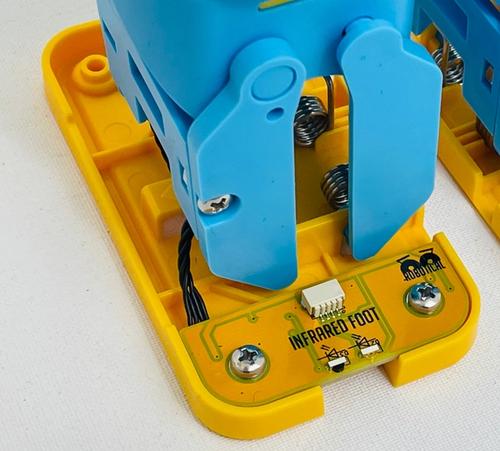 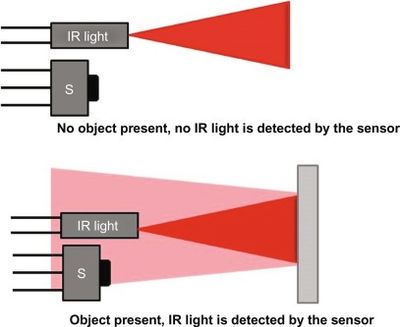 The responses from the sensor are described on slide 8. Learners may have already learned about something called BOOLEANs, these are pieces of code that take only two values; for Marty, they are true or false. When you go to the sensing tab on Blocks and press the 'Foot obstacle sensed' block, if there is nothing directly in front of the foot with the sensor, this will return false. If there is something there, it will return true. It would help to show this on a device screen to the class, so that they can appreciate how close Marty needs to be to react by moving Marty close to an object and pressing the foot sensing block on the device and then repeating this when moving Marty farther away. Alternatively, tapping the box beside the block will keep the feedback from the distance sensor on the workspace. |
| Timing | Activity | Possible adaptations |
|---|---|---|
| — | Cool DownTake time to discuss the learning that occurred. Suggested questions you might ask:
Carry out any end of lesson routines. Log off devices and clear everything away. | — |
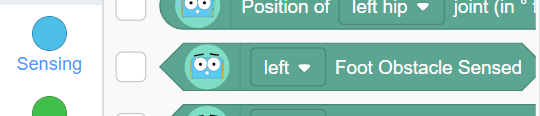
Slide 9, from the presentation, shows the most basic code to have Marty respond to an obstacle. Slide 10 shows the code in action.
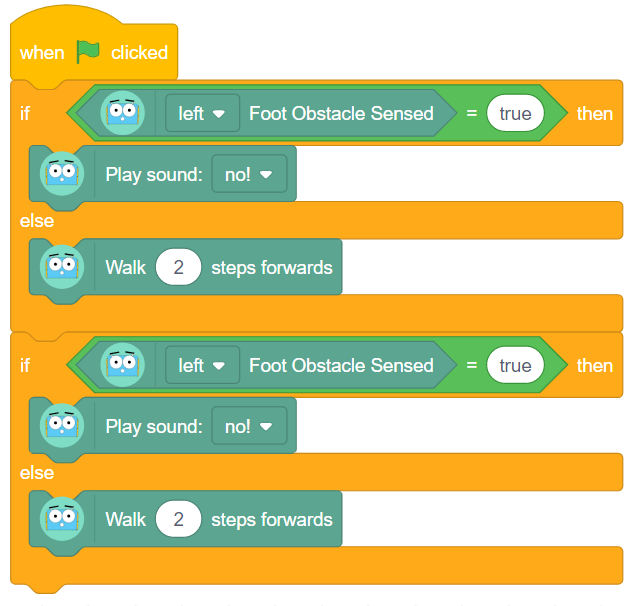
There are ideas for discussion, on slide 9, for the code as well as locations for each of the blocks.
| — |
| — | Time For PracticeThere are questions on slide 11 to promote learners to think about how they could improve on Marty's code. They may have noticed that the Marty from the second video was only two steps from the wall, so taking two steps would result in the sensor returning true. Try running code on the class Marty from a greater distance. What can we do to ensure Marty reaches and detects an obstacle so that they can react to it? Learners may suggest using a repeat block, but you could also say that they should keep their ideas within their group to encourage a greater diversity of responses. Have a whole-class planning session with ideas for how you can improve on the basic code, which will enable Marty to respond to objects that are initially farther away. You will need to decide if you are entering the code into the app for Marty to perform, if there is a learner in your class who will have this responsibility or if you want groups to enter the code on their iPads and then connect to Marty when they are ready. | SupportProvide supportive questions around how we have actions repeat, repeat block, how we have Marty do one action depending on what happens first if/then/else block. While learners are planning, emphasize that they need to think about what happens as the code executes:
|
Challenge learners to have Marty react differently if they detect two obstacles in a short period of time. The first video of Marty moving, from the presentation, illustrates the different responses he might have. Learners may choose a different sound or raising arms in exasperation. The goal is a different response.
