Parallel Programming with Disco Marty
Choices with an If Statements
Using timing with disco eye lights
Using nested conditional statements with disco arm lights
Using parallel programming with disco feet lights
25 of 25 linked standards shown.
| Curriculum area | Linked standards |
|---|---|
| Digital Technologies, Design & technologies: Design & Technologies | |
| Digital Technologies, Design & technologies: Digital Technologies |
Select a code to read the full standard.
| Curriculum area | Linked standards |
|---|---|
| General standards |
Select a code to read the full standard.
| Curriculum area | Linked standards |
|---|---|
| Health and Wellbeing: Mental, Emotional, Social and Physical Wellbeing | |
| Literacy & English: Listening and Talking | |
| Literacy & English: Writing | |
| Numeracy: Number, Money and Measure | |
| Technologies: Computing Science |
Select a code to read the full standard.
| Curriculum area | Linked standards |
|---|---|
| Computing, Design and Technology: Computing | |
| Computing, Design and Technology: Design and Technology |
Select a code to read the full standard.
| Curriculum area | Linked standards |
|---|---|
| International Society for Technology in Education (ISTE) |
Select a code to read the full standard.
| Curriculum area | Linked standards |
|---|---|
| Middle School Technology Applications: Grade 6 to Grade 8 |
Select a code to read the full standard.
In this lesson, learners will bring together their understanding of the disco light blocks and parallel programming to have multiple actions and multiple responses. Ideas presented here draw on the timing of the lights and responses to movements.
Please read the knowledge base article about the Disco addons, if you haven't already.
Knowledge of parallel programming, conditional statements and loops
Challenge learners to think of more than one routine for Marty: once part of the song passes, perhaps 4 or 8 bars, Marty changes his move / light display.
| Activity |
|---|
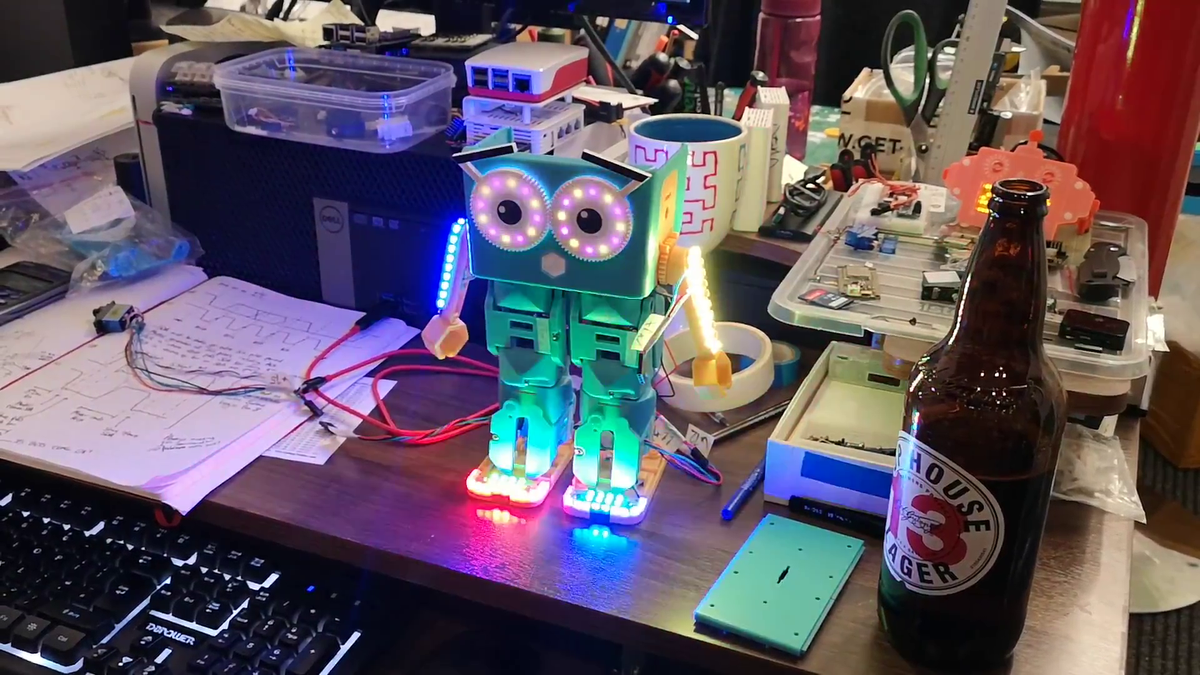
Warm upRead the story text from the resources about a party of adventurers exploring a castle. They come to a point in the story where there is a choice of turning left or turning right at a junction. Ask learners for possible actions they could take: turn left, turn right. The scenario will present a third choice of 'split the party' and go left and right. All three options will have 'consequences'. Read the choices learners suggest, they might suggest any of the three. Hopefully, they will suggest turn left or turn right, first and second; hopefully, they will suggest splitting the party, and going left and right, with the result being progression in the story. However, they might think that the adventurers are stuck. Ask questions about the party: how many people are in the party? Do they have to stick together? Are they able to think for themselves, maybe? Share the objectives and success criteria from the PowerPoint presentation and then display the example of Marty dancing with accompanying lights across feet, eyes and arms, the actions are coordinated meaning that the lights change with arm, eye and knee movements. Each of the code blocks is explained in the teacher guide. Discussing efficiency and debugging in coding is worthwhile. It is also worthwhile mentioning that even people at Robotical need to improve on initial code. The video and code aren't shown side by side here because it would be difficult to see the specific parts. The code is discussed in the teacher guide. Ask what they noticed, learners may suggest that the arms, legs and eyes move and the lights light up after Marty moves. Highlight that the example they are seeing is using separate event blocks, they are running in parallel. |
| Activity |
|---|
Get LearningThis learning time should focus more on planning than writing the code. The program will be bigger than what learners have previously created so it makes a lot of sense for discussion and thinking to be longer than it has in past. Discuss as a class what blocks are essential for parallel programming:
Display a second video that features the lights and movement not relying on each other. Ask learners what they see, this time. They may suggest the movement is much quicker because it only happens once. The lights only last as long as the movements because the repeat blocks match the length of the dance. Once enough feedback is given, by learners, show the next slide that contains four event blocks, one for a movement and 3 for each of the disco light add-ons: this is the code that makes Marty move like the video. Ask learners what they see. Suggestions may include:
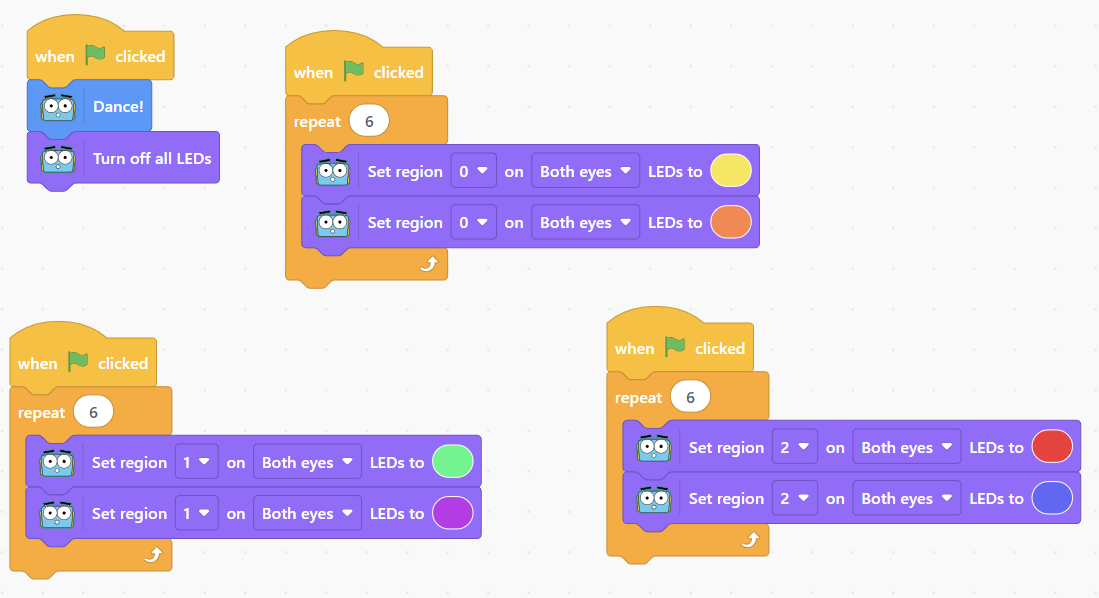 The 'set all LEDs to off' sets all the lights to off, once the code completes. Without this, the lights will stay lit. This is a very helpful block to have for testing this code. Give time for learners to think about what they might like to have their Marty do, for a dance with the lights. Have groups share some of the ideas they are considering, allow for class questions and discussion around what will happen, how can it happen, where might it run slowly (if necessary)? |
Time for PracticeWhen the discussion has sufficiently covered a wide range of areas, have learners begin planning out what the different event blocks will have 'responsibility for what is the goal for each event, one might control the lights for the feet, one might control the movement of the legs, etc. or, one might control all the lights or all the movements. This discussion, before coding, will allow for the consolidation of understanding of parallel programming, particularly when different class groups are taking part in the information exchange. It may be that the planning will not be complete after the first block of time for a lesson. Learners need to be sure to save any plans for their code, if they are using paper to record their plans, the plans need to be kept for the next session. If you have planned for a double block, allow for the planning to continue until learners can explain what they want to create and how they want to create it. Groups must be confident with their plan and should be able to summarise the eventuality of the code to you before any actual coding starts. As learners complete their planning, allow them to start writing and testing their code. Emphasize the usefulness of testing individual blocks to ensure that they return the desired result. Remind learners that testing single blocks makes it easier to find problems rather than initially testing events that are working in parallel. Below are some examples of blocks that might be used for this lesson. 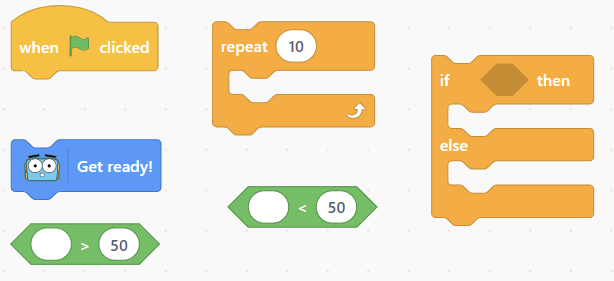 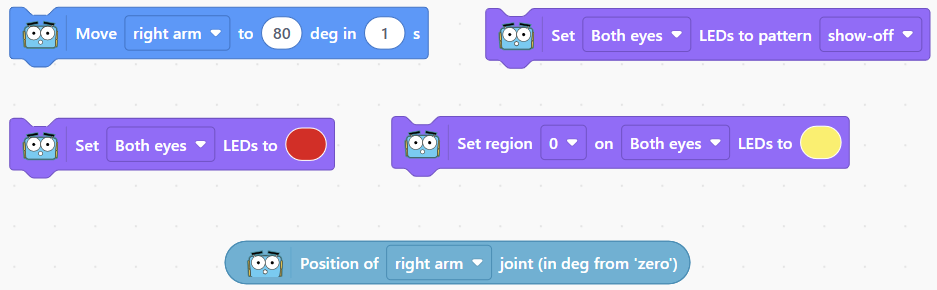 And this is the mix that could be used for learners to time their actions: disco music. SupportHighlight the blocks with values that can be edited, particularly the repeat block, the movement block, the wait block. Model, with learners, the effect that changing these values can have on the outcome of the code. Encourage problem solving, trial and error is important to get things as you want. Mistakes are expected and should be welcome. |
| Activity |
|---|
Cool DownBring learners back together to discuss the challenges they faced and overcame. Have groups model their creations and explain what is happening, when. Encourage questions about differences between the design of different groups' code. If a group chose to explore any extension activities, allow for time to explain this. Suggested questions you might ask:
Carry out any end of lesson routines. Log off devices and clear everything away. |