Skip to content
Learning Site
Home

About

  • About Robotical
  • Case Studies
  • Meet the Team
  • Blog
  • Contact Us

Our Products

  • Marty the Robot
  • Axiom
  • Cog

Teach

  • Lessons & Resources
  • Marty for Educators
  • Funding & Grants
  • Professional Development
  • Why Teach STEM?
  • Coding Environments
  • Student Led Learning

Let's Code

  • Marty the Robot
  • Code Online
  • Marty Apple App
  • Marty Android App
  • Update your Marty
  • Cog
  • Code Online
  • Cog iOS App
  • Cog Android App
  • Axiom
  • Axiom Science

Support

  • Marty Get Started
  • Cog Quick Start Guide
  • Axiom Science Quick Start Guide
  • Support & FAQs
  • Marty V2 User Guides
  • Marty V1 Resources
  • Request Support
  • Request Top-Up Training

Shop

  • Marty the Robot and Physical Computing
  • Class Packs
  • Add Ons & Extras
  • Account
  • Shipping, Returns & Cancellations
  • Distributors
HomeLessonsUnits of workCurriculum standardsTutorials

Information

  • Lessons & Resources
  • Knowledge Base & User Guides
  • About Us
  • Shipping, Returns & Cancellation
  • Privacy Policy
  • Learning site privacy
  • Terms of Service
  • Partner Hub

Support & Help

  • Support & Help Center
  • Getting Started with Marty V2
  • Getting Started with Marty V1

Learning, Resources & Guides

  • Marty V2 Lessons Site
  • Marty V1 Lessons Site

Contact Us in the UK

Stanhope House,12 Stanhope Place,Edinburgh,United Kingdom,EH12 5HH
(+44) 0131 564 0922
hello@robotical.io
Contact Us

Contact Us in the US

2810N Church St, PMB 61694,Wilmington,Delaware,USA19802-4447
(+1) 833 886 1661
hello@robotical.io
Contact Us

Why not join our mailing list?

For News, New Products and Special Offers

Join mailing list

Copyright 2016-2026 © Robotical Ltd

All lessons
Marty app
CurrentPrevious

0.06 Estimating the Steps

About how many steps do you think it will be?
0.06 Estimating the Steps
Estimated time
45 minutes
Difficulty
Intermediate
Products
Marty V2

On this page

  1. Lesson overview
  2. Objectives & resources
  3. Key vocabulary
  4. Lesson plan
  5. Extensions and challenges
  6. Additional reading
  7. Curriculum standards

Extensions and challenges

Extend

Challenge learners to find the difference between their estimates and the actual distance. Set challenges that are farther away, but require learners to estimate how many steps they need to take to reach the goal.

Support

After checking each estimate, make a mark on the floor with the number of steps. This can be used to compare group member estimates for each object and to inform future estimates for the other objects.

Additional reading

User Guide for the Marty Controller

Reminders of the learning from Introducing

Curriculum standards

26
Choose your curriculum to see the relevant standards.

26 of 26 linked standards shown.

Australian CurriculumAustralia2
Curriculum areaLinked standards
Digital Technologies, Design & technologies: Digital Technologies

Select a code to read the full standard.

Digital Technologies, Design & technologies: Digital Technologies

  • ACTDIK002Recognise and explore patterns in data and represent data as pictures, symbols and diagrams
  • ACTDIP004Follow, describe and represent a sequence of steps and decisions (algorithms) needed to solve simple problems
CSTA Education StandardsUSA2
Curriculum areaLinked standards
General standards

Select a code to read the full standard.

  • 1A-AP-08Model daily processes by creating and following algorithms (sets of step-by-step instructions) to complete tasks.
  • 1A-AP-15Using correct terminology, describe steps taken and choices made during the iterative process of program development.
Curriculum for ExcellenceScotland10
Curriculum areaLinked standards
Health and Wellbeing: Mental, Emotional, Social and Physical Wellbeing
Literacy & English: Listening and Talking
Literacy & English: Writing
Numeracy: Number, Money and Measure
Technologies: Computing Science

Select a code to read the full standard.

Health and Wellbeing: Mental, Emotional, Social and Physical Wellbeing

  • HWB 0-11a / HWB 1-11a / HWB 2-11a / HWB 3-11a / HWB 4-11Social wellbeing
  • HWB 0-14a / HWB 1-14a / HWB 2-14a / HWB 3-14a / HWB 4-14aSocial wellbeing

Literacy & English: Listening and Talking

  • LIT 0-02a / ENG 0-03aTools for listening and talking
  • LIT 0-10aCreating texts

Literacy & English: Writing

  • LIT 0-21bTools for writing
  • LIT 0-26aOrganising and using information

Numeracy: Number, Money and Measure

  • MNU 0-01aEstimation and rounding
  • MNU 0-11aMeasurement

Technologies: Computing Science

  • TCH 0-13aUnderstanding the world through computational thinking
  • TCH 0-15aDesigning, building and testing computing solutions
England's National CurriculumEngland1
Curriculum areaLinked standards
Computing, Design and Technology: Computing

Select a code to read the full standard.

Computing, Design and Technology: Computing

  • ✔️Understand what algorithms are; how they are implemented as programs on digital devices; and that programs execute by following precise and unambiguous instructions
Georgia Standards of ExcellenceUSA7
Curriculum areaLinked standards
Computer Science:
English Language Arts: Speaking and Listening
English Language Arts: Writing
Mathematics:

Select a code to read the full standard.

Computer Science:

  • CSS.CT.K-2.5.3Create and use Algorithms (a set of step-by-step instructions) to complete a task.
  • CSS.DA.K-2.9.4Create simple artifacts using a computing device.
  • CSS.DA.K-2.9.7Practice using a variety of computing hardware and software to achieve personal learning goals.

English Language Arts: Speaking and Listening

  • ELAGSE1SL1Participate in collaborative conversations with diverse partners about grade 1 topics and texts with peers and adults in small and larger groups. a. Follow agreed-upon rules for discussions (e.g., listening to others with care, speaking one at a time about the topics and texts under discussion). b. Build on others’ talk in conversations by responding to the comments of others through multiple exchanges. c. Ask questions to clear up any confusion about the topics and texts under discussion.
  • ELAGSE1SL2Ask and answer questions about key details in a text read aloud or information presented orally or through other media.

English Language Arts: Writing

  • ELAGSE1W5With guidance and support from adults, focus on a topic, respond to questions and suggestions from peers, and add details to strengthen writing as needed. a. May include oral or written prewriting (graphic organizers).

Mathematics:

  • 1.MDR.6.1Estimate, measure, and record lengths of objects using non-standard units, and compare and order up to three objects using the recorded measurements. Describe the objects compared.
ISTEUSA2
Curriculum areaLinked standards
International Society for Technology in Education (ISTE)

Select a code to read the full standard.

International Society for Technology in Education (ISTE)

  • 4aStudents know and use a deliberate design process for generating ideas, testing theories, creating innovative artifacts or solving authentic problems.
  • 6bStudents create original works or responsibly repurpose or remix digital resources into new creations.
TEKSUSA2
Curriculum areaLinked standards
Elementary Technology Applications: Kindergarten to Grade 2

Select a code to read the full standard.

Elementary Technology Applications: Kindergarten to Grade 2

  • 1.ACreativity and innovation. The student uses creative thinking and innovative processes to construct knowledge and develop digital products. The student is expected to: apply prior knowledge to develop new ideas, products, and processes;
  • 4.ACritical thinking, problem solving, and decision making. The student applies critical-thinking skills to solve problems, guide research, and evaluate projects using digital tools and resources. The student is expected to: identify what is known and unknown and what needs to be known regarding a problem and explain the steps to solve the problem;

Resources

Learner resources

  • Workbook for Estimating the StepsFile links loading

Educator resources

  • Teacher GuideFile links loading
  • Presentation for Estimating the StepsFile links loading
  • Story textFile links loading
  • Game InstructionsFile links loading

Lesson overview

In this lesson, learners will begin to use estimation for their routes for Marty: about how many steps will it take to get to an object or a person?

This will be the beginning of a proper plan that will require testing and retrials.

Prerequisite knowledge

Experience with the Marty Controller (lesson link is in additional reading), awareness of estimation

Learning objectives

I can estimate how many steps it will take for Marty to reach a goal.

Resources and equipment

  • Marty the Robot V2
  • Marty Workbook
  • Marty Controller, in the Marty the Robot App

Key vocabulary

  • Direction
  • Forward
  • Back
  • Left
  • Right
  • Instruction
  • Estimation

Lesson plan

For this entire lesson, Marty should be on the ground, not on a table.

Warm up

Share the learning objectives and success criteria from the lesson. Say to learners, "We are going to practice thinking about how far away something is. We might not get our answers perfect, which is perfectly OK; let's focus on getting better."

Have learners sit in a circle for the game that is described in the resources section. The purpose of the game is to have learners focus on listening: about where is the sound coming from? Which will lead in to estimating distances.

Get Learning

Read the story from the presentation to introduce the focus of the lesson. The story text is longer than usual but is needed to highlight the misconception that estimates should be exact values, correct on the first attempt, when estimates should only be about using what you know to determine what you don't.

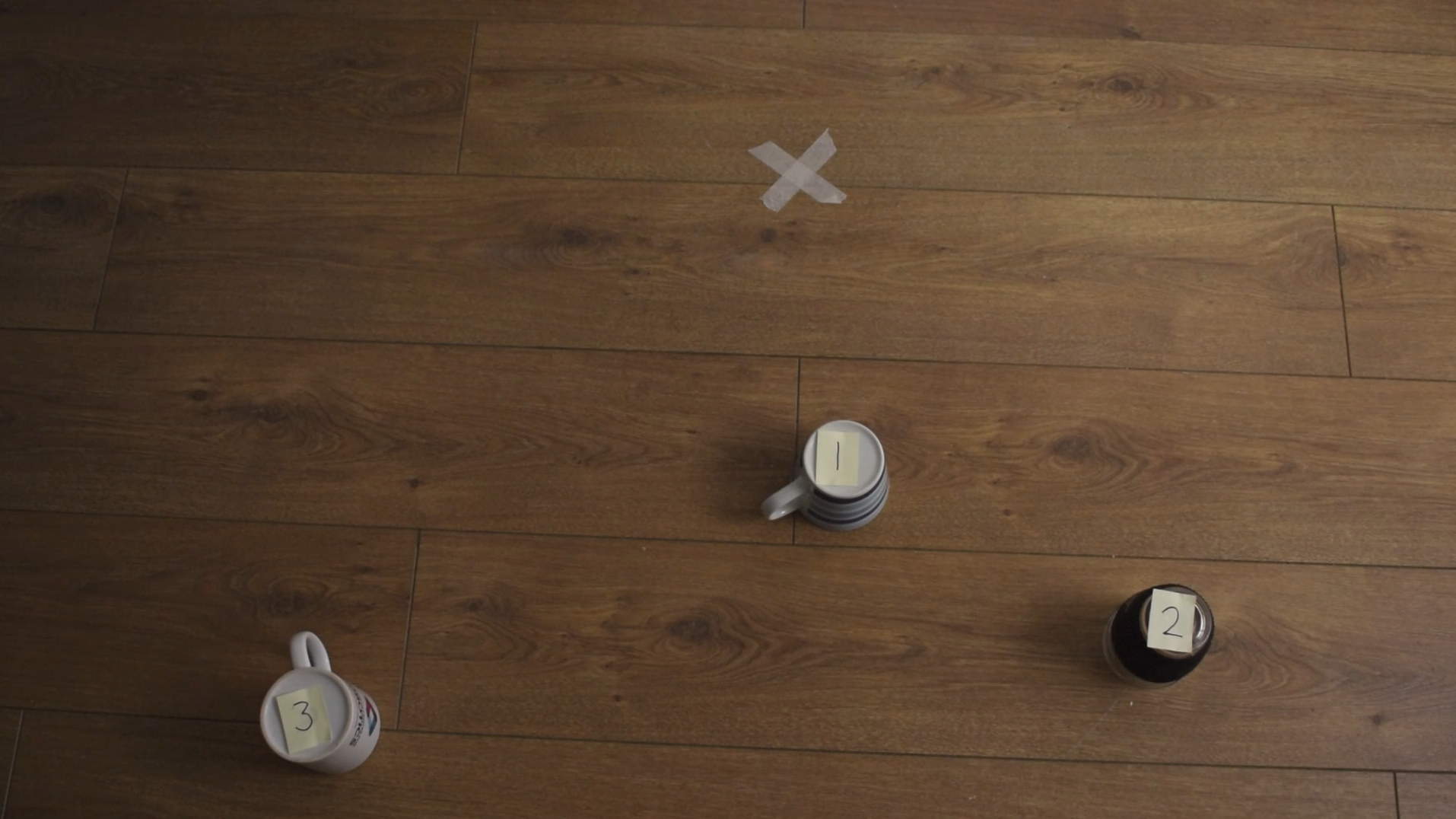
Have your Marty on the ground, on a marked x - masking tape is a good idea. Have at least three objects around Marty at different distances and angles from them. A good idea would be to label them objects 1, 2, 3, or some other naming convention. The image below gives one suggestion.
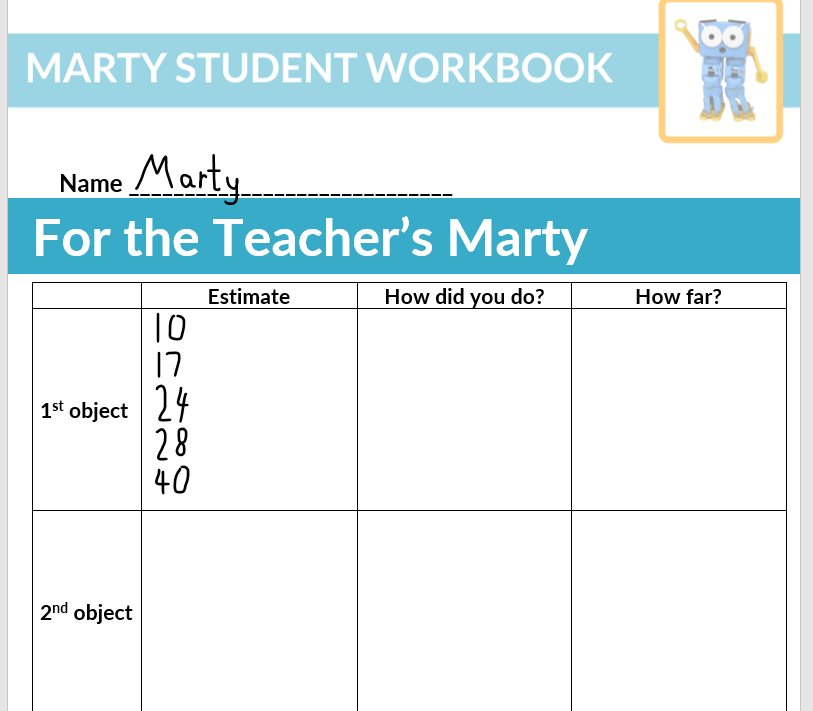
Have learners stand up and look at how far away Marty is from the 1st object. Suggest learners close their eyes and count as they picture Marty walking that distance. Have learners record their estimate in their workbook if there is an opportunity to do so. As a class, ask learners for their estimates and record them on the board. Perhaps a name or initial beside a number the first time a value is suggested and a tally mark for each additional time that number is suggested. Have groups record a selection of estimates from the board in their workbooks, it should look something like this:
Point Marty in the direction of the object and press the forward arrow the number of times required for the first estimate - a good idea is to start with the value that is the least to give learners an idea as to how far that estimate takes Marty and compare from there. Just before starting to tap the forward arrow, remove the object and replace with tape or some other marker, in case the estimate is too much.

For the second estimate, choose the one that is the greatest value. It is best to hide Marty's movement as the arrow is pressed so that they cannot determine the exact number of steps, should Marty cross over the mark because the estimate was too great. If the estimate was very accurate - Marty touched the objects or was a hair's breadth from it - congratulate the estimation with words of praise to support the estimate, something like, "That was a very accurate estimate," or, "that was extremely close for an estimate, good thinking." In this instance, extend congratulations to similar estimates complimenting how close the values were.

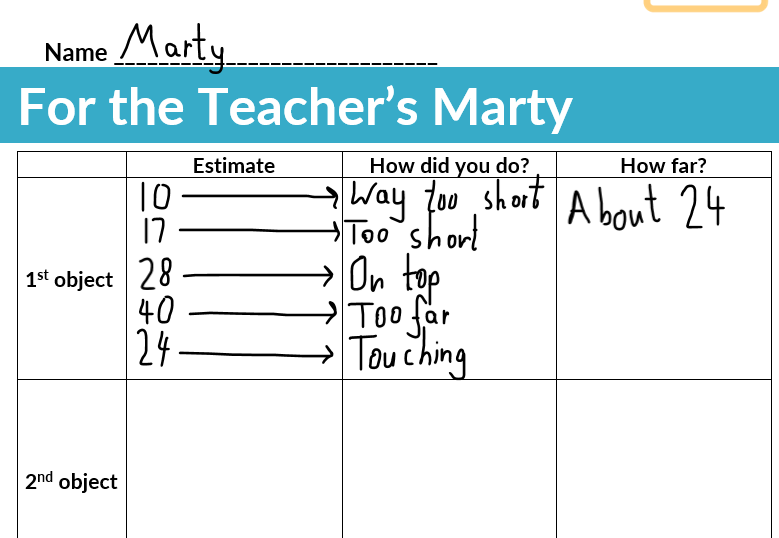
For estimates that ended up with Marty quite far away from the object, you can choose to either tell learners, "These estimates weren't quite right, it seems that Marty's steps are a bit bigger/smaller than you thought," or you could ask, "that estimate is close, does Marty need more or fewer steps?" This would allow for discussion as to which estimate you could try next. Once learners determine if Marty walked too far or not far enough, look at the list of other estimates and have the class select the next value that is either greater or less than the previous one, depending on what you need. Bring Marty back to the x and check the next appropriate value in the list. Repeat this as little or often as you want. Have learners record the description of the estimate (not far enough, too far, or other descriptive phrases) and the actual distance to the object, in their workbooks.

For the other estimates, you might record something like this:
Repeat the whole process with the second and third objects.

This video shows the shortest estimate followed by the longest estimate. The longer journey has the middle edited out so that learners cannot count the exact number of steps as Marty takes them. You could use this video as a way to have learners use the higher and lower end of the estimates to improve on what was initially thought.

Here are other individual step videos with 'estimates' for Marty, they are all featured in the presentation in a slightly more interactive way.

17 steps

24 steps

28 steps

Time for Practice

For learner-led estimations, there are two options for setting up the activity:

  1. Before the lesson starts, have multiple objects arranged around the room and multiple xs around the room. Each x will have objects close enough so that learners can choose three for estimation purposes. Carry out the process that was modeled as a whole class; each distance estimate should take less time because groups will have fewer members. Each object should have estimates recorded in the workbook but do not do three estimates at once: do them one at a time, following the process from the whole class procedure.
  2. Before the lesson starts, provide each group with tape to mark an x for their starting point. Provide learners with a selection of objects that they will need to place around the room sp that they can estimate distances. Encourage learners not to put Marty too far away, making the estimation very difficult, or too close. Each object should have estimates recorded in the workbook but do not do three estimates at once: do them one at a time, following the process from the whole class procedure.

Cool Down

Remind learners of their fantastic estimation skills and share with them that this skill will be so needed for future work. Share with them what they accomplished, "You were able to estimate a distance and then you improved on your estimates! Fantastic work!"

Ask learners if they think they did well with the lesson using a familiar formative assessment strategy: thumbs up for good, thumbs to the side for OK, thumbs down for not so good; a green, yellow or red card, indicating their thoughts; a one to one chat about the learning; whole class feedback using a PMI (plus, minus, interesting) approach; or some other strategy with which the learners are familiar.

Read the closing part of the story, to close off this lesson and tie it into the next part.

Carry out any end of lesson routines.

Log off devices and clear everything away.

Watch on YouTube
Watch on YouTube
Watch on YouTube
Watch on YouTube