Skip to content
Learning Site
Home

About

  • About Robotical
  • Case Studies
  • Meet the Team
  • Blog
  • Contact Us

Our Products

  • Marty the Robot
  • Axiom
  • Cog

Teach

  • Lessons & Resources
  • Marty for Educators
  • Funding & Grants
  • Professional Development
  • Why Teach STEM?
  • Coding Environments
  • Student Led Learning

Let's Code

  • Marty the Robot
  • Code Online
  • Marty Apple App
  • Marty Android App
  • Update your Marty
  • Cog
  • Code Online
  • Cog iOS App
  • Cog Android App
  • Axiom
  • Axiom Science

Support

  • Marty Get Started
  • Cog Quick Start Guide
  • Axiom Science Quick Start Guide
  • Support & FAQs
  • Marty V2 User Guides
  • Marty V1 Resources
  • Request Support
  • Request Top-Up Training

Shop

  • Marty the Robot and Physical Computing
  • Class Packs
  • Add Ons & Extras
  • Account
  • Shipping, Returns & Cancellations
  • Distributors
HomeLessonsUnits of workCurriculum standardsTutorials

Information

  • Lessons & Resources
  • Knowledge Base & User Guides
  • About Us
  • Shipping, Returns & Cancellation
  • Privacy Policy
  • Learning site privacy
  • Terms of Service
  • Partner Hub

Support & Help

  • Support & Help Center
  • Getting Started with Marty V2
  • Getting Started with Marty V1

Learning, Resources & Guides

  • Marty V2 Lessons Site
  • Marty V1 Lessons Site

Contact Us in the UK

Stanhope House,12 Stanhope Place,Edinburgh,United Kingdom,EH12 5HH
(+44) 0131 564 0922
hello@robotical.io
Contact Us

Contact Us in the US

2810N Church St, PMB 61694,Wilmington,Delaware,USA19802-4447
(+1) 833 886 1661
hello@robotical.io
Contact Us

Why not join our mailing list?

For News, New Products and Special Offers

Join mailing list

Copyright 2016-2026 © Robotical Ltd

All lessons
Marty app
CurrentPrevious

4.04: Exploring MartyPy Documentation

4.04: Exploring MartyPy Documentation
Estimated time
45 minutes
Difficulty
Advanced
Products
Marty V2

On this page

  1. Lesson overview
  2. Objectives & resources
  3. Key vocabulary
  4. Lesson plan
  5. Extensions and challenges
  6. Additional reading
  7. Curriculum standards

Extensions and challenges

Support

Encourage all learners to illustrate the commands to better remember the code and the resulting action(s). Ensure that each command learners include has an example of the code and a description of what is happening, either short text or diagram.

Extension

Learners should think about new commands that should be included in the library but the developers didn't think about, consider the parameters for the command to be carried out effectively and ensure that there is documentation clearly describing the purpose of the command and how it works.

Additional reading

Marty and Python Guides

MartyPy Library

Curriculum standards

20
Choose your curriculum to see the relevant standards.

20 of 20 linked standards shown.

Australian CurriculumAustralia2
Curriculum areaLinked standards
Digital Technologies, Design & technologies: Digital Technologies

Select a code to read the full standard.

Digital Technologies, Design & technologies: Digital Technologies

  • ACTDIP041Implement modular programs, applying selected algorithms and data structures including using an object-oriented programming language
  • ACTDIP044Plan and manage projects using an iterative and collaborative approach, identifying risks and considering safety and sustainability
CSTA Education StandardsUSA2
Curriculum areaLinked standards
General standards

Select a code to read the full standard.

  • 3A-CS-01Explain how abstractions hide the underlying implementation details of computing systems embedded in everyday objects.
  • 3A-AP-23Document design decisions using text, graphics, presentations, and/or demonstrations in the development of complex programs.
Curriculum for ExcellenceScotland13
Curriculum areaLinked standards
Health and Wellbeing: Mental, Emotional, Social and Physical Wellbeing
Literacy & English: Listening and Talking
Literacy & English: Reading
Literacy & English: Writing
Technologies: Computing Science

Select a code to read the full standard.

Health and Wellbeing: Mental, Emotional, Social and Physical Wellbeing

  • HWB 0-11a / HWB 1-11a / HWB 2-11a / HWB 3-11a / HWB 4-11Social wellbeing
  • HWB 0-14a / HWB 1-14a / HWB 2-14a / HWB 3-14a / HWB 4-14aSocial wellbeing

Literacy & English: Listening and Talking

  • LIT 4-04aFinding and using information
  • LIT 3-05a / LIT 4-05aFinding and using information
  • LIT 4-07aUnderstanding, analysing and evaluating

Literacy & English: Reading

  • LIT 3-14a / LIT 4-14aFinding and using information
  • LIT 3-15a / LIT 4-15aFinding and using information
  • LIT 4-16aUnderstanding, analysing and evaluation

Literacy & English: Writing

  • LIT 3-20a / LIT 4-20aEnjoyment and choice
  • LIT 3-22a / LIT 4-22aTools for writing
  • LIT 4-23aTools for writing

Technologies: Computing Science

  • TCH 4-14aUnderstanding and analysing computing technology
  • TCH 4-14cUnderstanding and analysing computing technology
England's National CurriculumEngland1
Curriculum areaLinked standards
Computing, Design and Technology: Computing

Select a code to read the full standard.

Computing, Design and Technology: Computing

  • ✔️Understand what algorithms are; how they are implemented as programs on digital devices; and that programs execute by following precise and unambiguous instructions
ISTEUSA2
Curriculum areaLinked standards
International Society for Technology in Education (ISTE)

Select a code to read the full standard.

International Society for Technology in Education (ISTE)

  • 3cStudents curate information from digital resources using a variety of tools and methods to create collections of artifacts that demonstrate meaningful connections or conclusions.
  • 5cStudents break problems into component parts, extract key information, and develop descriptive models to understand complex systems or facilitate problem-solving.

Resources

Learner resources

  • Python Student Workbook - Exploring MartyPy DocumentationFile links loading

Educator resources

  • Teacher's Guide - Exploring MartyPy DocumentationFile links loading
  • Presentation for Exploring MartyPy DocumentationFile links loading

Solution resources

  • Exploring MartyPy Documentation SolutionsFile links loading

Lesson overview

In this lesson, students will further explore what different movements and functionalities Marty has. Students will start to explore the documentation available for MartyPy.

Prerequisite knowledge

Growing knowledge of Python commands, experience with technical manuals

Learning objectives

  • I can describe code in terms of actions, purpose and parameters.
  • I can describe the usefulness of documentation when users write code.

Resources and equipment

  • Marty the Robot
  • Python Editor
  • Student Workbook
  • MartyPy documentation
  • Devices with Python and MartyPy

Key vocabulary

  • Library
  • Documentation

Lesson plan

warm-up

Ask if learners can recall anything interesting, challenging or funny, from the last lesson. Have them model the different movements they recall Marty making, challenge learners to make the movements with their own bodies, unless they are unable to do so, in which case have them model it on the available devices.

Get Learning

Remind learners of the importance of specific, unambiguous instructions, when giving them to a computer: remind them of what a person's interpretation means when instructions are given, with the examples of the robot drawings.

Ask learners to recall some of the commands they used in the last lesson when moving Marty through a variety of poses. Then ask if they can remember what each of the parameters, within the parentheses, represented. It may be that they can recall some parts of the commands but not all parts of all the commands. Ask what they think would be good to have, in case programmers forget the exact use or parameters for different commands.

Introduce 'libraries': in a general sense, ask learners what functions libraries serve for their communities. List the suggestions, the list might include:

  • they house books and, as a result, facts and knowledge
  • they group books on similar topics
  • they have books to explain, to instruct, to help us improve ourselves or encourage us to 'escape'.

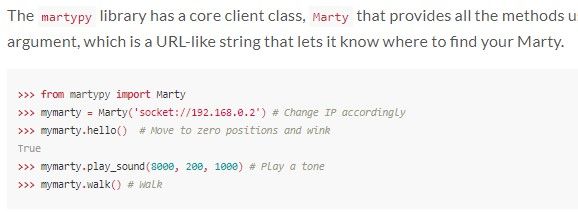
Share with learners that programming libraries hold specific information for specific functions to run. A library can hold pre-written code that can be called with a function. Libraries are often imported and the resources that are stored in the library are imported with them: when we set up Marty, last lesson, we did not write the program to make Marty walk; that was already written, we only had to type the command marty.walk() because the library had already done all of the hard work.

Have learners think about the number of movements required to have Marty walk one step and think how long it would take a programmer to type that into a program each time they wanted to make Marty walk one or more steps. Have learners explore the other commands from the library and think about the number of individual commands that might exist within the library.

Introduce 'documentation'. Documentation is what is used to explain what the library holds:

  • What commands does the library have?
  • What do the parts of each command mean?
  • What am I allowed to enter for each part?
  • How do I use the command, with all of the appropriate values?
  • Include images of the command in action, annotating the parts that are affected.

As they go through the documentation, learners should record commands they think will be useful for later use and start to build up a document of their own. Be sure to encourage them to include key parameters and examples, with explanations for what learners will see when the command runs. In addition, encourage groups to think about useful additions they would suggest or try to write, themselves; include these in pseudocode, initially, but include useful information that would clarify the terms for another user.

Wrap-up

Bring learners back together, do a group share, discussing the commands they thought were useful and ones that could be added: combining movements into one new movement that learners think would be used often enough to warrant being in the library.

Ask about challenges with learning and remembering the commands that are present in the library.

Encourage learners to think about how they could share this information with a younger year group, or adults. Perhaps they could think about how to design a short workshop with a group class who haven’t used MartyPy yet and get the students to take lead on explaining and teaching others how to use it (with the help of their handbooks of course!) This would be for some future time.