Learn how to modify Marty's behaviour based on the values passed to functions
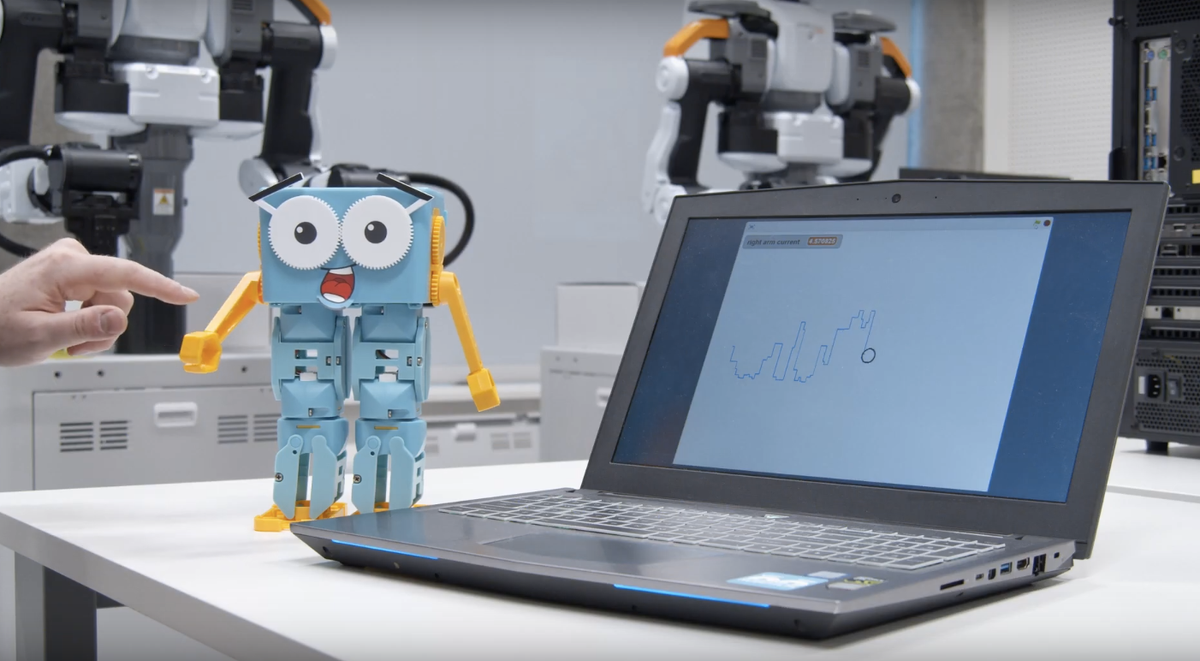
Challenge learners to go beyond two shapes.
Challenge learners to create irregular shapes. They have the number of degrees per shape and have practised finding the supplementary angle Marty will need to correctly turn at a vertex. This extension activity will reinforce: the number of degrees in each shape, through addition, use of a compass to draw the correct angle at each vertex, and push their ability to improve code with multiple iterations; this will likely take a bit of time.
Definitions about angles should be made available, particularly supplementary and the number of degrees for each shape. Individual copies of each shape are in a presentation, in the resources section. This could be printed out to support learners or displayed on the board as a reference if learners are drawing and measuring the shapes for Marty to walk.
17 of 17 linked standards shown.
| Curriculum area | Linked standards |
|---|---|
| Digital Technologies, Design & technologies: Design & Technologies | |
| Digital Technologies, Design & technologies: Digital Technologies |
Select a code to read the full standard.
| Curriculum area | Linked standards |
|---|---|
| General standards |
Select a code to read the full standard.
| Curriculum area | Linked standards |
|---|---|
| Health and Wellbeing: Mental, Emotional, Social and Physical Wellbeing | |
| Literacy & English: Listening and Talking | |
| Technologies: Computing Science |
Select a code to read the full standard.
| Curriculum area | Linked standards |
|---|---|
| Computing, Design and Technology: Computing | |
| Computing, Design and Technology: Design and Technology |
Select a code to read the full standard.
| Curriculum area | Linked standards |
|---|---|
| International Society for Technology in Education (ISTE) |
Select a code to read the full standard.
| Curriculum area | Linked standards |
|---|---|
| Elementary Technology Applications: Grade 3 to Grade 5 |
Select a code to read the full standard.
Students have had a lot of practice building code to get Marty to carry out a specific task but how do we modify code blocks to change Marty’s behaviours when we pass different values to them?
In this lesson, we will further explore parameters in MartyBlocks and see the effect that changing arguments can have on the overall program.
This lesson could be extended to allow more time for learners to create different shapes.
Knowledge of blocks, where values can change (movement blocks)
Maths
Loops are not expressly referenced in this lesson, they will feature in the following lesson; however, you could use them in this lesson if you have already taught loops. Instead of making use of loops, each block of code could be created for one side and angle and learners would need to tap the block, or the flag, for the number of sides that exist for that shape, waiting until Marty completes the movement for each side / angle.
Share with learners a video of a simple recipe that involves measuring ingredients and temperature for cooking; ingredients are parameters for a recipe. Have learners take down the values for the measurements, the arguments of the recipe, into their workbooks to keep track of what the cook used for the recipe.
Parameters and their arguments are important for a recipe's success. Have learners research the effect of changing the arguements of different parameters for the two recipes or for a different recipe.
The key for the warm-up is the definition of the two terms, parameter and argument. Having learners create a definition is the goal of the recipe videos and the regular use of the terms parameter and argument.
The following links will take you to websites describing the effect of changing the arguments for different parameters for recipes:
Show learners the code blocks for walking and making a turn. Ask learners to list shapes they know and some of their properties. Explore with learners what they would need to do to code the rest of a shape, once they walk one side and turn the degrees of an angle. A link to a video is included, below, and in the presentation showing Marty walking, making a 90 degree turn (approximately) and walking a second side. The argument for the angle parameter will need to be changed a bit to make Marty's movement look more like a 90 degree turn.
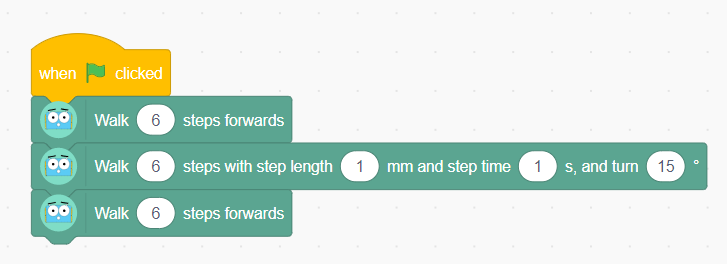
This code is OK for a single angle but should not be used for a shape, the shape should only have the side and turn for the angle.
It is important to teach that the angle that needs to be 'turned' is the difference between the angle in the shape and the straight line that is one of the line segments of the angle; for squares, the angle in the shape and the angle that Marty must turn is the same. There is a slide in the presentation to support learners, using a triangle, and how that is different to coding the turn for a square. This is important for shapes that do not have only right angles. This may be tricky for some so time is needed to use the code and see what happens when Marty turns the degrees that belong to the shape.
The activity in the workbook is a reminder for the number of sides each shape has and the total number of degrees for each of the angles. This table could also be used to support learners in finding the number of degrees for Marty to walk the perimter of a shape. Learners need to draw a line connecting the name, the description and the image of the shape. Additionally, there is a space for the supplementary angle to be filled in for each regular shape.
The video features Marty walking the perimeter of an equilateral triangle. This was not achieved in one attempt because Marty interacts with the environmernt and this affects the movements. Below are the videos for the attempts for Marty walking the triangle, the code that was used to achieve the results is in the teacher's guide.
Below are further examples of Marty walking the perimeter of various shapes. The square example is included in the presentation, along with the code that would create a square in a virtual environment. The code does not get Marty to walk the perimeter exactly, it needs some testing, some trial and error: learners will need to change the argument for the angle parameter. The code is provided so learners have a starting point.
Learners need to investigate the number of degrees in a regular 2D shape.
They will need to also figure out the difference between the angle and the straight line. For each regular shape, Marty will need to have the same number of movement blocks as sides and the corect angle to turn at each vertex. The links below will take you to videos of the other shapes from the workbook. The code is in the teacher's guide. Feel free to share the videos with learners looking to challenge themselves. The decagon does not show the complete shape.
For the code, each of the turns are done in 6 steps. The reason for this is that 6 is an even number, and regular shape angles are generally divisible by 6, which allows Marty to get his feet level, via the get ready block, after each of the turns and before walking the next side. Having an odd number of steps makes the turn less accurate because the get ready command will be used on the wrong foot. Any even number will do but each of the turn steps should not exceed 30 degrees.
One other note is that learners can stipulate how long each step should be by using the same block as they do for turning but setting the turn to 0 degrees. Using the basic walk forward block will cause each step Marty takes to be 25mm in length.
Learners will see that the accurate maths angle for each vertex does not always result in Marty walking the perimeter perfectly: the surface Marty is placed on can cause friction or slippage which can result in a less than perfect angle walked. As a result, learners will absolutely need to 'iterate' their work. This means estimating about how muuch for each step based on how close the shape was with the exact measurement, and testing, testing, testing with each new estimate.
This process is likely to take some time, particularly with 6 shapes learners could program Marty to walk. The workbook features the shape name, shape description and an image of the shape. Additionally, each shape has an extension to a line segment where learners can record the angle of turn Marty will need to move through in order to create the shape.
Bring learners back together to discuss the challenges they faced and overcame. Have groups model their creations and explain what is happening, when. A good way to keep the modelling interesting is to have different groups display different shapes. One idea would be to do so in reverse order: it is unlikely that all groups will manage to complete all 6 shapes but some may. These examples may generate more questions than other groups because of the quantity of iteration that may be required.
Suggested questions you might ask:
Carry out any end of lesson routines.
Log off devices and clear everything away.