Who has the fastest reaction time? Play this game with Marty and the micro:bit to find out!
18 of 18 linked standards shown.
| Curriculum area | Linked standards |
|---|---|
| Digital Technologies, Design & technologies: Design & Technologies | |
| Digital Technologies, Design & technologies: Digital Technologies |
Select a code to read the full standard.
| Curriculum area | Linked standards |
|---|---|
| General standards |
Select a code to read the full standard.
| Curriculum area | Linked standards |
|---|---|
| Health and Wellbeing: Mental, Emotional, Social and Physical Wellbeing | |
| Literacy & English: Listening and Talking | |
| Literacy & English: Writing | |
| Technologies: Computing Science |
Select a code to read the full standard.
| Curriculum area | Linked standards |
|---|---|
| Computing, Design and Technology: Computing |
Select a code to read the full standard.
| Curriculum area | Linked standards |
|---|---|
| International Society for Technology in Education (ISTE) |
Select a code to read the full standard.
| Curriculum area | Linked standards |
|---|---|
| Middle School Technology Applications: Grade 6 to Grade 8 |
Select a code to read the full standard.
Students will be creating and building their own reaction game using the micro:bit to measure who has the fastest reactions. Except, there will be a twist! Marty will be placed in the middle, so each time someone wins a round in the game, Marty moves one step closer to the faster player. Students will need to consider the logic of deciding who has won each round of the game, how this will be displayed to users, either in Marty Blocks or on the micro:bit, and how Marty will signal who was faster.
Experience with the micro:bit and connecting to the web-based Marty Blocks, knowledge of random numbers, functions and variables
| Timing | Activity | Possible adaptations |
|---|---|---|
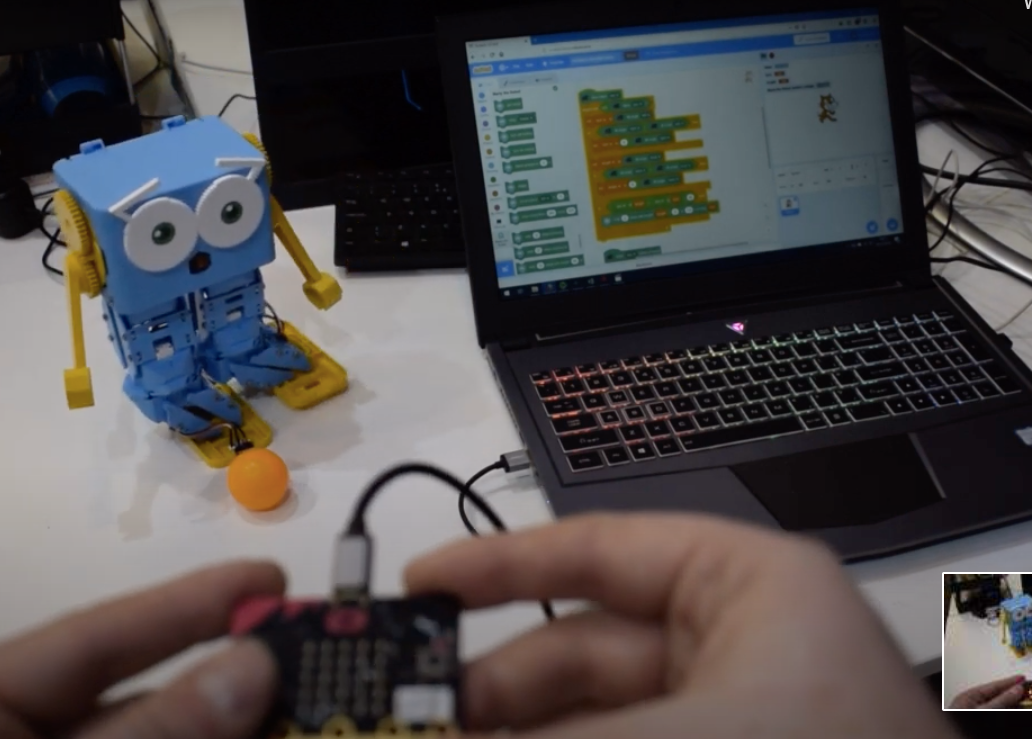
| — | Warm upAsk learners who has ever played a reaction game, maybe Whack-a-Mole or Dobble. For those that have, ask them to describe to those who have not, the purpose of the game and how it works. Share with learners the first three slides from the presentations, the title, objectives and success criteria. If you have reaction type games, feel free to show them, If not, there are three slides in the presentation, the first of these is Dobble, a reaction card card, the second is a math app for a table or phone and the third is a physical setup with a micro:bit that uses code to create the reaction game. Feel free to show or delete the slides as you wish, they are all set to begin at a place that is showing the game, or app, in action, skipping any superfluous information. Show learners a video of Marty 'judging' two players interacting with a micro:bit. Let them see the variety of controls that are being used and how Marty responds to each of the 'reaction rounds'. The video on the presentation does not include the scoreboard. The set up of variables is described in the teacher's guide. Learners can use their workbooks to determine what conditions are necessary to properly develop a game that return the results of who was faster. | — |
| Timing | Activity | Possible adaptations |
|---|---|---|
| — | Get LearningThe following are ideas for questions and responses before coding starts, Educator: How did players know when they had to press the button on the micro:bit? Have learners complete the activity that checks understanding of vocabulary that will support today's activity. In case you want a reminder for preparing Marty for work with the micro:bit, share the videos below, with learners. Feel free to delete the slides and show learners how to do these steps, or set up the devices before the lesson. If you choose not to use the videos in the presentation, you should delete the appropriate slides. |
| Timing | Activity | Possible adaptations |
|---|---|---|
| — | Cool DownBring learners back together to discuss the challenges they faced and overcame. Have groups model their creations and explain what is happening, when. Encourage other groups to ask questions to deepen the understanding of the processes. Take time to have group code displayed to the class, encourage observational questions from peers. Suggested questions you might ask:
Carry out any end of lesson routines. Log off devices and clear everything away. | — |
The video below is in the presentation, following the video is a graphic displaying the code that was used for this. It would be good to discuss what the micro:bit blocks are doing and why that isn't exactly what we want to happen in the game: Marty moves toward the person that was fastest and then moves toward the other person. How can we make Marty only go one way? Hopefully, learners will suggest a conditional statement: if button A is first, do action A, else if button B is first, do action B. The challenge arises as to where to arrange that. The code example, in the teacher guide, uses functions but there might be other ways to do it. Suggestions are included in the teacher guide.
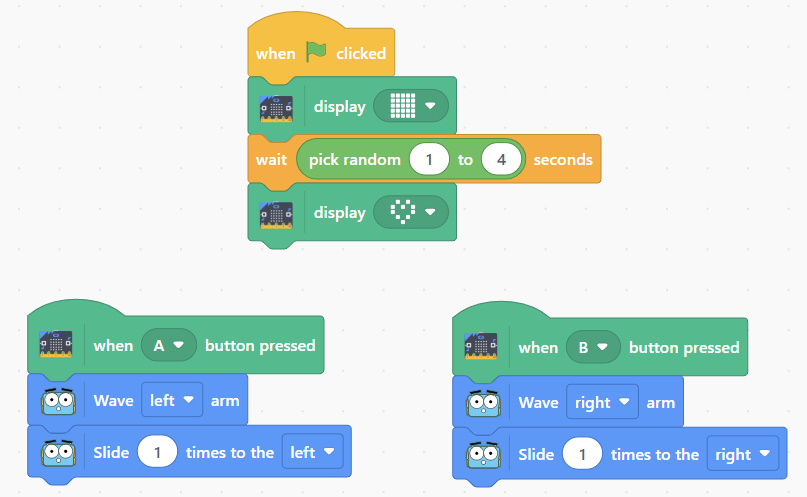
Given that learners will be familiar with the micro:bit event blocks, they should come to the conclusion that using micro:bit events is not the best way forward unless they feel confident that they know who was fastest depending on the direction Marty first moves. Take time to comment that this is not an efficient solution and it can be ambiguous, which may lead to arguments.
Remind learners about conditional statements, if they were not suggested. Perhaps a question like how do we trigger an action based on a particular input? If we did this, could we somehow ensure that the trigger will only respond to the faster of the players?
Give learners time to talk about how to plan a conditional statement.
| — |
| — | Time for PracticeGive learners plenty of time to develop their code for the reaction game. At an appropriate time, ask the whole class how they are going to decide who wins? Have them think back to when Marty danced after the first video: how could we store something to keep track of the score for the two players? Learners will hopefully suggest using a variable. If they don't, ask what do you call the element of code that can store a value and can change depending on running code. That should be enough to remind learners of variable. Use other questions to guide learners in case that question isn't enough. When learners agree that variables are necessary, for a score, remind them about the helpfulness of useful variable names: x, y and z do not do much to support someone, who did not write the code, who is trying to figure out the purpose of the variables. Take time to walk around the classroom commenting on work accomplished and asking supportive questions. | SupportHaving support for a generic function will help learners who need some revision with this coding concept. Provide a same of 'calling a function' in a completely unrelated program. A suggestion is given below to support thinking about the way functions can be used in a larger program. This is also included in the resources section, as a pdf. An additional blank function template is given to support different function scenarios. Some of the Blocks have been modified to support this resource, this is only meant as a way of illustrating the function call. 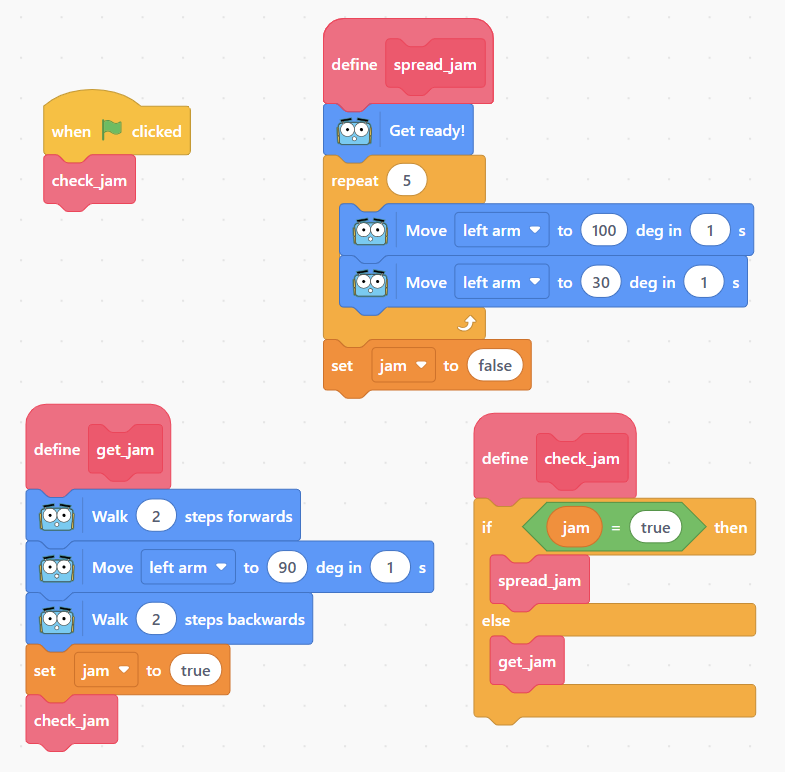 |
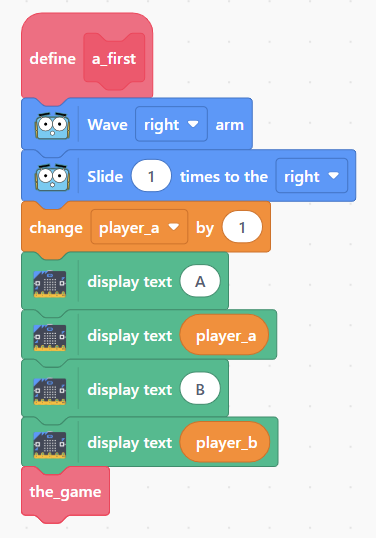
For learners wanting a visual display on their micro:bit, have them think about using the variables to display the updated scores either as a marque: Player one has (variable for p1), Player two has... or a screen message like A (variable) B (variable). Additionally, learners could include a marquee message for who the winner is. An example idea is below (for player_a):
Finally, learners could develop different victory celebrations dependent on the difference between first and second place: if it is 5-0, there could be an extended dance, if it is 5-4, it could be more of a sigh of relief kind of move.