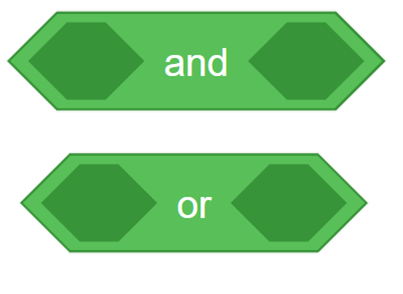
Make decisions with Marty using the AND, OR logic operators.
17 of 17 linked standards shown.
| Curriculum area | Linked standards |
|---|---|
| Digital Technologies, Design & technologies: Digital Technologies |
Select a code to read the full standard.
| Curriculum area | Linked standards |
|---|---|
| General standards |
Select a code to read the full standard.
| Curriculum area | Linked standards |
|---|---|
| Health and Wellbeing: Mental, Emotional, Social and Physical Wellbeing | |
| Literacy & English: Listening and Talking | |
| Literacy & English: Writing | |
| Technologies: Computing Science |
Select a code to read the full standard.
| Curriculum area | Linked standards |
|---|---|
| Computing, Design and Technology: Computing | |
| Computing, Design and Technology: Design and Technology |
Select a code to read the full standard.
| Curriculum area | Linked standards |
|---|---|
| International Society for Technology in Education (ISTE) |
Select a code to read the full standard.
| Curriculum area | Linked standards |
|---|---|
| Elementary Technology Applications: Grade 3 to Grade 5 |
Select a code to read the full standard.
When we make decisions, we often have one than one thing to consider: it might be wet and cold outside. If that is true, you should take a warm jacket and an umbrella. But what if it is wet or cold? In programming, this means it could be wet, it could be cold, it could be both.
Logic blocks allow our if-then statements to be more specific; however, they can be tricky to start with. Marty will be sensing again, this time, we will need to make use of more sensors.
Awareness of Blocks; practice with if-then blocks
| Timing | Activity | Possible adaptations |
|---|---|---|
| — | Warm up:Share with learners the lesson objectives and success criteria from the presentation. Keep the slide with the success criteria on the board while you carry out the following activity. Play the game, Step Forward If..., which is in the resources section. The goal of the game is to introduce the logic words or/and, with emphasis on the different meaning these small words can make to a sentence: Step forward if you have a brother and a sister; Step forward if you have a brother or a sister. In the first instance, both conditions need to be met for a learner to step forward, in the second instance, either condition or both conditions can be met for a learners to step forward. The story text is presented with the PowerPoint, after the success criteria, so that learners are introduced to the ideas presented in the logic blocks from the children's perspective. Stop the presentation where it is recommended so learners can engage with the tasks in the workbook. | — |
| Timing | Activity | Possible adaptations |
|---|---|---|
| — | Get LearningHave learners think about the 'or' and the 'and' statements that were in the presentation and the game. The same statements are also in their workbooks, take time to let them think about and discuss the difference between using the two logic blocks in a sentence. Challenge learners to think of more sentences that use them and compare what they mean. After giving learners time to work on this with their group, ask them to try and generalize the difference: 'when I use and, it means...' 'when I use or, it means...' Beyond this, have a talk with learners about why it might be best to use one or the other logic commands: when is it important that both conditions must be met in order for an action to be executed; when is it important that an action be carried out if at least one condition is met? The following slides show the code that is needed for a basic logic statement with an if-then block. This features as a video so that learners can see how everything fits together: the color sensor is revisited and the ground detection block is introduced. Learners haven't seen the 'foot sensor on the ground' block before but the previous video, of Marty executing the code, clearly illustrates its purpose. For more support on this, a description is given in the teacher guide and a link is in the additional reading section. This video shows how to connect all the blocks to get logic and if/then blocks to work together. This is also in the presentation. Show the examples from the presentation where Marty executes code using logic blocks. Have learners investigate to see if they can identify what the conditions might be that allow Marty to act in each clip. The video is shot so that learners can see different scenarios and Marty's response to each. Perhaps have learners describe the environment - where Marty is - and describe Marty's actions, for each video. |
| Timing | Activity | Possible adaptations |
|---|---|---|
| — | Cool DownBring learners back together to discuss the challenges they faced and overcame. Have groups share their instructions for using the logic blocks. What conditions and actions did they choose, and what were the differences between using the two logic blocks? Suggested questions you might ask:
Carry out any end of lesson routines. Log off devices and clear everything away. | — |
or block logic (1) - https://youtu.be/mgKO7cpMnS8 - one condition met
and block logic (2) - https://youtu.be/YiYMfJ4yHkE - one condition met
and block logic (3) - https://youtu.be/Arpgup-hLIo - both conditions met
or block logic (4) - https://youtu.be/lsnyyKleBNM - both conditions met
Following this are graphics that describe how the plan should look for a logic block with a conditional statement. The presentation reminds learners of blocks they know and how logic modifies the symbol for the if/then block.
| — |
| — | Time for PracticeHave groups plan a program for Marty to react to two conditions, they need to draw the plan that includes two statements inside the rhombus shapes as shown in the presentation for using and/or. Learners only need to build their program for one of the and/or options. If they create two programs on the same page and click the green flag to run, Marty will not react as they would expect. If learners want a challenge, they could write one logic block program and save it and then write a second with the other logic block and save that. Encourage learners to observe and discuss other groups' work regarding the change that occurs when and is used versus when or is used. | SupportLearners will likely not have considered that the difference between these two words can have such an impact upon actions. Share with learners an assortment of sentences using one or the other logic blocks, with explanations for what each statement means. With repeated exposure to the use of the two logic blocks, familiarity should occur naturally. As learners are coding, be sure to ask them what it means to use the and/or blocks: what if you used and, there (they used or); what if you used or, there (they used and). |
Challenge learners to write about scenarios where the choice of logic blocks - and/or - is crucial. What if a scenario that must have two conditions met (and) had been written to execute when only one condition needed to be met (or). The opposite of this would be an alternative or additional challenge.