How do robots multitask? Using parallel programming!
18 of 18 linked standards shown.
| Curriculum area | Linked standards |
|---|---|
| Digital Technologies, Design & technologies: Digital Technologies |
Select a code to read the full standard.
| Curriculum area | Linked standards |
|---|---|
| General standards |
Select a code to read the full standard.
| Curriculum area | Linked standards |
|---|---|
| Health and Wellbeing: Mental, Emotional, Social and Physical Wellbeing | |
| Literacy & English: Listening and Talking | |
| Literacy & English: Writing | |
| Technologies: Computing Science |
Select a code to read the full standard.
| Curriculum area | Linked standards |
|---|---|
| Computing, Design and Technology: Computing | |
| Computing, Design and Technology: Design and Technology |
Select a code to read the full standard.
| Curriculum area | Linked standards |
|---|---|
| International Society for Technology in Education (ISTE) |
Select a code to read the full standard.
| Curriculum area | Linked standards |
|---|---|
| Elementary Technology Applications: Grade 3 to Grade 5 |
Select a code to read the full standard.
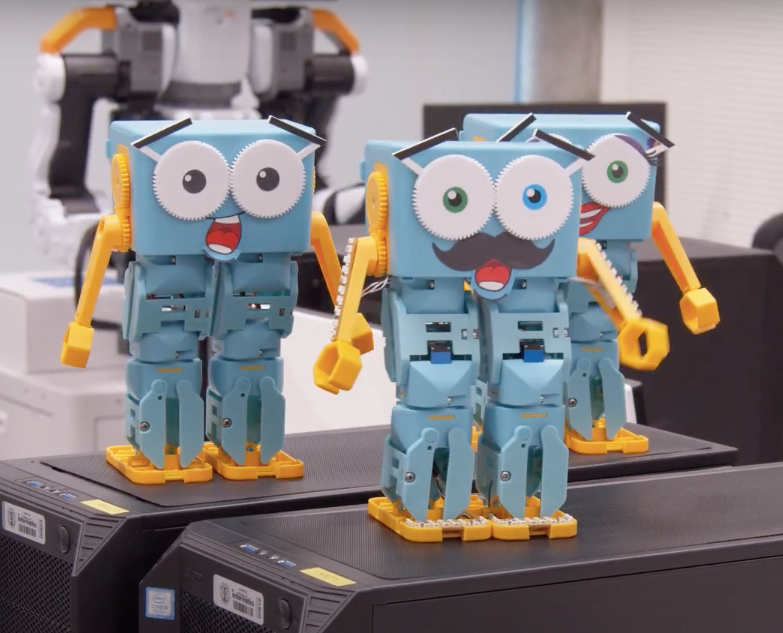
This lesson will be a basic introduction to parallel programming where students will think about how they can go about getting Marty to do two things at the same time rather than one after the other. First, this will be demonstrated in Blocks before trying it out with Marty.
Awareness of event blocks and what they do; knowledge of a variety of movement blocks
| Timing | Activity | Possible adaptations |
|---|---|---|
| — | Warm upAsk learners if they have ever helped with dinner, for example, chopping some vegetables, stirring something that was cooking or measuring ingredients. Inform learners that if others were working with them to create the meal, they were working in parallel with other people. Share with learners a couple of funny video clips of people working in parallel but then something going wrong. The first two video clips show what happens when the working relationship breaks down. The third clip doesn't show people working in parallel but only what can happen when someone stops working in parallel. The first video of Marty shows him doing a dance that requires the arms and legs moving together. The dance block, by itself, also accomplishes this but having separate movements, in parallel, allows for a lot more control in terms of timing and angle of movement. 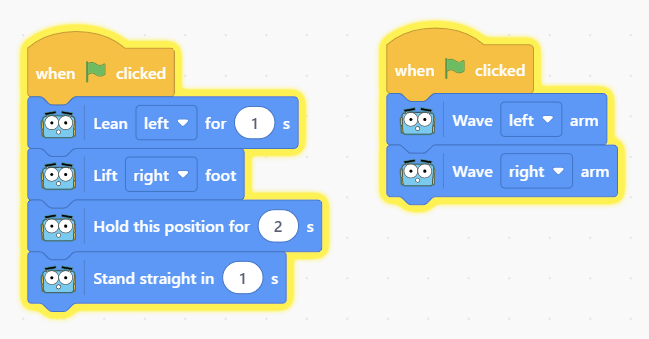 Have learners think of actions they complete each day that involves them doing two things at once: some examples could be holding down shift and a letter on the keyboard to get a capital letter, turning a key and a handle to open a locked door, stirring a mixture and adding ingredients while cooking, holding down two buttons on a device to take a screen capture. Have learners complete the workbook page about actions that require parallel parts. The actions can be very close together when they happen at the same time but, as long as one does not stop the other from being accomplished, they are parallel actions. | — |
| Timing | Activity | Possible adaptations |
|---|---|---|
| — | Get LearningTying in the vocabulary of parallel programming with mathematics, the next slide in the presentation shows two parallel lines traveling across the slide. This will hopefully reinforce the idea that parallel programming has elements that work at the same time but don't interact. The parallel lines go on, forever, never touching, and always staying the same distance apart (click on the slide to see the animation occur). The workbook has six shapes with learners to mark the parallel sides. Arrows have been used to show that these sides would extend in this direction without touching the other side. The trapezium (or trapezoid) and parallelogram are the other two shapes that need marks for parallel sides; the triangles do not have parallel sides. There is an example of a person patting their head and rubbing their stomach, which illustrates the kind of process learners will be coding today: these two actions do not interfere, they are independent actions. This may be challenging for some learners so make it fun. If you feel that this will be too challenging for some learners, feel free to delete the slide. Discuss which sort of movements could not be done in parallel and why they can't be. Have learners complete the task in their workbook identifying potential parallel processes and actions that cannot be completed in parallel. Suggest that learners try this with themselves: which actions are they able to complete in parallel and why are they not able to. Explore the reasons for their thoughts; this should be fairly straightforward, you can't lift and lower the same hand at the same time; you can't lift both feet off the ground at the same time because of gravity (not the same as a jump); some of Marty's actions require a variety of parts to move at the same time, so you couldn't press dance and expect to move the arms, legs or eyebrows at the same time as the dance block is being executed. |
| Timing | Activity | Possible adaptations |
|---|---|---|
| — | Cool DownBring learners back together to discuss the challenges they faced and overcame. Have groups model their creations and explain what is happening, when. Encourage questions about differences between the design of different groups' code. If a group chose to explore any extension activities, allow for time to explain this. Suggested questions you might ask:
Carry out any end of lesson routines. Log off devices and clear everything away. | — |
| — |
| — | Time for PracticeGive learners a chance to think what sort of actions they would like Marty to carry out: maybe it is a dance, perhaps something simpler like walking and waving or even making a sound (but hopefully not too much) while moving. Show learners how to create parallel blocks by dragging two event blocks onto the workspace. Drag the lift and lower left arm blocks under one of the event blocks and do the same with the right arm for the other event block. The slide on the presentation shows how this should look. The next again slide shows the video of Marty executing the code. Give learners an opportunity to scan through the blocks and see that there are no blocks that do this by themselves: you need to make use of parallel programming principles to create a complex action, for Marty. The movement on the video happens once and stops. Challenge learners to have an action that repeats or a more complex one: first the arms move in parallel, then arms and one leg, maybe the eyebrows, etc. | SupportWith every block of code learners put onto the workspace, encourage them to 'be' Marty: have them model the movement and feel what other movements they would be able to do at the same time but also encourage them to think about concepts like balance and comfort. Encourage learners to think back about opposite actions and why two opposite actions cannot occur at the same time. |