What do you remember?
19 of 19 linked standards shown.
| Curriculum area | Linked standards |
|---|---|
| Digital Technologies, Design & technologies: Digital Technologies |
Select a code to read the full standard.
| Curriculum area | Linked standards |
|---|---|
| General standards |
Select a code to read the full standard.
| Curriculum area | Linked standards |
|---|---|
| Health and Wellbeing: Mental, Emotional, Social and Physical Wellbeing | |
| Literacy & English: Listening and Talking | |
| Literacy & English: Reading | |
| Literacy & English: Writing | |
| Technologies: Computing Science |
Select a code to read the full standard.
| Curriculum area | Linked standards |
|---|---|
| Computing, Design and Technology: Computing | |
| Computing, Design and Technology: Design and Technology |
Select a code to read the full standard.
| Curriculum area | Linked standards |
|---|---|
| International Society for Technology in Education (ISTE) |
Select a code to read the full standard.
| Curriculum area | Linked standards |
|---|---|
| Middle School Technology Applications: Grade 6 to Grade 8 |
Select a code to read the full standard.
At this stage, students should have spent some time programming with Blocks and in this lesson, we will revise what has been covered, previously. Students will get the chance to put into practice what they have learned through creating a small project with the only restriction being that they have to feature a chosen block, specific to their group.
General knowledge of commands in Blocks
| Timing | Activity | Possible adaptations |
|---|---|---|
| — | Warm-upAsk for volunteers to share if they have experience with Blocks already. Ask about any Blocks commands or blocks that they can remember and if they can remember what they do. | — |
| Timing | Activity | Possible adaptations |
|---|---|---|
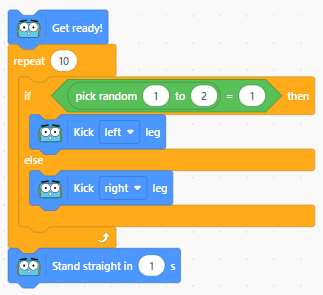
| — | Get LearningHave learners complete the quick matching activity, either individually or in small groups. Encourage learners to think of when / why a program might make use of this element: conditionals, when there are two possible outcomes; loops, when I would have to drag multiple of the same kind of block to achieve a result. Groups of learners will each receive a coding concept to practise using. Functions is the most challenging, sit with this group initially to remind them what happens when this block is clicked: a function start block is put on the workspace and a block with the function name appears in the 'My Blocks' section, to be used for 'calling' the function, later. Reassure learners that the only success criteria is that they properly implement their one block and the program runs with Marty completing an action. | SupportHave cards with simple code examples as reminders, stipulate that the example code can't be used in their program. Have groups use the same code with Marty to see how it runs. |
Challenge groups to include three or more of the concepts in their program. Encourage learners to review their code to see if they can make it more efficient.
| Timing | Activity | Possible adaptations |
|---|---|---|
| — | Wrap-upBring learners together to share any challenges and successes with the work done. If groups had opportunities to collaborate, ask them to share how they might have used another group's concept. Open the discussion for peer feedback. | — |