Skip to content
Learning Site
Home

About

  • About Robotical
  • Case Studies
  • Meet the Team
  • Blog
  • Contact Us

Our Products

  • Marty the Robot
  • Axiom
  • Cog

Teach

  • Lessons & Resources
  • Marty for Educators
  • Funding & Grants
  • Professional Development
  • Why Teach STEM?
  • Coding Environments
  • Student Led Learning

Let's Code

  • Marty the Robot
  • Code Online
  • Marty Apple App
  • Marty Android App
  • Update your Marty
  • Cog
  • Code Online
  • Cog iOS App
  • Cog Android App
  • Axiom
  • Axiom Science

Support

  • Marty Get Started
  • Cog Quick Start Guide
  • Axiom Science Quick Start Guide
  • Support & FAQs
  • Marty V2 User Guides
  • Marty V1 Resources
  • Request Support
  • Request Top-Up Training

Shop

  • Marty the Robot and Physical Computing
  • Class Packs
  • Add Ons & Extras
  • Account
  • Shipping, Returns & Cancellations
  • Distributors
HomeLessonsUnits of workCurriculum standardsTutorials

Information

  • Lessons & Resources
  • Knowledge Base & User Guides
  • About Us
  • Shipping, Returns & Cancellation
  • Privacy Policy
  • Learning site privacy
  • Terms of Service
  • Partner Hub

Support & Help

  • Support & Help Center
  • Getting Started with Marty V2
  • Getting Started with Marty V1

Learning, Resources & Guides

  • Marty V2 Lessons Site
  • Marty V1 Lessons Site

Contact Us in the UK

Stanhope House,12 Stanhope Place,Edinburgh,United Kingdom,EH12 5HH
(+44) 0131 564 0922
hello@robotical.io
Contact Us

Contact Us in the US

2810N Church St, PMB 61694,Wilmington,Delaware,USA19802-4447
(+1) 833 886 1661
hello@robotical.io
Contact Us

Why not join our mailing list?

For News, New Products and Special Offers

Join mailing list

Copyright 2016-2026 © Robotical Ltd

All lessons
Marty app
CurrentPrevious

2.18: Obstacle Course 2

Program Marty to take on any obstacle course by sensing the environment
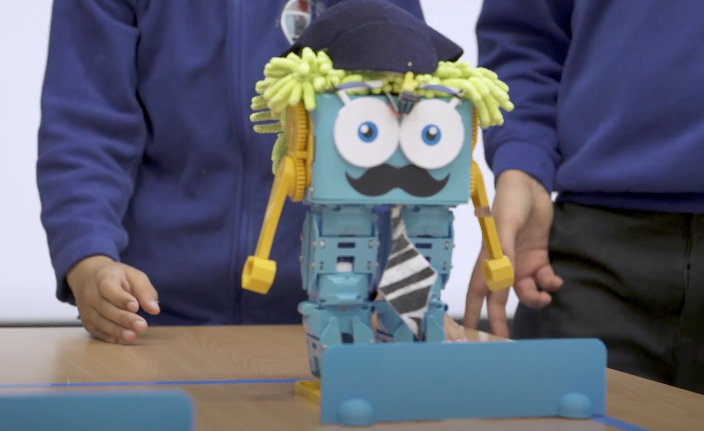
2.18: Obstacle Course 2
Estimated time
45 minutes
Difficulty
Advanced
Products
Marty V2

On this page

  1. Lesson overview
  2. Objectives & resources
  3. Key vocabulary
  4. Lesson plan
  5. Extensions and challenges
  6. Additional reading
  7. Curriculum standards

Extensions and challenges

  • Time each of the Marty robots to see who can get through the course the quickest
  • Give extra time to go back and make changes to the program after seeing how other groups have tackled different obstacles

Additional reading

  • Educator’s Guide
  • Introduction to Programming with Marty using MartyBlocks

Curriculum standards

25
Choose your curriculum to see the relevant standards.

25 of 25 linked standards shown.

Australian CurriculumAustralia4
Curriculum areaLinked standards
Digital Technologies, Design & technologies: Design & Technologies
Digital Technologies, Design & technologies: Digital Technologies

Select a code to read the full standard.

Digital Technologies, Design & technologies: Design & Technologies

  • ACTDEP024Critique needs or opportunities for designing, and investigate materials, components, tools, equipment and processes to achieve intended design solutions
  • ACTDEP036Generate, develop, test and communicate design ideas, plans and processes for various audiences using appropriate technical terms and technologies including graphical representation techniques

Digital Technologies, Design & technologies: Digital Technologies

  • ACTDIK023Investigate how data is transmitted and secured in wired, wireless and mobile networks, and how the specifications affect performance
  • ACTDIP027Define and decompose real-world problems taking into account functional requirements and economic, environmental, social, technical and usability constraints
CSTA Education StandardsUSA2
Curriculum areaLinked standards
General standards

Select a code to read the full standard.

  • 2-CS-02Design projects that combine hardware and software components to collect and exchange data.
  • 2-AP-15Seek and incorporate feedback from team members and users to refine a solution that meets user needs.
Curriculum for ExcellenceScotland12
Curriculum areaLinked standards
Health and Wellbeing: Mental, Emotional, Social and Physical Wellbeing
Literacy & English: Listening and Talking
Literacy & English: Writing
Numeracy: Number, Money and Measure
Technologies: Computing Science
Technologies: Craft, Design, Engineering and Graphics

Select a code to read the full standard.

Health and Wellbeing: Mental, Emotional, Social and Physical Wellbeing

  • HWB 0-11a / HWB 1-11a / HWB 2-11a / HWB 3-11a / HWB 4-11Social wellbeing
  • HWB 0-14a / HWB 1-14a / HWB 2-14a / HWB 3-14a / HWB 4-14aSocial wellbeing

Literacy & English: Listening and Talking

  • LIT 2-02aTools for listening and talking
  • LIT 2-05aFinding and using information
  • LIT 2-07aUnderstanding, analysing and evaluating

Literacy & English: Writing

  • LIT 2-23aTools for writing
  • LIT 2-26aOrganising and using information

Numeracy: Number, Money and Measure

  • MNU 2-01aEstimation and rounding
  • MNU 2-11aMeasurement

Technologies: Computing Science

  • TCH 2-14bUnderstanding and analysing computing technology
  • TCH 2-15aDesigning, building and testing computing solutions

Technologies: Craft, Design, Engineering and Graphics

  • TCH 2-09aDesign and construct models/product
England's National CurriculumEngland2
Curriculum areaLinked standards
Computing, Design and Technology: Computing
Computing, Design and Technology: Design and Technology

Select a code to read the full standard.

Computing, Design and Technology: Computing

  • ✔️Understand what algorithms are; how they are implemented as programs on digital devices; and that programs execute by following precise and unambiguous instructions

Computing, Design and Technology: Design and Technology

  • ✔️Design purposeful, functional, appealing products for themselves and other users based on design criteria
ISTEUSA3
Curriculum areaLinked standards
International Society for Technology in Education (ISTE)

Select a code to read the full standard.

International Society for Technology in Education (ISTE)

  • 4cStudents develop, test and refine prototypes as part of a cyclical design process.
  • 5dStudents understand how automation works and use algorithmic thinking to develop a sequence of steps to create and test automated solutions.
  • 6bStudents create original works or responsibly repurpose or remix digital resources into new creations.
TEKSUSA2
Curriculum areaLinked standards
Middle School Technology Applications: Grade 6 to Grade 8

Select a code to read the full standard.

Middle School Technology Applications: Grade 6 to Grade 8

  • 4.DCritical thinking, problem solving, and decision making. The student makes informed decisions by applying critical-thinking and problem-solving skills. The student is expected to: use multiple processes and diverse perspectives to explore alternative solutions;
  • 6.DTechnology operations and concepts. The student demonstrates a thorough understanding of technology concepts, systems, and operations. The student is expected to: understand and use software applications, including selecting and using software for a defined task;

Resources

Learner resources

  • Workbook for Obstacle Course 2File links loading
  • Obstacle Course 1File links loading
  • Obstacle Course 2File links loading
  • Obstacle Course Printing GuideFile links loading

Educator resources

  • Teacher GuideFile links loading
  • Presentation for Obstacle Course 2File links loading

Solution resources

  • Solutions for Obstacle Course 2File links loading

Lesson overview

This lesson is similar to lesson 1.15 where students had to program Marty to go around an obstacle course. The main difference here is that students will be using IR sensors to help Marty negotiate the obstacles rather than measuring out the number of steps required.

Prerequisite knowledge

Awareness of conditions and loops; experience with sensors

Learning objectives

  • Create/select an appropriate obstacle course based on Marty’s size and functionality
  • Program Marty to go around obstacle course using IR sensors instead of using exact values and number of steps

Resources and equipment

  • Marty the Robot
  • Marty Workbook
  • Tablets
  • Access to the MartyBlocks editor
  • Obstacle course design
  • Objects to be in obstacle course

Key vocabulary

  • Obstacle course
  • Algorithm
  • Sensing
  • IR sensor
  • Reacting
  • Programming

Lesson plan

  1. Recap what was covered in the last lesson in terms of IR sensors and how we use them to help Marty sense and make decisions
  2. Create the obstacle course. If creating your own, then give students time to design. Then either print out an example one or create one based on student designs using random objects as obstacles and markers
  3. Split students into small groups and give time to plan out their program
  4. Time dedicated to programming Marty with a limit so that we can see which team has managed to program Marty to go the furthest through the obstacle course (click run once on computer/tablet and then leave to run!)