Skip to content
Learning Site
Home

About

  • About Robotical
  • Case Studies
  • Meet the Team
  • Blog
  • Contact Us

Our Products

  • Marty the Robot
  • Axiom
  • Cog

Teach

  • Lessons & Resources
  • Marty for Educators
  • Funding & Grants
  • Professional Development
  • Why Teach STEM?
  • Coding Environments
  • Student Led Learning

Let's Code

  • Marty the Robot
  • Code Online
  • Marty Apple App
  • Marty Android App
  • Update your Marty
  • Cog
  • Code Online
  • Cog iOS App
  • Cog Android App
  • Axiom
  • Axiom Science

Support

  • Marty Get Started
  • Cog Quick Start Guide
  • Axiom Science Quick Start Guide
  • Support & FAQs
  • Marty V2 User Guides
  • Marty V1 Resources
  • Request Support
  • Request Top-Up Training

Shop

  • Marty the Robot and Physical Computing
  • Class Packs
  • Add Ons & Extras
  • Account
  • Shipping, Returns & Cancellations
  • Distributors
HomeLessonsUnits of workCurriculum standardsTutorials

Information

  • Lessons & Resources
  • Knowledge Base & User Guides
  • About Us
  • Shipping, Returns & Cancellation
  • Privacy Policy
  • Learning site privacy
  • Terms of Service
  • Partner Hub

Support & Help

  • Support & Help Center
  • Getting Started with Marty V2
  • Getting Started with Marty V1

Learning, Resources & Guides

  • Marty V2 Lessons Site
  • Marty V1 Lessons Site

Contact Us in the UK

Stanhope House,12 Stanhope Place,Edinburgh,United Kingdom,EH12 5HH
(+44) 0131 564 0922
hello@robotical.io
Contact Us

Contact Us in the US

2810N Church St, PMB 61694,Wilmington,Delaware,USA19802-4447
(+1) 833 886 1661
hello@robotical.io
Contact Us

Why not join our mailing list?

For News, New Products and Special Offers

Join mailing list

Copyright 2016-2026 © Robotical Ltd

All lessons
Marty app
CurrentPrevious

1.09: Tidy Up the Code with Repeat Blocks

Learn about the repeat commands in MartyBlocks
1.09: Tidy Up the Code with Repeat Blocks
Age / stage
5 - 7
Estimated time
45 minutes
Difficulty
Intermediate
Products
Marty V2

On this page

  1. Lesson overview
  2. Before you begin
  3. Warm-up
  4. Get learning
  5. Further challenge ideas
  6. Cool down
  7. Additional reading
  8. Curriculum standards

Additional reading

  • Marty the Robot Educator Guide
  • Educator FAQ

Curriculum standards

16
Choose your curriculum to see the relevant standards.

16 of 16 linked standards shown.

Australian CurriculumAustralia3
Curriculum areaLinked standards
Digital Technologies, Design & technologies: Design & Technologies
Digital Technologies, Design & technologies: Digital Technologies

Select a code to read the full standard.

Digital Technologies, Design & technologies: Design & Technologies

  • ACTDEP015Generate, develop, and communicate design ideas and decisions using appropriate technical terms and graphical representation techniques

Digital Technologies, Design & technologies: Digital Technologies

  • ACTDIK014Examine the main components of common digital systems and how they may connect together to form networks to transmit data
  • ACTDIP020Implement digital solutions as simple visual programs involving branching, iteration (repetition), and user input
CSTA Education StandardsUSA2
Curriculum areaLinked standards
General standards

Select a code to read the full standard.

  • 1B-AP-08Compare and refine multiple algorithms for the same task and determine which is the most appropriate.
  • 1B-AP-10Create programs that include sequences, events, loops, and conditionals.
Curriculum for ExcellenceScotland6
Curriculum areaLinked standards
Health and Wellbeing: Mental, Emotional, Social and Physical Wellbeing
Literacy & English: Listening and Talking
Literacy & English: Writing
Technologies: Computing Science

Select a code to read the full standard.

Health and Wellbeing: Mental, Emotional, Social and Physical Wellbeing

  • HWB 0-14a / HWB 1-14a / HWB 2-14a / HWB 3-14a / HWB 4-14aSocial wellbeing

Literacy & English: Listening and Talking

  • LIT 1-02aTools for listening and talking
  • LIT 1-07aUnderstanding, analysing and evaluating

Literacy & English: Writing

  • LIT 1-23aTools for writing

Technologies: Computing Science

  • TCH 1-13aUnderstanding the world through computational thinking
  • TCH 1-14aUnderstanding and analysing computing technology
England's National CurriculumEngland1
Curriculum areaLinked standards
Computing, Design and Technology: Computing

Select a code to read the full standard.

Computing, Design and Technology: Computing

  • ✔️Understand what algorithms are; how they are implemented as programs on digital devices; and that programs execute by following precise and unambiguous instructions
ISTEUSA2
Curriculum areaLinked standards
International Society for Technology in Education (ISTE)

Select a code to read the full standard.

International Society for Technology in Education (ISTE)

  • 4dStudents exhibit a tolerance for ambiguity, perseverance and the capacity to work with open-ended problems.
  • 5dStudents understand how automation works and use algorithmic thinking to develop a sequence of steps to create and test automated solutions.
TEKSUSA2
Curriculum areaLinked standards
Elementary Technology Applications: Grade 3 to Grade 5

Select a code to read the full standard.

Elementary Technology Applications: Grade 3 to Grade 5

  • 1.CCreativity and innovation. The student uses creative thinking and innovative processes to construct knowledge and develop digital products. The student is expected to: use virtual environments to explore systems and issues.
  • 6.ATechnology operations and concepts. The student demonstrates knowledge and appropriate use of technology systems, concepts, and operations. The student is expected to: demonstrate an understanding of technology concepts, including terminology for the use of operating systems, network systems, virtual systems, and learning systems appropriate for Grades 3-5 learning;

Resources

Learner resources

  • Workbook for Tidy Up the Code with Repeat BlocksFile links loading

Educator resources

  • Teacher GuideFile links loading
  • Presentation for Tidy Up the Code with Repeat BlocksFile links loading
  • Story textFile links loading

Lesson overview

In this lesson, students will continue to build upon their programming knowledge using repeat blocks, or loops, with MartyBlocks. Students will understand that they can use loops to reduce the number of lines of code that they have to write by the end of the lesson through using a combination of computational thinking and the MartyBlocks editor.

Learning objectives

  • I can identify a repeat block
  • I can use a repeat block to make my program smaller and easier to explain

Key vocabulary

  • Code blocks
  • Loops
  • Repetition

Prior learning

Awareness of some block names, awareness of planning diagrams

Before you begin

Equipment

  • Marty the Robot v2
  • Tablets
  • Access to the MartyBlocks editor

Warm-up

TimingActivityPossible adaptations
Timing—

Warm Up

Share the objectives and success criteria from the presentation.

Play the word game that requires learners to repeat everything that everyone says before them:

  • my name is John and I like jaguars,
  • my name is Lisa and I like lemons and this is John and he likes jaguars
  • my name is Ashley and I like apples, this is Lisa and she likes lemons and this is John and he likes jaguars.

Depending on class size, it might be wise to have this done in smaller groups so that less time is taken. The idea of the game is to get used to things repeating.

Read the story text from the presentation. When you reach the section on planning and comparing the blocks between MartyBlocks Jr and MartyBlocks, have learners engage with the group tasks in their workbooks.

Possible adaptations—

Get learning

TimingActivityPossible adaptations
Timing—

Get Learning

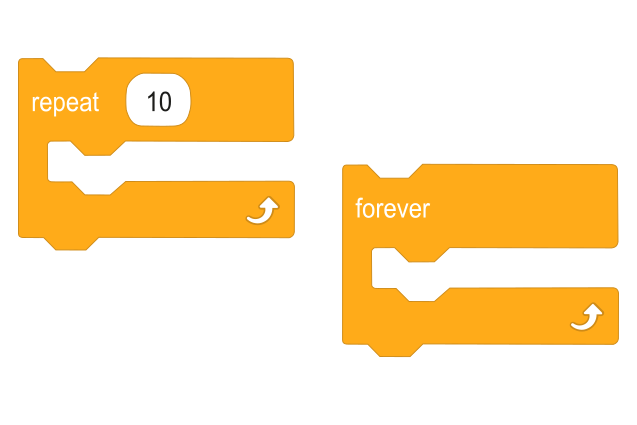
Have learners look at and discuss two of the repeat blocks in the Control section:
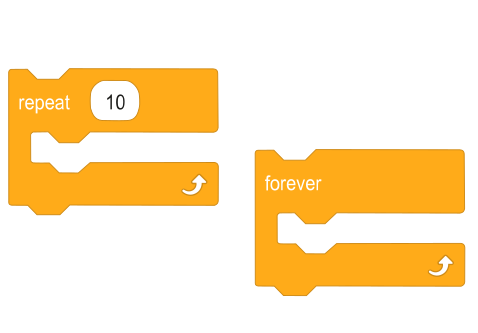
  • what they do differently;
    • one has an argument that allows you to set the number of times the code will repeat and the other will only end when the stop icon is pressed (there are other ways to stop the forvever repeat block but it is suggested that you do not mention more, yet, as they are more complex).
  • what they do that is the same;
    • they both repeat the code, within the block
  • when you would want to use one instead of the other;
    • when you want the repeat to occur a specific number of times vs when the number of times is not important
  • when you would have to use one over the other, when one has a limitation that wold cause problems in a program.
    • when repeating too often would cause Marty to walk over an edge or into an obstacle

The presentation shows two examples of code the village children have created in MartyBlocks. After time for learners to discuss how they think they would improve the code, a mouse click will reveal an example for a more efficient version, which makes use of the repeat block. Do not limit the discussion to this as the only correct answer. Encourage learners to compare any contrasting thoughts they may have had with what is presented on the slide.

Cool down

TimingActivityPossible adaptations
Timing—

Cool Down

Bring learners back together to discuss the challenges they faced and overcame. Have groups model their creations and explain what is happening, when. Encourage other groups to compare their work and ask questions to deepen their understanding of the processes.

Suggested questions you might ask:

  • Do you prefer the repeat block in MartyBlocks or MartyBlocks Jr (if applicable)
  • Do you prefer reading code that has the repeat block or does not have it?
  • What challenges did you face when converting from repeat-free plans to plans and code with repeats.

Carry out any end of lesson routines.

Log off devices and clear everything away.

Possible adaptations—

Show learners the plan that the village children used for one of the code comparisons: repeat block-free code and repeat block code. Explain how the rhombus shape indicates what the repeat block will do: the arrow controls the flow for the program, the repeat block will go back to an earlier block of code, and everything, after where the arrow points, is repeated. The teacher guide explains this with the examples beside the plan without a repeat.

Here is a very basic block of code with Marty acting to it.

Possible adaptations—
Timing—

Time for Practice

The next slide will show a very basic example of a plan and code without the repeat block, and a video of Marty carrying out the code, and the transformed plan and code with the repeat block. The updated code with the repeat block is displayed, below.

Watch on YouTube

Have learners consult their workbooks. In it, they will find three plans, without any use of the shape for the repeat block. Challenge learners to rewrite the plan, using the rhombus shape to indicate where the repeat would interact with the code. Then, have learners create the code in MartyBlocks and test the code in action; does it do what the plan asks? The updated plan with the associated code blocks are in the teacher guide.

This will require a bit of time for learners to discuss, plan and test.

Possible adaptations

Support

Have cut-outs of the planning shapes to support arranging them, first, then learners could trace or copy their physical plan. The emphasis has to be on the plan making sense and taken from the shapes looking perfect. Alternatively, you may want to prepare sufficient shapes to allow learners to glue them into the workbook.

Further challenge ideas

Extend

Challenge learners to include two separate loops within a program with an action to separate the two blocks.

Watch on YouTube