Learn how loops blocks can simplify code
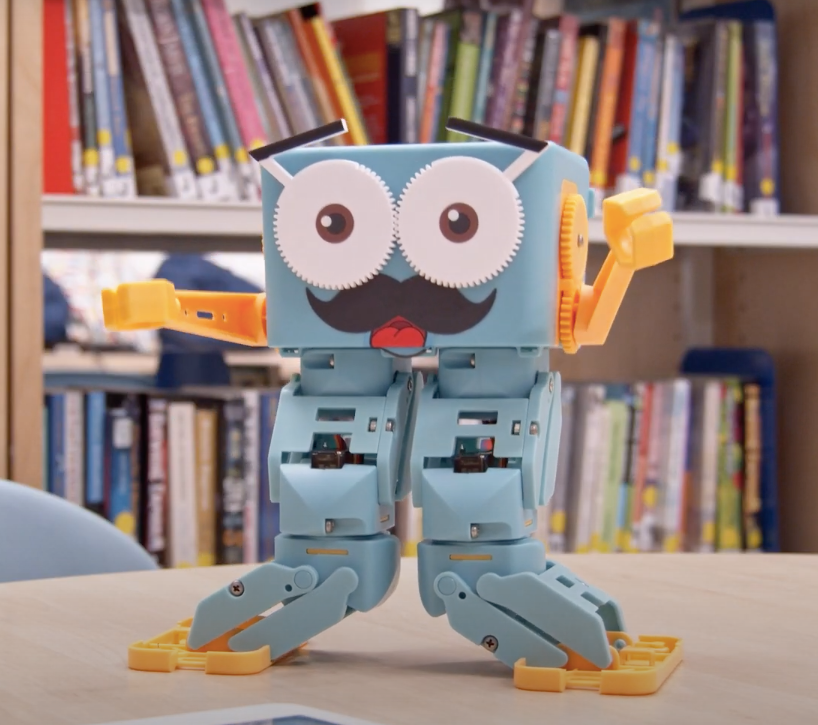
Have learners walk perimeters of shapes that are made of composite shapes: a square, with an equailarteral triangle on one side for example.
Have learners add some code to their shape to give Marty's motions a bit of flair: a wiggle or other motion at each vertex, that does not move Marty from the vertex; a sound played a key points, or at the end, which does not exist in the loop.
Have learners think of a way to have Marty record his path: build a way of attaching a pen, or another writing implement, to Marty as he walks.
Have print outs of the slides that feature the shape code, the loop for the square and the
non-loop for the pentagon.
Have learners regularly refer to the workbook for the examples they know of loops, in their life, so that they can more easily apply this model to the code.
Share past workbooks that detailed the angles for the shapes, so that time is not taken up finding the supplementary angle and subtracting, again.
15 of 15 linked standards shown.
| Curriculum area | Linked standards |
|---|---|
| Digital Technologies, Design & technologies: Digital Technologies |
Select a code to read the full standard.
| Curriculum area | Linked standards |
|---|---|
| General standards |
Select a code to read the full standard.
| Curriculum area | Linked standards |
|---|---|
| Health and Wellbeing: Mental, Emotional, Social and Physical Wellbeing | |
| Literacy & English: Listening and Talking | |
| Literacy & English: Writing | |
| Technologies: Computing Science |
Select a code to read the full standard.
| Curriculum area | Linked standards |
|---|---|
| Computing, Design and Technology: Computing | |
| Computing, Design and Technology: Design and Technology |
Select a code to read the full standard.
| Curriculum area | Linked standards |
|---|---|
| International Society for Technology in Education (ISTE) |
Select a code to read the full standard.
Learners will already have been introduced to loops and what they do. This lesson takes learning from other areas, the arguments from the previous lesson, and encourages the use of loops to make the code more efficient and easier to read. Students will understand that they can use loops to reduce the number of lines of code that they have to write, using a combination of computational thinking and the MartyBlocks editor.
Awareness of arguments; knowledge of block names, knowledge of loops
Have learners think about tasks that they regularly complete, where the task itself is made of smaller tasks that repeat. Record their examples and ask learners to record ideas in their workbook. Example videos are in the presentation to encourage thinking, if no suggestions are forthcoming.
Watch each video for as long as you think is necessary, the goal is to present the loop but some of the videos contain interesting learning.
In the presentation, the water cycle video is set to start at the beginning of the loop of the actual cycle.
This sythesizer track has the initial audio looping every 13 seconds. Ask learners to listen for it and see if they can identify the length of each loop.
The examples loops learners suggest might be more like get up, get washed, eat, go to school... These tasks repeat every (week)day and each task is made up of smaller tasks: get up - turn off the alarm, sit up, stretch, stand up, make the bed; get washed - go to the bathroom, turn on the tap, wet your hands, pick up the soap, lather, wash face, rinse hands, rinse face, towel dry...
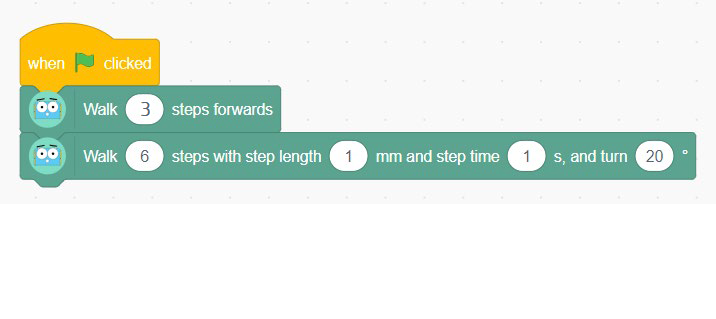
Share a video of Marty completing a shape's perimeter via a repeat code block. Learners might notice that there is no pause after each side and angle: the motion only stops after the final side and angle is completed. Remind learners of the fact that in the video, what learners will see is correct for Marty but may not be mathematically correct in terms of the angle, as seen in the code. Learners need to watch for the parts that repeat but don't need to make any notes, yet.
Below is the code that allowed Marty to walk the shape. A greater selection of shape code is available in the teacher guide.
Remind learners where to find the repeat block (in the control section) and review the differences between them, with a Marty or via the videos in the presentation. The video from the presentation showcases the walk block, found in the motion section. It is hoped that learners will see that the arguments are different for the forever repeat block and the one that repeats 10 times (it is 10 by default in Marty Blocks but 3 in the presentation. It can be any value you choose from Marty Blocks if you want to show a live demo). Learners may see that the repeat (3) block has an option for blocks to connect below while the repeat forever block does not. Explore why this might be. The repeat forever block does not have an option to connect something below because the code will never stop.
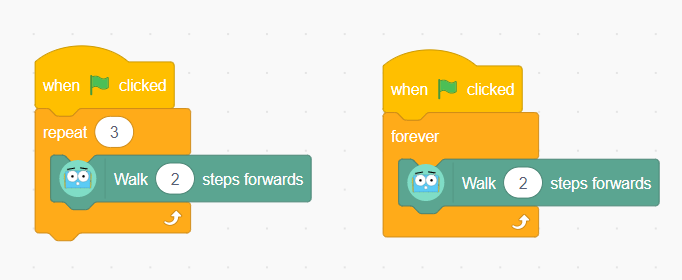
The video shows the two blocks on the workspace and the effect on Marty. Clicking one or the other of the blocks will cause that code to run. In this instance, the green flag was not pressed because only one block was meant to run. Having two blocks on the workspace and running at the same time will be explored in the lesson on parallel programming.
Of course, the video had to stop as Marty would have just kept going if it hadn't.
Have a discussion about how loops can help minimize the amount of writing that is needed and keep the code neatly organized, think back to the music example: do you think the composer wrote each of the repeating notes over and over or do you think that they looped them? The water cycle is a continuous loop, sometimes it moves at different speeds because of the climate of an area but it continues to cycle, regardless. Another point that is worth mentioning is the timing of what happens in a loop is the same each time the loop runs (unless there are variables in the code, which hasn't been explored yet).
Show the video of the pentagon loop again and share the code afterward that is not contained in a repeat block. Discuss with learners where they might be able to repeat some actions and make the code easier to read and understand. Learners could record the parts that repeat in their workbook.
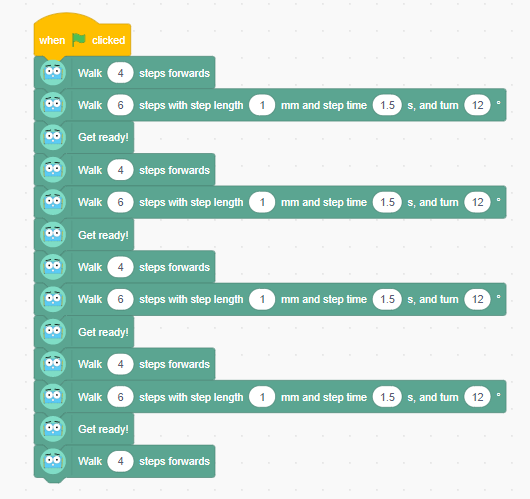
Emphasize that loops repeat everything inside the block however many times the programmer sets; so, if you wanted to run most parts of the code 6 times but some of it only 5 times, what could you do? Remind learners of the last lesson that involved walking the perimeter of a shape. In the blocks that were created, each run through the code involved walking, turning and get ready, when it came to the last side of the shape, you could have removed the turn and get ready block because you were done and tap the block with just the walk command. You generally want a loop to have fixed code within it that will run for the number of times you want it to run.
The final example of code, in the presentation, shows what Marty needs to walk a square. Feel free to delete this slide if you want learners to think this through themselves. The example is given to showcase the difference between a repeat block with an argument of 4, with all code inside, and an argument of 3, with most of the code inside.
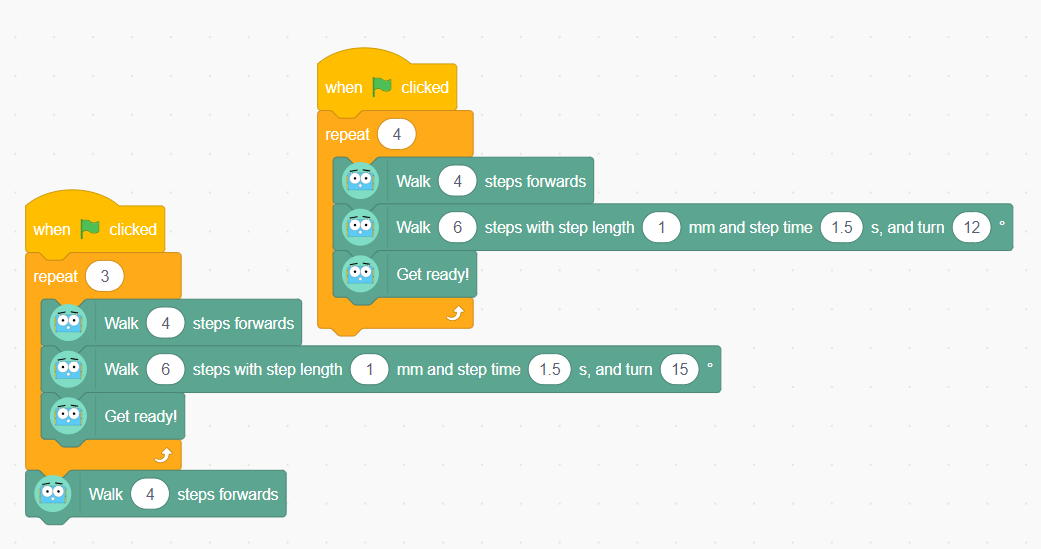
To further reinforce what happens with different repeat blocks, have learners look at the examples of repeat blocks to determine which block fits which description, from the workbook. They are very similar and a bit sneaky so encourage discussion.
Have learners wrap their shape code from the lesson on parameters and arguments inside a repeat block. They will need to include a walk block either before or after the repeat block and have the argument set to 1 less than the number of sides for the shape, unless they want to end the shape on a turn. Saving the file with a new name would be good so that they can maintain the original shape code, without a loop.
The addition of a repeat block to the code for a square will not take much time at all, so encourage learners to apply this to all of the shapes that were explored in the last lesson. It may be that after multiple repetitions of the code, learners notice that Marty's endpoint is not exactly right, this presents another opportunity for problem solving, where learners can tweak the arguments to more accurately represent the 2D shape, given the environment.
There is potential for applying the learning about loops to the other shapes from the lesson on arguments and parameters. Because the only changes needed will be arguments - number of steps and degree value for each step with a turn - learners may be able to complete all of the perimeter walks.
Bring learners back together to discuss the challenges they faced and overcame. Have groups model their creations and explain what is happening, when. Encourage other groups to ask questions to deepen the understanding of the processes.
Take time to have group code displayed to the class, encourage observational questions from peers.
Suggested questions you might ask:
Carry out any end of lesson routines.
Log off devices and clear everything away.
