1: Introducing Marty and Programming
Step 3 of 4: 0.03 Marty's First Moves
Beginning with Unplugged Coding
22 of 22 linked standards shown.
| Curriculum area | Linked standards |
|---|---|
| Digital Technologies, Design & technologies: Digital Technologies |
Select a code to read the full standard.
| Curriculum area | Linked standards |
|---|---|
| General standards |
Select a code to read the full standard.
| Curriculum area | Linked standards |
|---|---|
| Health and Wellbeing: Mental, Emotional, Social and Physical Wellbeing | |
| Literacy & English: Listening and Talking | |
| Literacy & English: Writing | |
| Numeracy: Number, Money and Measure | |
| Technologies: Computing Science |
Select a code to read the full standard.
| Curriculum area | Linked standards |
|---|---|
| Computing, Design and Technology: Computing |
Select a code to read the full standard.
| Curriculum area | Linked standards |
|---|---|
| Computer Science: | |
| English Language Arts: Speaking and Listening | |
| English Language Arts: Writing |
Select a code to read the full standard.
| Curriculum area | Linked standards |
|---|---|
| International Society for Technology in Education (ISTE) |
Select a code to read the full standard.
| Curriculum area | Linked standards |
|---|---|
| Elementary Technology Applications: Kindergarten to Grade 2 |
Select a code to read the full standard.
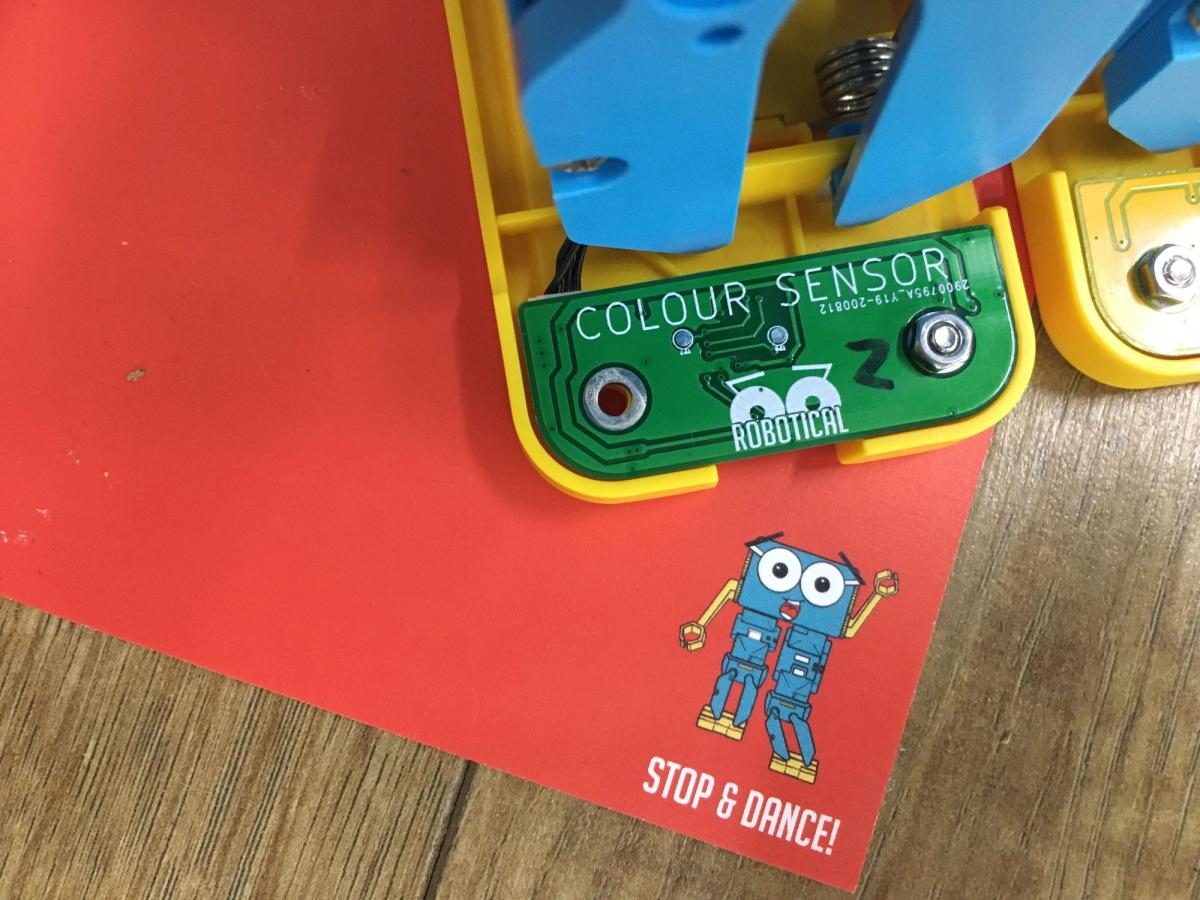
In this lesson, learners will create a sequence of steps to allow Marty to move forward and stop, making use of Robotical's colored cards. Each card has an instruction built into it, that Marty understands, without the need to write or arrange any code.
What instructions are, directional language: forward, backward, left, right, colors - red, green, blue, purple, yellow
Creating instructions
For this entire lesson, Marty should be on the ground, not on a table. Additonally, the story text can be read with or without the presentation. There are instances in the presentation where media will showcase Marty moving, delete these slides if you want to model Marty in the classroom while reading the story; keep them to have Marty's movements modelled in the presentation. In preparation, all Marty's could be turned on and in 'unplugged' mode before the lesson starts. Unplugged mode is explained, here; alternatively, the Martys could be turned on during the 'time for practice' section of the lesson.
| Timing | Activity | Possible adaptations |
|---|---|---|
| — | Warm upRead to learners the learning objectives and success criteria using whichever method is familiar. They are on the ppt slides but the presentation does not need to be shown if you don't want it to be. Warm up with a game of musical statues or musical bumps (there are links on the game names if you do not know how to play them). Here is a link to an audio track on YouTube that has a child-friendly music track. Use as many stop-and-start sections of the track as you need for the warm-up. Ask learners how they knew when to start dancing. When the music started. Ask them how they knew to stop dancing. When the music stopped. Tell learners that these were instructions that were given to them and they followed the instructions. You didn't tell them to start dancing, every time, when the music started and you didn't tell them to stop, every time, when the music stopped. You could say that we followed the commands of the game. Now we are going to learn about something that needs our commands to get moving. | — |
| Timing | Activity | Possible adaptations |
|---|---|---|
| — | Get LearningRead the story from the presentation. Much of the knowledge and understanding part of the learning for the lesson will occur as you read the story. Encourage learners to ask questions during the story, or pause during the story if you see thoughtful faces to further explore what is happening. The following videos feature in the presentation: Marty dancing upon being set down. video of Marty walking when light changes video of Marty stopping when lifted |
| Timing | Activity | Possible adaptations |
|---|---|---|
| — | Cool DownRemind learners of the amazing work that they accomplished, "You were able to instruct a robot to move from a starting point to a finishing point! That is just amazing! I wonder what we will get up to with Marty, next time?" Remind learners of the goals for the lesson, "To tell a robot to move to a finish place," and, "to have Marty reach the finish place." Ask learners if they think they did well with the lesson using a familiar formative assessment strategy: thumbs up for good, thumbs to the side for OK, thumbs down for not so good; a green, yellow or red card, indicating their thoughts; a one to one chat about the learning; whole class feedback using a PMI (plus, minus, interesting) approach; or some other strategy with which the learners are familiar. A formative assessment document is included in the resource section. Carry out any end of lesson routines. Clear everything away. | — |
video of Marty walking after the green card
video of Marty stopping with the red card
| — |
| — | Time for PracticeLet learners know that they will need to instruct Marty to reach their destination by using the color cards. Reinforce that learners need to be gentle with Marty, perhaps something like, "If we were all to touch Marty, the destination would never be reached. Let's do our best to just use the controller colors to tell Marty where to go and we can celebrate together at the end, when Marty reaches the goal." Have learners choose their starting point and place down the green card where they decide it should be. Have them then place the red card at the goal for where they want Marty to walk. Have learners line up Marty so that they are facing the red card, from the direction of the green card. Once they are happy with the way Marty is pointing, have them, or an adult in the classroom, turn on unplugged mode. Then, place Marty on the green card and they will automatically start walking. It may be that Marty will not reach the red card on the first attempt; because Marty is a walking robot, the floor surface can affect his distance and direction: sometimes there is more friction and they do not walk as far, sometimes there is less, sometimes Marty's foot can catch on something, etc. It is important that learners see there are occasions where trial and error is a necessity with robots and writing programs. Once learners all manage to reach the goal, celebrate with them. "You just created a program to tell Marty to do something. You are at the very start of a journey to create instructions for computers and robots!!" | SupportUse a long ruler to guide the placement of Marty, for the initial direction. Encourage learners to get low to the ground to get a 'Marty-eye' view. |
Make the finish area farther away, if you make the goal farther than 50 cm, learners will need to use a second green card to keep moving in that direction. This will require learners to use a bit more trial and error as Martys movement is affected by bumps in the carpet or slidy surfaces.
