3: Marty Sensing the Environment
Step 4 of 5: 2.22: Light Sensors and Conditional Statements
Use Marty's light sensors to trigger a response when a change occurs
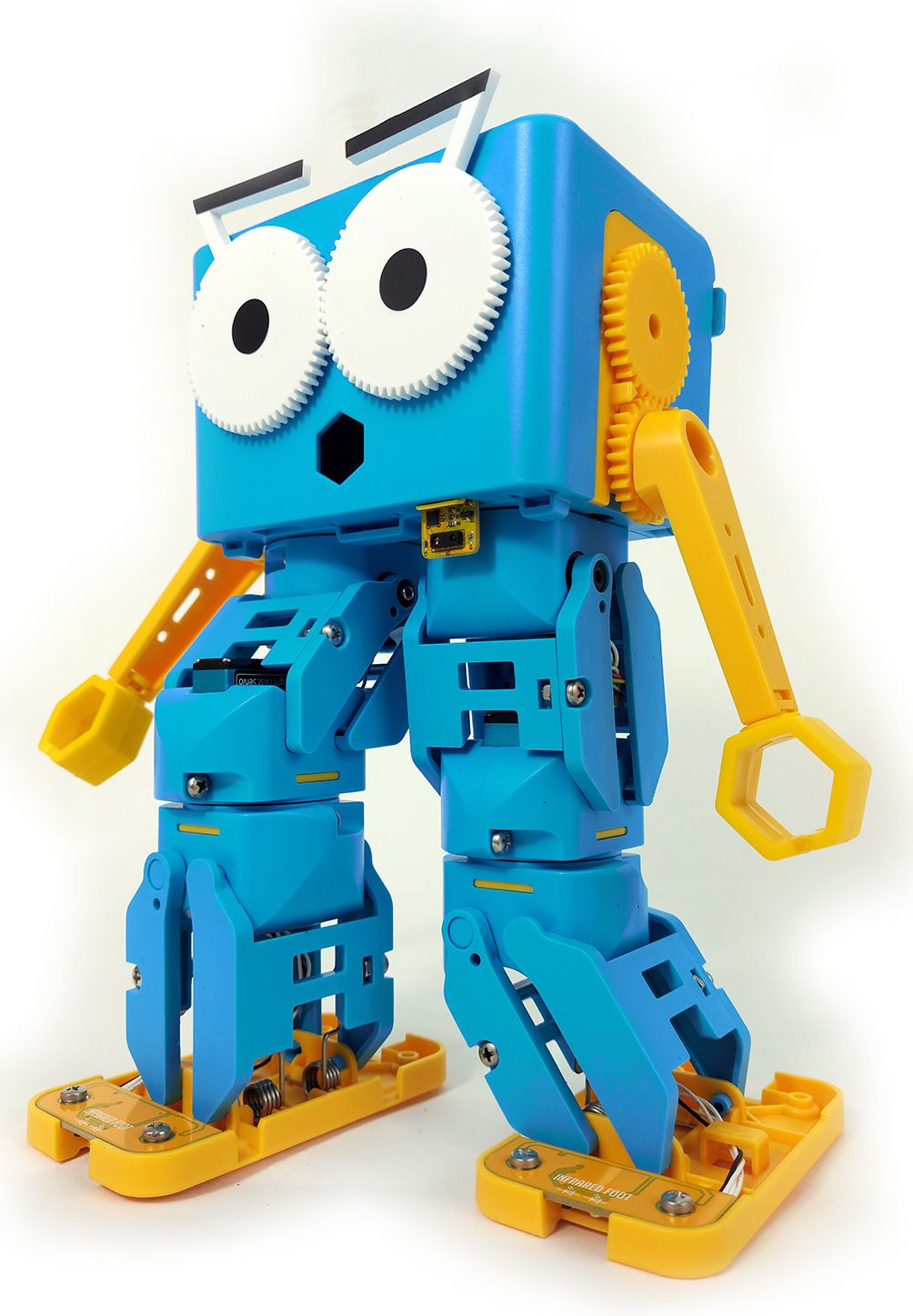
Challenge learners to fine-tune the sensor values:
Have physical code cards available for learners to use, when building their scripts:
Have a printout of the basic conditional statement, using the light sensor but not the loop.
18 of 18 linked standards shown.
| Curriculum area | Linked standards |
|---|---|
| Digital Technologies, Design & technologies: Digital Technologies |
Select a code to read the full standard.
| Curriculum area | Linked standards |
|---|---|
| General standards |
Select a code to read the full standard.
| Curriculum area | Linked standards |
|---|---|
| Health and Wellbeing: Mental, Emotional, Social and Physical Wellbeing | |
| Literacy & English: Listening and Talking | |
| Literacy & English: Writing | |
| Technologies: Computing Science |
Select a code to read the full standard.
| Curriculum area | Linked standards |
|---|---|
| Computing, Design and Technology: Computing | |
| Computing, Design and Technology: Design and Technology |
Select a code to read the full standard.
| Curriculum area | Linked standards |
|---|---|
| International Society for Technology in Education (ISTE) |
Select a code to read the full standard.
| Curriculum area | Linked standards |
|---|---|
| Middle School Technology Applications: Grade 6 to Grade 8 |
Select a code to read the full standard.
In this lesson, learners are introduced to light sensors, like the add-on available with Marty v2. These sensors allow Marty to respond when enough light is detected, while enough light is detected or while an amount of light is not detected. Learners will begin by thinking about light sensors in nature and move to a built environment, where light sensors are used on a regular basis for a variety of reasons.
Please read the knowledge base article about the light sensor addon, before engaging with this lesson.
Experience using sensors with Marty, Conditional statements
Have the classroom dimmed or dark, before the learners enter: lights off, blinds or curtains to prevent full light, with Marty ready with the code block, pictured below. Increase the light slightly and watch Marty 'react'. Continue to do this, increasing the light in the room, watching Marty alternate his movements. Ensure that you are not near the keyboard and do not have any wireless devices on you to maximise the effect. There is a description of the script in the Teacher Guide.
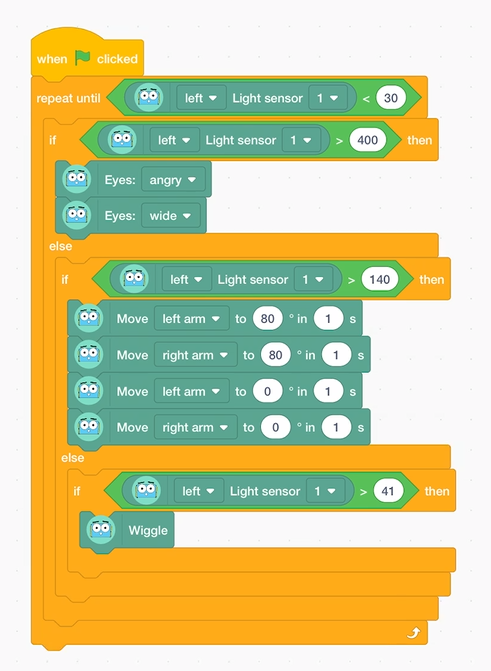
Marty should look like the video, below, if you choose to change the light as in the video:
Discuss what learners think has happened. Record the ideas that they share.
Perhaps choose to show one or more of the videos below. They show a plants reaction to available light. For the growing plants, rather than the grown plants, draw attention to the change in the leaves as the plant grows: when leaves do not receive light, what happens to them?
How is the light affecting the plant? Suggestions may include, the light is attractive to the plant, the light is something the plant needs and so it moves toward it, the light controls the plants' movement, the light is food for the plant and the plants move to where the food is, the plant senses the light and acts because of the light.
Record the suggestions
Display the first three slides of the ppt, the title, objectives and success criteria for today's lesson.
Ask learners if they can think of any technological devices that react to light: they turn on, they move toward the light, they make a noise or alert in some other way, or perhaps something changes about them.
Record the examples that learners suggest.
Ask why they think some machines act in this way. Is there a comparison between what the machines are doing and what the plants are doing? What might these machines have that cause them to act where there is a change in the levels of light. Learners may suggest the word sensor. If they do, ask what a sensor does. At this time, you might like to ask if they can remember any other sensors machines can have, if you do this, encourage learners to take a note, or just remember the suggestions.
Display the MartyBlocks screen on the board with the light sensor block, found in the sensing section. Click on the block to display what it returns.
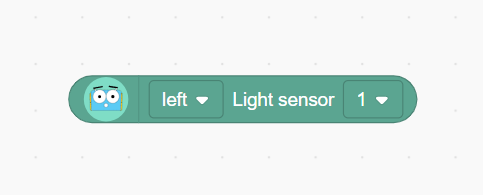
Have a learner cover a part of Marty and repeat the process. Have a learner take Marty closer to a light source and repeat. Record the light value when nothing is blocking the sensor and no additional light is added, this will be used as a reference for work, later in the lesson.
Ask learners how we might be able to make use of Marty's ability to sense light. Suggestions may include: he could start or stop moving, start or stop making noise or change a movement depending on the amount of light. Show the learners a small script that does just that substituting a value, slightly less than what you recorded earlier, for the one in the image:
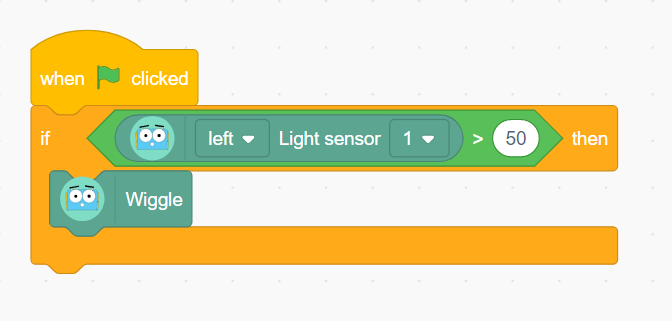
Marty should look like this.
Learners will notice that Marty's 'wiggles' happen once and only once. When you increase or decrease the amount of light, nothing changes. Ask learners if they can think why this is. Answers may be similar to, "We only asked to perform this once," or "Marty stops after the command is run." Ask learners how they can give more options for this program. Suggestions may include, "We could have more choices," or, "we could have a loop".
Challenge learners to build on the very basic conditional program to give Marty more to do in terms of how long he does it and in terms of choice of actions.
Show learners an example of Marty carrying out a completed script, without showing the script. Challenge learners to plan what they think Marty is being told to do and how he is being told to do it.
Below is a basic loop with a conditional statement.
Before learners begin working on their code, remind them of the success criteria that were shared, earlier. While groups are designing their code, have them document the challenges they faced and the steps they took. It will support sharing at the end of the lesson.
Below are examples of pieces of code that learners could create to carry out a similar action to the above video.
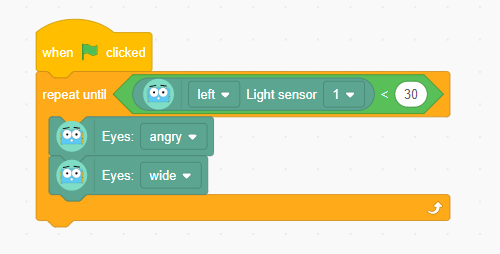
This has a simple loop, with the light sensor:
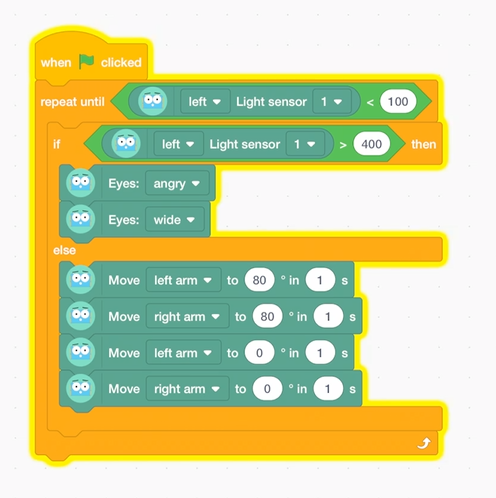
This is the MartyBlocks code from the video at the start of this section: a loop with an if/else statement:
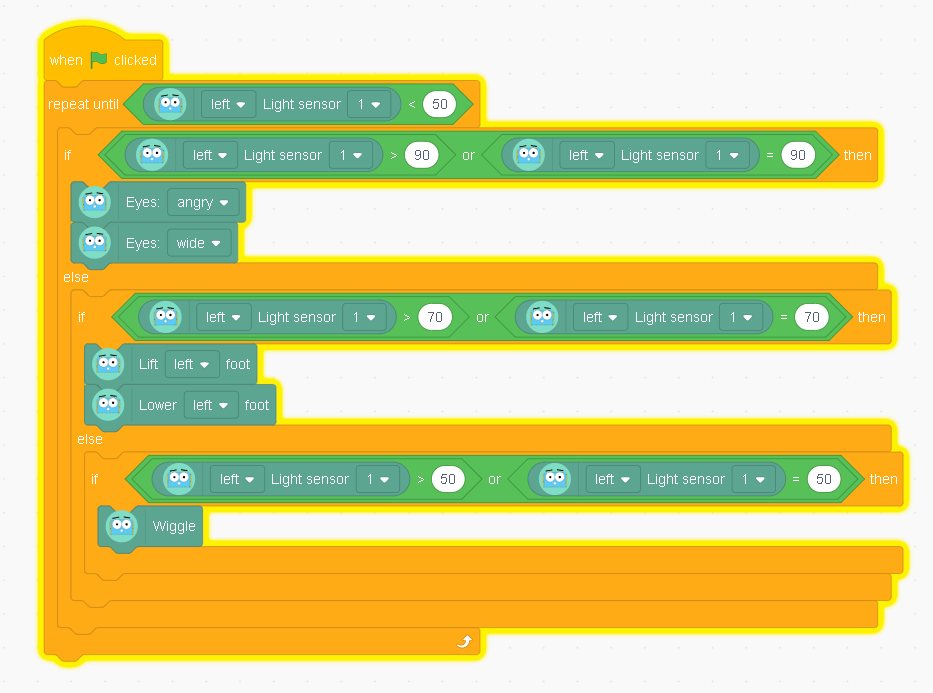
This is very similar to the example when learners entered the room but also includes the logic of OR, if the light is equal to a value:
Bring learners back together to discuss the challenges they faced and overcame. Have groups model their creations and explain what is happening, when. Encourage other groups to ask questions to deepen the understanding of the processes.
Suggested questions you might ask:
Carry out any end of lesson routines.
Log off devices and clear everything away.
