Skip to content
Learning Site
Home

About

  • About Robotical
  • Case Studies
  • Meet the Team
  • Blog
  • Contact Us

Our Products

  • Marty the Robot
  • Axiom
  • Cog

Teach

  • Lessons & Resources
  • Marty for Educators
  • Funding & Grants
  • Professional Development
  • Why Teach STEM?
  • Coding Environments
  • Student Led Learning

Let's Code

  • Marty the Robot
  • Code Online
  • Marty Apple App
  • Marty Android App
  • Update your Marty
  • Cog
  • Code Online
  • Cog iOS App
  • Cog Android App
  • Axiom
  • Axiom Science

Support

  • Marty Get Started
  • Cog Quick Start Guide
  • Axiom Science Quick Start Guide
  • Support & FAQs
  • Marty V2 User Guides
  • Marty V1 Resources
  • Request Support
  • Request Top-Up Training

Shop

  • Marty the Robot and Physical Computing
  • Class Packs
  • Add Ons & Extras
  • Account
  • Shipping, Returns & Cancellations
  • Distributors
HomeLessonsUnits of workCurriculum standardsTutorials

Information

  • Lessons & Resources
  • Knowledge Base & User Guides
  • About Us
  • Shipping, Returns & Cancellation
  • Privacy Policy
  • Learning site privacy
  • Terms of Service
  • Partner Hub

Support & Help

  • Support & Help Center
  • Getting Started with Marty V2
  • Getting Started with Marty V1

Learning, Resources & Guides

  • Marty V2 Lessons Site
  • Marty V1 Lessons Site

Contact Us in the UK

Stanhope House,12 Stanhope Place,Edinburgh,United Kingdom,EH12 5HH
(+44) 0131 564 0922
hello@robotical.io
Contact Us

Contact Us in the US

2810N Church St, PMB 61694,Wilmington,Delaware,USA19802-4447
(+1) 833 886 1661
hello@robotical.io
Contact Us

Why not join our mailing list?

For News, New Products and Special Offers

Join mailing list

Copyright 2016-2026 © Robotical Ltd

Step 4 of 5

3: Marty Sensing the Environment

Step 4 of 5: 2.22: Light Sensors and Conditional Statements

  1. 42.22: Light Sensors and Conditional Statements
Marty app
CurrentPrevious

2.22: Light Sensors and Conditional Statements

Use Marty's light sensors to trigger a response when a change occurs
2.22: Light Sensors and Conditional Statements
Age / stage
8 - 10
Estimated time
45 minutes
Difficulty
Intermediate
Products
Marty V2

On this page

  1. Lesson overview
  2. Before you begin
  3. Warm-up
  4. Get learning
  5. Further challenge ideas
  6. Cool down
  7. Additional reading
  8. Curriculum standards

Additional reading

Marty's light sensor

What is a light sensor?

Curriculum standards

18
Choose your curriculum to see the relevant standards.

18 of 18 linked standards shown.

Australian CurriculumAustralia2
Curriculum areaLinked standards
Digital Technologies, Design & technologies: Digital Technologies

Select a code to read the full standard.

Digital Technologies, Design & technologies: Digital Technologies

  • ACTDIP027Define and decompose real-world problems taking into account functional requirements and economic, environmental, social, technical and usability constraints
  • ACTDIP031Evaluate how student solutions and existing information systems meet needs, are innovative, and take account of future risks and sustainability
CSTA Education StandardsUSA2
Curriculum areaLinked standards
General standards

Select a code to read the full standard.

  • 2-CS-02Design projects that combine hardware and software components to collect and exchange data.
  • 2-AP-12Design and iteratively develop programs that combine control structures, including nested loops and compound conditionals.
Curriculum for ExcellenceScotland7
Curriculum areaLinked standards
Health and Wellbeing: Mental, Emotional, Social and Physical Wellbeing
Literacy & English: Listening and Talking
Literacy & English: Writing
Technologies: Computing Science

Select a code to read the full standard.

Health and Wellbeing: Mental, Emotional, Social and Physical Wellbeing

  • HWB 0-14a / HWB 1-14a / HWB 2-14a / HWB 3-14a / HWB 4-14aSocial wellbeing

Literacy & English: Listening and Talking

  • LIT 2-02aTools for listening and talking
  • LIT 2-07aUnderstanding, analysing and evaluating

Literacy & English: Writing

  • LIT 2-23aTools for writing
  • LIT 2-26aOrganising and using information

Technologies: Computing Science

  • TCH 2-13aUnderstanding the world through computational thinking
  • TCH 2-14bUnderstanding and analysing computing technology
England's National CurriculumEngland2
Curriculum areaLinked standards
Computing, Design and Technology: Computing
Computing, Design and Technology: Design and Technology

Select a code to read the full standard.

Computing, Design and Technology: Computing

  • ✔️Understand what algorithms are; how they are implemented as programs on digital devices; and that programs execute by following precise and unambiguous instructions

Computing, Design and Technology: Design and Technology

  • ✔️Design purposeful, functional, appealing products for themselves and other users based on design criteria
ISTEUSA3
Curriculum areaLinked standards
International Society for Technology in Education (ISTE)

Select a code to read the full standard.

International Society for Technology in Education (ISTE)

  • 1dStudents understand the fundamental concepts of technology operations, demonstrate the ability to choose, use and troubleshoot current technologies and are able to transfer their knowledge to explore emerging technologies.
  • 4aStudents know and use a deliberate design process for generating ideas, testing theories, creating innovative artifacts or solving authentic problems.
  • 5cStudents break problems into component parts, extract key information, and develop descriptive models to understand complex systems or facilitate problem-solving.
TEKSUSA2
Curriculum areaLinked standards
Middle School Technology Applications: Grade 6 to Grade 8

Select a code to read the full standard.

Middle School Technology Applications: Grade 6 to Grade 8

  • 1.CCreativity and innovation. The student uses creative thinking and innovative processes to construct knowledge, generate new ideas, and create products. The student is expected to: explore complex systems or issues using models, simulations, and new technologies to make predictions, modify input, and review results;
  • 6.DTechnology operations and concepts. The student demonstrates a thorough understanding of technology concepts, systems, and operations. The student is expected to: understand and use software applications, including selecting and using software for a defined task;

Resources

Learner resources

  • Workbook for Light Sensors and Conditional StatementsFile links loading
  • Recommended blocksFile links loading

Educator resources

  • Teacher GuideFile links loading
  • Presentation for Light Sensors and Conditional StatementsFile links loading
3: Marty Sensing the Environment
Unit overview
12.06: What's in Marty's Way?
22.16: Ground Detection - Safety First
32.21: Estimating with Distance Sensors
52.23: Noise Sensors and Parallel Programming
Previous step2.21: Estimating with Distance Sensors
Next step2.23: Noise Sensors and Parallel Programming

Lesson overview

In this lesson, learners are introduced to light sensors, like the add-on available with Marty v2. These sensors allow Marty to respond when enough light is detected, while enough light is detected or while an amount of light is not detected. Learners will begin by thinking about light sensors in nature and move to a built environment, where light sensors are used on a regular basis for a variety of reasons.

Please read the knowledge base article about the light sensor addon, before engaging with this lesson.

Learning objectives

  • I can read and use the output from a sensor
  • I can write a condition, in a program, to have a device perform an action depending on the result from a sensor

Key vocabulary

  • sensor
  • loop
  • if statement (conditional)

Prior learning

Experience using sensors with Marty, Conditional statements

Before you begin

Equipment

  • Marty the Robot V2
  • Marty Workbook
  • Tablets
  • Access to the Blocks editor
  • Light Sensor add on for Marty v2

Warm-up

TimingActivityPossible adaptations
Timing—

Warm up

Have the classroom dimmed or dark, before the learners enter: lights off, blinds or curtains to prevent full light, with Marty ready with the code block, pictured below. Increase the light slightly and watch Marty 'react'. Continue to do this, increasing the light in the room, watching Marty alternate his movements. Ensure that you are not near the keyboard and do not have any wireless devices on you to maximise the effect. There is a description of the script in the Teacher Guide.
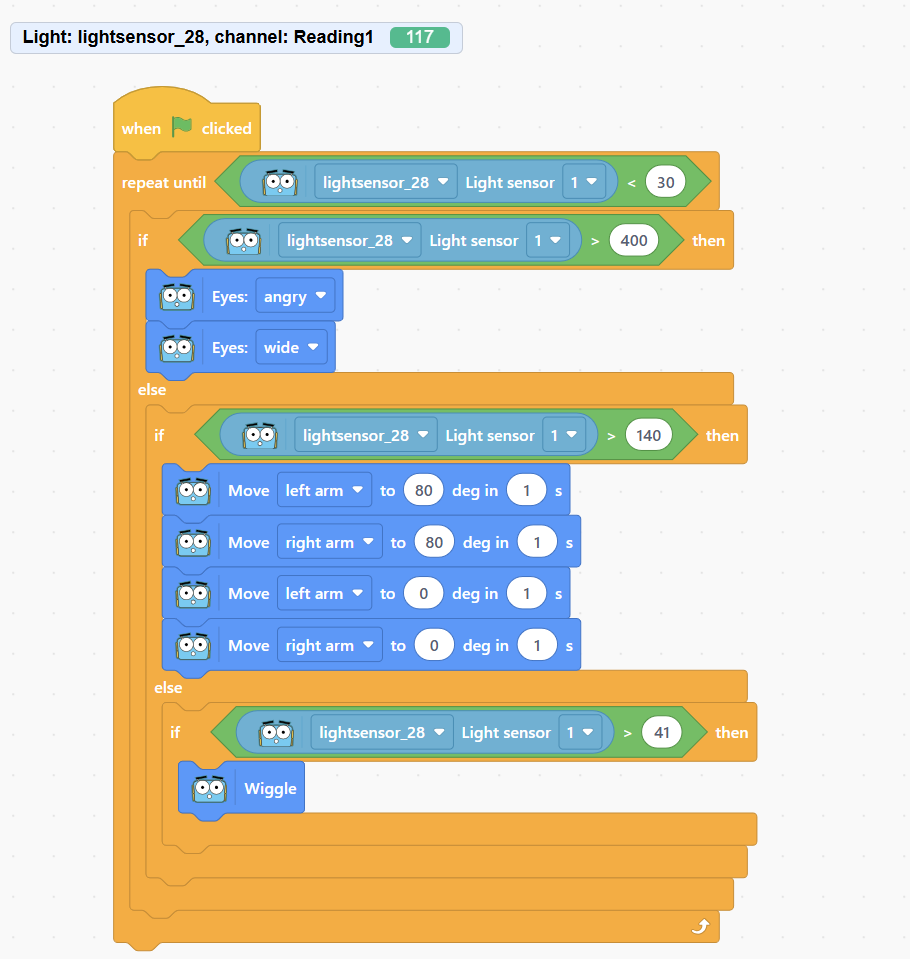
Complex light sensor code

Marty should look like the video, below, if you choose to change the light as in the video:

Watch on YouTube

Discuss what learners think has happened. Record the ideas that they share.

Perhaps choose to show one or more of the videos below. They show a plants reaction to available light. For the growing plants, rather than the grown plants, draw attention to the change in the leaves as the plant grows: when leaves do not receive light, what happens to them?

  • Growing sunflower
  • Grown plant

Get learning

TimingActivityPossible adaptations
Timing—

Get Learning

Ask learners if they can think of any technological devices that react to light: they turn on, they move toward the light, they make a noise or alert in some other way, or perhaps something changes about them.

Record the examples that learners suggest.

Ask why they think some machines act in this way. Is there a comparison between what the machines are doing and what the plants are doing? What might these machines have that cause them to act where there is a change in the levels of light. Learners may suggest the word sensor. If they do, ask what a sensor does. At this time, you might like to ask if they can remember any other sensors machines can have, if you do this, encourage learners to take a note, or just remember the suggestions.

Display the Blocks screen on the board with the light sensor block, found in the sensing section. Click on the block to display what it returns.
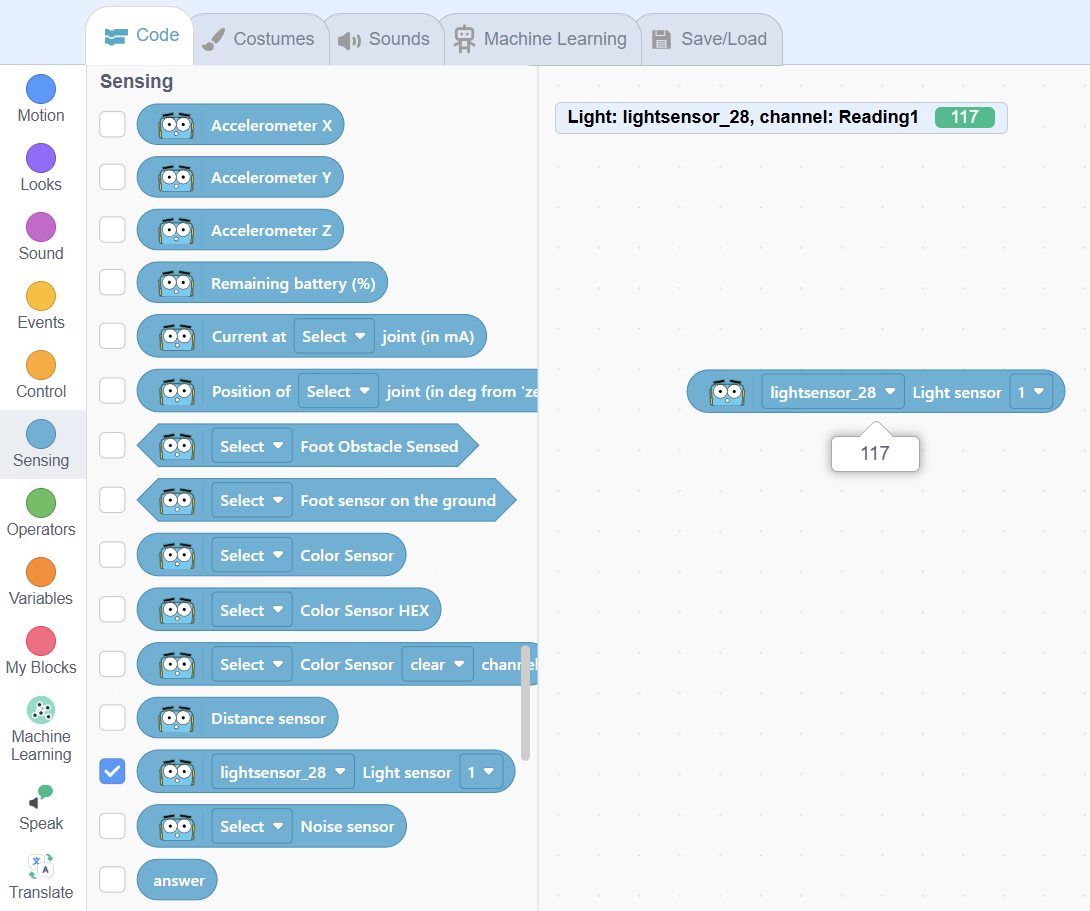
Have a learner cover a part of Marty and repeat the process. Have a learner take Marty closer to a light source and repeat. Record the light value when nothing is blocking the sensor and no additional light is added, this will be used as a reference for work, later in the lesson.

Ask learners how we might be able to make use of Marty's ability to sense light. Suggestions may include: he could start or stop moving, start or stop making noise or change a movement depending on the amount of light. Show the learners a small script that does just that substituting a value, slightly less than what you recorded earlier, for the one in the image:
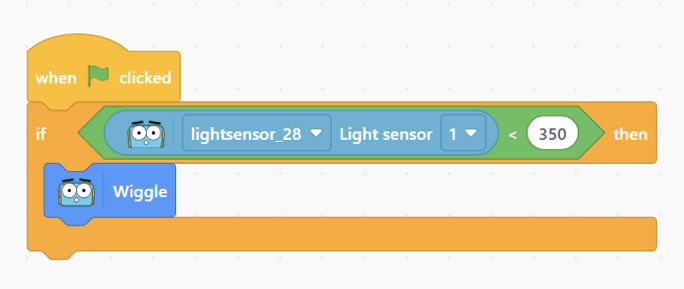
Basic light sensor code

Cool down

TimingActivityPossible adaptations
Timing—

Cool Down

Bring learners back together to discuss the challenges they faced and overcame. Have groups model their creations and explain what is happening, when. Encourage other groups to ask questions to deepen the understanding of the processes.

Suggested questions you might ask:

  • How did you determine what values to use for the conditional statements?
  • Did you address all of the values that the light sensor could record? How did you manage that?
  • Did you check the value from the light sensor regularly, or just once? Is there value in checking the light sensor periodically? Why, why not?

Carry out any end of lesson routines.

Log off devices and clear everything away.

Possible adaptations—

Unit resources

Learner resources

  • 2.06 What's in Marty's Way.pdf
  • 2.16 Ground Detection - Safety First.zip
  • 2.21 Estimating with Distance Sensors.zip
  • 2.22 Light Sensors and Conditional Statements.zip
  • 2.23 Noise Sensors and Parallel Programming.zip
  • Growing plants
  • How is the light affecting the plant? Suggestions may include, the light is attractive to the plant, the light is something the plant needs and so it moves toward it, the light controls the plants' movement, the light is food for the plant and the plants move to where the food is, the plant senses the light and acts because of the light.

    Record the suggestions

    Display the first three slides of the ppt, the title, objectives and success criteria for today's lesson.

    Possible adaptations—

    Marty should look like this.

    Watch on YouTube

    Learners will notice that Marty's 'wiggles' happen once and only once. When you increase or decrease the amount of light, nothing changes. Ask learners if they can think why this is. Answers may be similar to, "We only asked to perform this once," or "Marty stops after the command is run." Ask learners how they can give more options for this program. Suggestions may include, "We could have more choices," or, "we could have a loop".

    Challenge learners to build on the very basic conditional program to give Marty more to do in terms of how long he does it and in terms of choice of actions.

    Possible adaptations—
    Timing—

    Time for Practice

    Show learners an example of Marty carrying out a completed script, without showing the script. Challenge learners to plan what they think Marty is being told to do and how he is being told to do it.

    Below is a basic loop with a conditional statement.

    Watch on YouTube

    Before learners begin working on their code, remind them of the success criteria that were shared, earlier. While groups are designing their code, have them document the challenges they faced and the steps they took. It will support sharing at the end of the lesson.

    Below are examples of pieces of code that learners could create to carry out a similar action to the above video.

    This has a simple loop, with the light sensor:
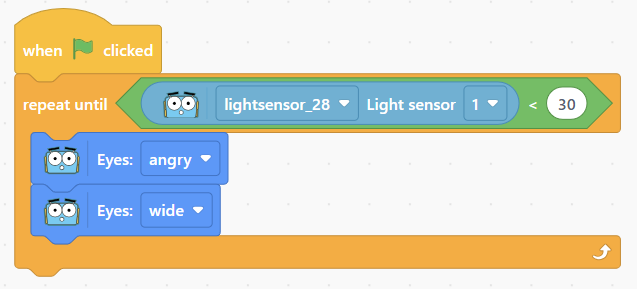
    Basic repeat until light sensor code

    This is the Blocks code from the video at the start of this section: a loop with an if statement:
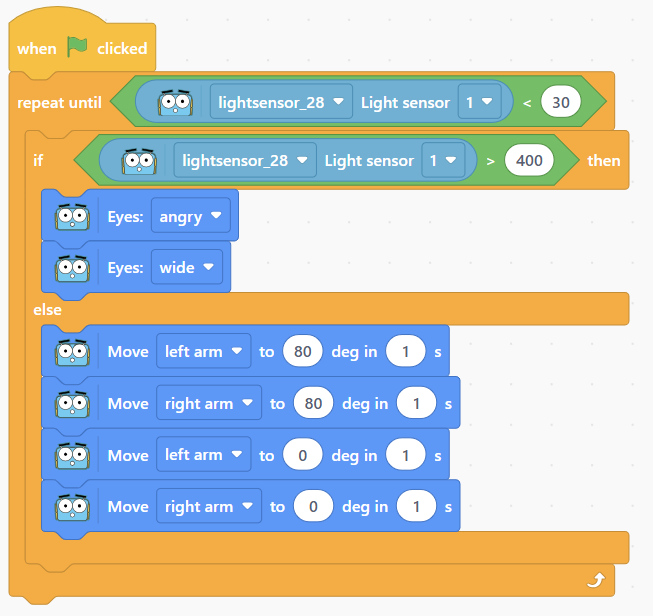
    Loop with if statement

    This is very similar to the example when learners entered the room but also includes the logic of OR, if the light is less than to a value:
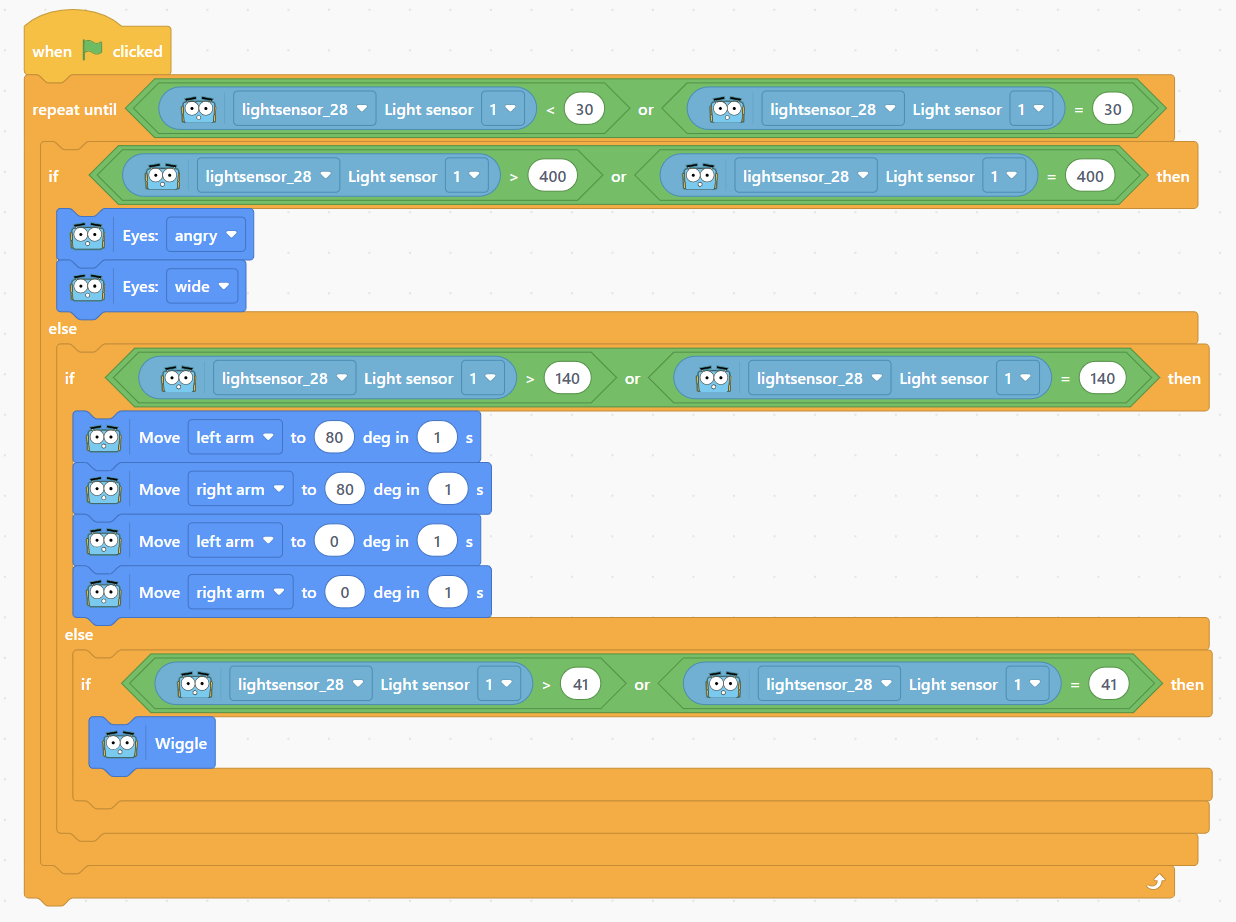
    Possible adaptations

    Support

    Have physical code cards available for learners to use, when building their scripts:

    • if/then and if/then/else blocks
    • loops
    • light sensor blocks
    • operator blocks: <, >, =
    • a variety of movement blocks

    Have a printout of the basic conditional statement, using the light sensor but not the loop.

    Further challenge ideas

    Extend

    Challenge learners to fine-tune the sensor values:

    • storing the value from the sensor as a variable and alerting the group if the value changes while the script is running
    • describe the way a nested conditional statement works to change what is returned
    • describe any bugs faced and how they were addressed