3: Marty Sensing the Environment
Step 2 of 5: 2.16: Ground Detection - Safety First
Use Marty's IR sensors to prevent him walking off the edge of a surface!
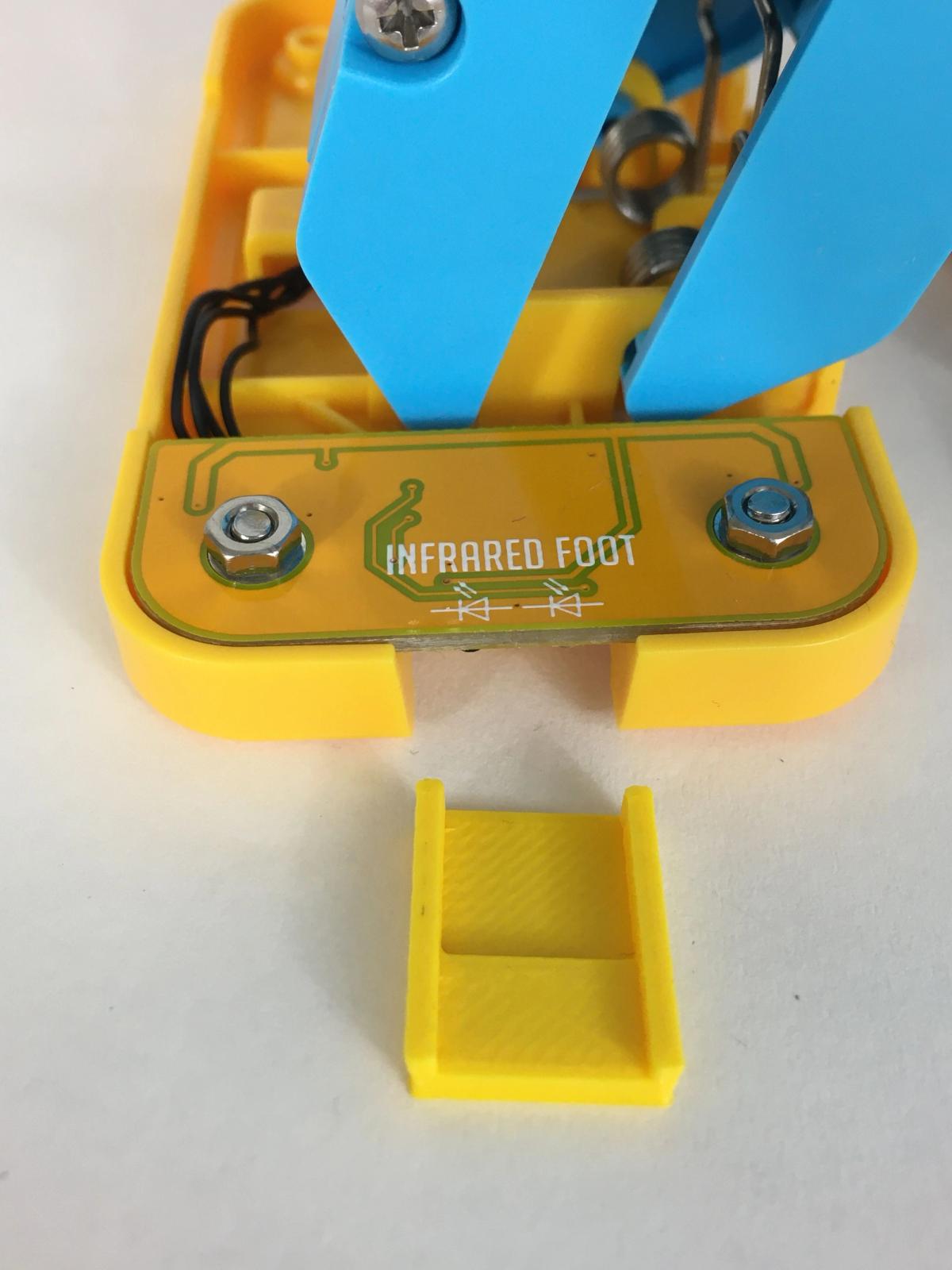
The include file describing the IR sensor shields will support you using the ground sensor, depending on which batch of Marty V2 you have.
17 of 17 linked standards shown.
| Curriculum area | Linked standards |
|---|---|
| Digital Technologies, Design & technologies: Design & Technologies | |
| Digital Technologies, Design & technologies: Digital Technologies |
Select a code to read the full standard.
| Curriculum area | Linked standards |
|---|---|
| General standards |
Select a code to read the full standard.
| Curriculum area | Linked standards |
|---|---|
| Health and Wellbeing: Mental, Emotional, Social and Physical Wellbeing | |
| Literacy & English: Listening and Talking | |
| Literacy & English: Writing | |
| Technologies: Computing Science |
Select a code to read the full standard.
| Curriculum area | Linked standards |
|---|---|
| Computing, Design and Technology: Computing | |
| Computing, Design and Technology: Design and Technology |
Select a code to read the full standard.
| Curriculum area | Linked standards |
|---|---|
| International Society for Technology in Education (ISTE) |
Select a code to read the full standard.
| Curriculum area | Linked standards |
|---|---|
| Elementary Technology Applications: Grade 3 to Grade 5 |
Select a code to read the full standard.
We previously used Marty's IR sensors to detect obstacles in his path, however they can also be used in other ways! In this lesson we explore how IR sensors can be used to detect whether Marty has his feet on solid ground or is at risk of falling over an edge!
Sufficient confidence with loops and conditional statements; knowledge of sensors
Before beginning this lesson, it is important that the ground or colour sensor be properly configured in the Marty the robot app, please click here to revise the knowledge base for the colour sensor and here for the IR sensor . Additionally, this lesson will involve Marty walking to the edge of a surface. It is strongly recommended that the surface be a book on the floor or on a desk that allows enough space for Marty to fall and not fall very far.
| Timing | Activity | Possible adaptations |
|---|---|---|
| — | Warm UpHave the presentation ready with the Objectives and Success Criteria shared with learners. The first video features the Roadrunner and Coyote and a humorous consequence of what can happen to a character that is not properly sensing their environment. To help learners appreciate the purpose of a ground sensor, have them stand up and look down. Ask them what they see. learners may respond with shoes, socks, their feet, carpet, the ground, sand. Ask learners to close their eyes. Ask them what they feel. they may say the floor or ground, socks or shoes. We know that things are there when we look down because we see them. We also know that things are there (below us) when our eyes are closed because we can feel them. We could say that we sense the ground through touch and sight. Have learners sit in their chairs and close their eyes. Have them raise their feet above the ground and ask them if they know if the ground is there. How do they know? Learners may say that they saw it when their eyes were open or they are on a chair and the chair is on the ground. They can't sense the ground but they know it is there. Suggest learners lower their feet for a second, for a rest, and open their eyes. People know things, machines don't. Have learners close their eyes and raise their legs again. Ask learners to slowly lower their legs to the ground and be ready to describe how it feels when their feet touch the ground. Have learners record their thoughts in the workbook. Suggest to learners that what just happened, now, is kind of like how Marty senses the ground. |
| Timing | Activity | Possible adaptations |
|---|---|---|
| — | Get LearningIn the lesson today, we are going to write code for Marty so that he can stay safe next to an edge; in this case, it will be a table edge, not a mountain edge. It might not prepare Marty for the hike in the video but should prevent the coyote's mistakes. The teacher guide describes the code that commands Marty to carry out these actions. Have learners discuss in groups what kind of robot they might expect to have a ground sensor or a situation where it might be wise to have the ability to detect the ground. If learners are a bit stuck, ask them why a ground sensor might be good if a robot was on the third floor of a building and wanted to leave the building; what if a robot was piloting a helicopter; what if a robot needed to climb a ladder; what if a robot was being used to rescue people in a building that was unstable? Share with learners the images of the ground sensor and where to find the block in Blocks. Illustrate that the block for the groud sensor needs to be used with a conditional, or if, block: it does not snap to the other blocks like the movement blocks. | — |
| Timing | Activity | Possible adaptations |
|---|---|---|
| — | Cool DownBring learners back together to discuss the challenges they faced and overcame. Have groups model their creations and explain what is happening, when. Encourage other groups to ask questions to deepen the understanding of the processes. Suggested questions you might ask:
Carry out any end of lesson routines. Log off devices and clear everything away. | — |
Show the second video of a hiker navigating a dangerous route. Reinforce that the hiker should not ever remove both clips of the harness, this is incredibly dangerous. The second video features a lot of sensing. In the clip, the hiker can see how far down it is, they can feel the wood under their feet and the tension from the cable when they lean back. Additionally, the hiker probably feels a lot of excitement.
| — |
Time for PracticeShare with learners where to find the ground sensor, what the ground sensor returns and the basic code of the ground sensor connecting inside a conditional statement (these images feature in the presentation). The video shows the result of basic code that has Marty walk to the edge of a surface, one step for each press of the green flag, and perform a different action if the ground sensor returns false. The image below shows the code that was used for Marty to stop at the edge of the box in the video. 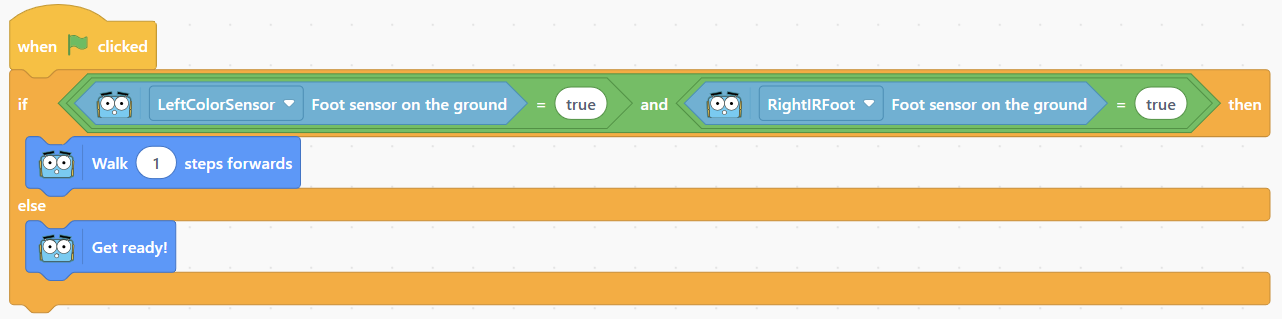 Ask learners what they think they could do to avoid having to click the green flag twice, it is hoped they will suggest a repeat block. Remind them of the blocks they have already used in their code, conditional blocks, repeat blocks, wait blocks, movement blocks, logic blocks. Encourage learners to make the code more interesting than just one action and stop and make sure that both the left sensor and the right sensor feature in the program. |
Support |
Challenge learners to code Marty to respond to an edge without making use of logic blocks. They will need to think about compound if statements. An example is included in the teacher guide that explains how this works.
