Skip to content
Learning Site
Home

About

  • About Robotical
  • Case Studies
  • Meet the Team
  • Blog
  • Contact Us

Our Products

  • Marty the Robot
  • Axiom
  • Cog

Teach

  • Lessons & Resources
  • Marty for Educators
  • Funding & Grants
  • Professional Development
  • Why Teach STEM?
  • Coding Environments
  • Student Led Learning

Let's Code

  • Marty the Robot
  • Code Online
  • Marty Apple App
  • Marty Android App
  • Update your Marty
  • Cog
  • Code Online
  • Cog iOS App
  • Cog Android App
  • Axiom
  • Axiom Science

Support

  • Marty Get Started
  • Cog Quick Start Guide
  • Axiom Science Quick Start Guide
  • Support & FAQs
  • Marty V2 User Guides
  • Marty V1 Resources
  • Request Support
  • Request Top-Up Training

Shop

  • Marty the Robot and Physical Computing
  • Class Packs
  • Add Ons & Extras
  • Account
  • Shipping, Returns & Cancellations
  • Distributors
HomeLessonsUnits of workCurriculum standardsTutorials

Information

  • Lessons & Resources
  • Knowledge Base & User Guides
  • About Us
  • Shipping, Returns & Cancellation
  • Privacy Policy
  • Learning site privacy
  • Terms of Service
  • Partner Hub

Support & Help

  • Support & Help Center
  • Getting Started with Marty V2
  • Getting Started with Marty V1

Learning, Resources & Guides

  • Marty V2 Lessons Site
  • Marty V1 Lessons Site

Contact Us in the UK

Stanhope House,12 Stanhope Place,Edinburgh,United Kingdom,EH12 5HH
(+44) 0131 564 0922
hello@robotical.io
Contact Us

Contact Us in the US

2810N Church St, PMB 61694,Wilmington,Delaware,USA19802-4447
(+1) 833 886 1661
hello@robotical.io
Contact Us

Why not join our mailing list?

For News, New Products and Special Offers

Join mailing list

Copyright 2016-2026 © Robotical Ltd

Step 1 of 5

3: Marty Sensing the Environment

Step 1 of 5: 2.06: What's in Marty's Way?

  1. 12.06: What's in Marty's Way?
Marty app
CurrentPrevious

2.06: What's in Marty's Way?

Use Infrared sensors to give Marty the ability to detect obstacles and respond to the environment
2.06: What's in Marty's Way?
Age / stage
8 - 10
Estimated time
45 minutes
Difficulty
Intermediate
Products
Marty V2

On this page

  1. Lesson overview
  2. Before you begin
  3. Warm-up
  4. Get learning
  5. Further challenge ideas
  6. Cool down
  7. Additional reading
  8. Curriculum standards

Additional reading

  • Educator’s Guide
  • Obstacle Sensing

Curriculum standards

21
Choose your curriculum to see the relevant standards.

21 of 21 linked standards shown.

Australian CurriculumAustralia3
Curriculum areaLinked standards
Digital Technologies, Design & technologies: Design & Technologies
Digital Technologies, Design & technologies: Digital Technologies

Select a code to read the full standard.

Digital Technologies, Design & technologies: Design & Technologies

  • ACTDEP025Generate, develop and communicate design ideas and processes for audiences using appropriate technical terms and graphical representation techniques

Digital Technologies, Design & technologies: Digital Technologies

  • ACTDIK014Examine the main components of common digital systems and how they may connect together to form networks to transmit data
  • ACTDIP019Design, modify and follow simple algorithms involving sequences of steps, branching, and iteration (repetition)
CSTA Education StandardsUSA2
Curriculum areaLinked standards
General standards

Select a code to read the full standard.

  • 1B-AP-10Create programs that include sequences, events, loops, and conditionals.
  • 1B-AP-13Use an iterative process to plan the development of a program by including others' perspectives and considering user preferences.
Curriculum for ExcellenceScotland10
Curriculum areaLinked standards
Health and Wellbeing: Mental, Emotional, Social and Physical Wellbeing
Literacy & English: Listening and Talking
Literacy & English: Reading
Literacy & English: Writing
Numeracy: Number, Money and Measure
Technologies: Computing Science

Select a code to read the full standard.

Health and Wellbeing: Mental, Emotional, Social and Physical Wellbeing

  • HWB 0-14a / HWB 1-14a / HWB 2-14a / HWB 3-14a / HWB 4-14aSocial wellbeing

Literacy & English: Listening and Talking

  • LIT 2-02aTools for listening and talking
  • LIT 2-07aUnderstanding, analysing and evaluating

Literacy & English: Reading

  • LIT 2-15aFinding and using information

Literacy & English: Writing

  • LIT 1-20a / LIT 2-20aEnjoyment and choice
  • LIT 2-26aOrganising and using information

Numeracy: Number, Money and Measure

  • MNU 2-01aEstimation and rounding
  • MNU 2-11aMeasurement

Technologies: Computing Science

  • TCH 2-13aUnderstanding the world through computational thinking
  • TCH 2-14bUnderstanding and analysing computing technology
England's National CurriculumEngland2
Curriculum areaLinked standards
Computing, Design and Technology: Computing
Computing, Design and Technology: Design and Technology

Select a code to read the full standard.

Computing, Design and Technology: Computing

  • ✔️Understand what algorithms are; how they are implemented as programs on digital devices; and that programs execute by following precise and unambiguous instructions

Computing, Design and Technology: Design and Technology

  • ✔️Design purposeful, functional, appealing products for themselves and other users based on design criteria
ISTEUSA2
Curriculum areaLinked standards
International Society for Technology in Education (ISTE)

Select a code to read the full standard.

International Society for Technology in Education (ISTE)

  • 4aStudents know and use a deliberate design process for generating ideas, testing theories, creating innovative artifacts or solving authentic problems.
  • 5dStudents understand how automation works and use algorithmic thinking to develop a sequence of steps to create and test automated solutions.
TEKSUSA2
Curriculum areaLinked standards
Elementary Technology Applications: Grade 3 to Grade 5

Select a code to read the full standard.

Elementary Technology Applications: Grade 3 to Grade 5

  • 1.CCreativity and innovation. The student uses creative thinking and innovative processes to construct knowledge and develop digital products. The student is expected to: use virtual environments to explore systems and issues.
  • 4.CCritical thinking, problem solving, and decision making. The student applies critical-thinking skills to solve problems, guide research, and evaluate projects using digital tools and resources. The student is expected to: evaluate student-created products through self and peer review for relevance to the assignment or task;

Resources

Learner resources

  • Workbook for What's in Marty's WayFile links loading
  • Using the IR SensorsFile links loading

Educator resources

  • Presentation for What's in Marty's WayFile links loading
  • Teacher GuideFile links loading
3: Marty Sensing the Environment
Unit overview
22.16: Ground Detection - Safety First
32.21: Estimating with Distance Sensors
42.22: Light Sensors and Conditional Statements
52.23: Noise Sensors and Parallel Programming
Next step2.16: Ground Detection - Safety First

Lesson overview

Until now, students have had to test out the number of steps that it will take Marty to walk a certain distance manually. However, using Marty's inbuilt IR sensors we can program them to detect obstacles in his path. In this lesson, students will explore how we can use IR sensors.

Instructions for installing the IR sensor can be found in the knowledge base, here.

Learning objectives

  • I can create code for Marty to detect if an obstacle is there.
  • I can command Marty to react if there is something in the way.

Key vocabulary

  • Infrared
  • Sensor
  • Sense
  • Programming
  • BOOLEAN

Prior learning

An awareness of loops and if / conditional statements, an understanding of BOOLEAN statements

Before you begin

Equipment

  • Marty the Robot V2
  • Marty Workbook
  • Tablets
  • Access to the Blocks editor
  • Objects to use as obstacles

Warm-up

TimingActivityPossible adaptations
Timing—

Warm Up

Share with learners what they have done, so far, to avoid Marty walking into an object. Learners could say estimate steps, test, adjust and re-test. Inform learners that today we will be introducing a sensor to remove part of the work from us.

Share with learners video of some low and high-tech examples of distance sensors.

This is a good example up until about 41 seconds, after this it is an advertisement for a charity.

Watch on YouTube
Watch on YouTube

Have learners think about the purpose sensors serve for machines and some people and record ideas in their workbooks.

Show a response from Marty upon approaching an obstacle. There are two videos of this occurring, Marty is set at a different distance from the wall, as a starting point for each, and the video is not edited to give a programmer time to change the number of steps.

Get learning

TimingActivityPossible adaptations
Timing—

Get Learning

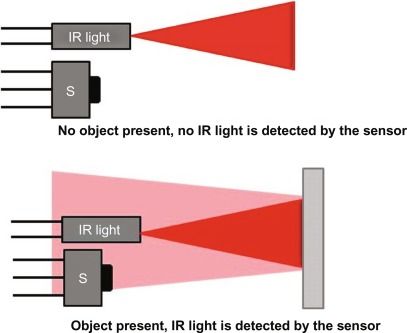
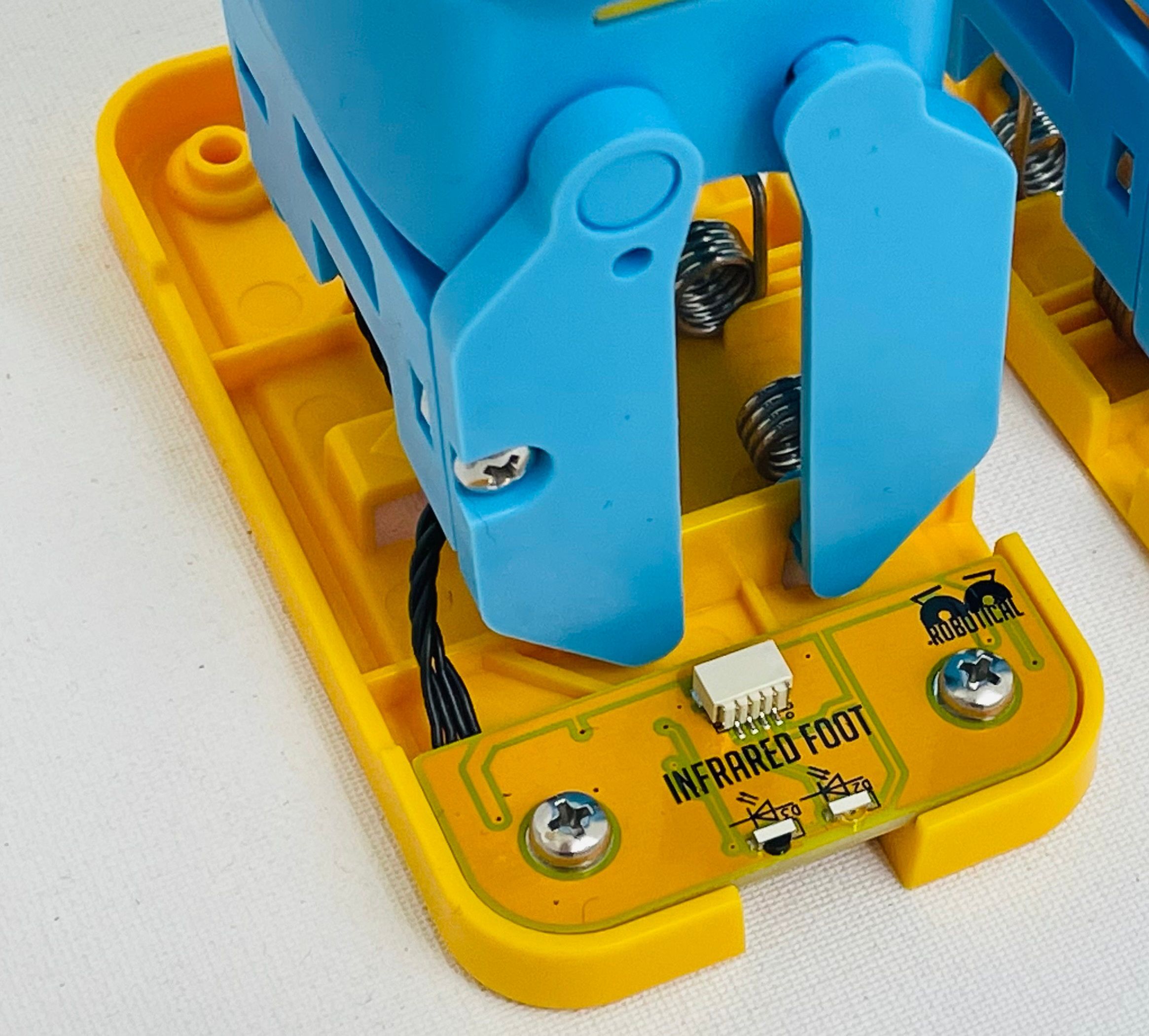
Share with learners an image of the IR sensor and a slide of how it works. Explain that the IR sensor gets feedback from light that reflects off the wall and that is how Marty 'knows' something is in the way.
When it comes to Marty acting based on the response the sensor gives it is important to understand that the IR sensor only sends one of two messages, true or false. The sensor sends true when light reflects off an object and is received by the sensor. The sensor sends false when there is no reflected light received by the sensor. The sensor has to be very close to an object to return true. There is another sensor that can detect how far away an object is but the IR sensor is not able to do this.

Learners may have already learner about something called BOOLEANs, these are types that take only two values, examples are 0, 1 or true, false. Have learners go to the sensing tab on Blocks and press the 'Foot obstacle sensed' block. If there is nothing directly in front of the left or right foot, this will return false. If there is something, it will return true.

Learners will need to use the BOOLEAN values of true or false with their if statements to have Marty move.

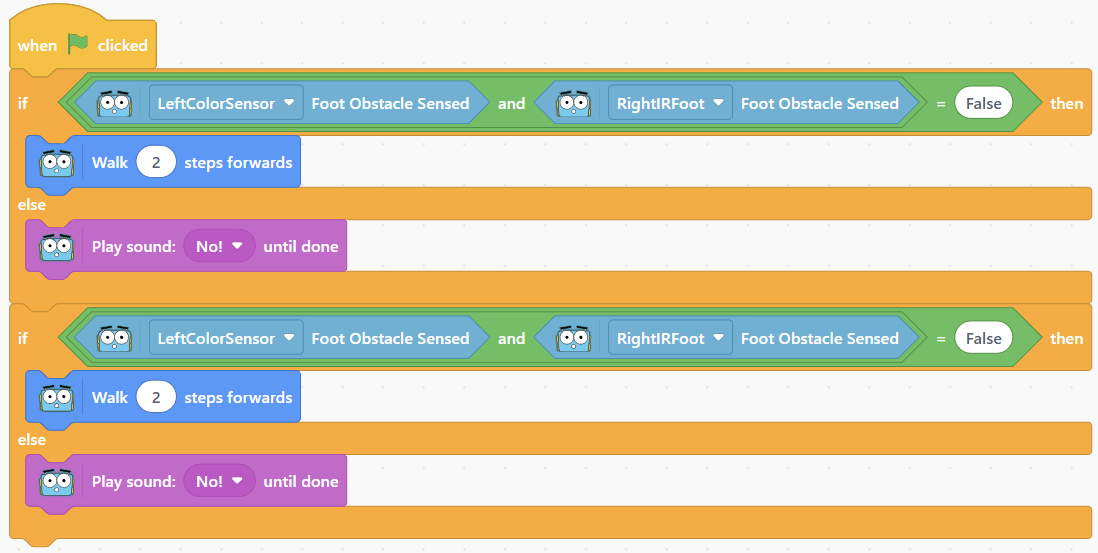
Share the following basic video of Marty. Marty walks two steps and makes a noise because an obstacle is detected. There are no loops, just a move and sound block that are each used twice.

Cool down

TimingActivityPossible adaptations
Timing—

Cool Down

Bring learners back together to discuss the learning that occurred. Have groups share their thoughts about code that relies on a person monitoring everything and code that is more autonomous - the code works so it should be able to run reliably without someone always watching it.

Suggested questions you might ask:

  • What was interesting or challenging about using the obstacle sensor?
  • What modifications would you suggest for someone designing a new obstacle sensor?
  • Where are some other areas of our lives where an obstacle sensor could be a helpful tool?

Carry out any end of lesson routines.

Log off devices and clear everything away.

Possible adaptations—

Unit resources

Learner resources

  • 2.06 What's in Marty's Way.pdf
  • 2.16 Ground Detection - Safety First.zip
  • 2.21 Estimating with Distance Sensors.zip
  • 2.22 Light Sensors and Conditional Statements.zip
  • 2.23 Noise Sensors and Parallel Programming.zip
Watch on YouTube

Ask learners what they think would cause Marty to do this. Suggestions could include that Marty bumped into the wall and stopped because of that or that the programmer discreetly stopped the program and started a different event block.

Possible adaptations—
Watch on YouTube

Share the code that will affect this movement. a suggestion for discussing what is in the code is in the presentation notes.
Possible adaptations—
Timing—

Time For Practice

Learners may have noticed that the Marty from the second video was two steps from the wall, so taking two steps would result in the sensor returning true. Have learners test the code from the presentation from a greater distance. What can we do to ensure Marty reaches and detects an obstacle so that they can react to it? Learners may suggest using a repeat block but you could also say that they should keep their ideas within their group to encourage a greater diversity of responses.

Give learners time to plan their movement and response to an obstacle.

Possible adaptations

Support

Provide supportive questions around how we have actions repeat, repeat block, how we have Marty do one action depending on what happens first if/then/else block.

Emphasize that during the planning stage, learners think about what happens as the code executes:

  • Marty walks forward (how do we make Marty take another step)
  • Marty continues to walk forward until the sensor alerts Marty (how do we tell Marty what to do if something is detected)
  • A different action occurs (how do I code the different actions that could occur)

Further challenge ideas

Extend

Challenge learners to have Marty react differently if they detect two obstacles in a short period of time. The first video of Marty moving, from the presentation, illustrates the different responses he might have. Learners may choose a different sound or raising arms in exasperation. The goal is a different response.