Skip to content
Learning Site
Home

About

  • About Robotical
  • Case Studies
  • Meet the Team
  • Blog
  • Contact Us

Our Products

  • Marty the Robot
  • Axiom
  • Cog

Teach

  • Lessons & Resources
  • Marty for Educators
  • Funding & Grants
  • Professional Development
  • Why Teach STEM?
  • Coding Environments
  • Student Led Learning

Let's Code

  • Marty the Robot
  • Code Online
  • Marty Apple App
  • Marty Android App
  • Update your Marty
  • Cog
  • Code Online
  • Cog iOS App
  • Cog Android App
  • Axiom
  • Axiom Science

Support

  • Marty Get Started
  • Cog Quick Start Guide
  • Axiom Science Quick Start Guide
  • Support & FAQs
  • Marty V2 User Guides
  • Marty V1 Resources
  • Request Support
  • Request Top-Up Training

Shop

  • Marty the Robot and Physical Computing
  • Class Packs
  • Add Ons & Extras
  • Account
  • Shipping, Returns & Cancellations
  • Distributors
HomeLessonsUnits of workCurriculum standardsTutorials

Information

  • Lessons & Resources
  • Knowledge Base & User Guides
  • About Us
  • Shipping, Returns & Cancellation
  • Privacy Policy
  • Learning site privacy
  • Terms of Service
  • Partner Hub

Support & Help

  • Support & Help Center
  • Getting Started with Marty V2
  • Getting Started with Marty V1

Learning, Resources & Guides

  • Marty V2 Lessons Site
  • Marty V1 Lessons Site

Contact Us in the UK

Stanhope House,12 Stanhope Place,Edinburgh,United Kingdom,EH12 5HH
(+44) 0131 564 0922
hello@robotical.io
Contact Us

Contact Us in the US

2810N Church St, PMB 61694,Wilmington,Delaware,USA19802-4447
(+1) 833 886 1661
hello@robotical.io
Contact Us

Why not join our mailing list?

For News, New Products and Special Offers

Join mailing list

Copyright 2016-2026 © Robotical Ltd

All lessons
Marty app
CurrentPrevious

1.10: Choices with an If Statement

Let's give Marty a choice

1.10: Choices with an If Statement
Age / stage
5 - 7
Estimated time
45 minutes
Difficulty
Intermediate
Products
Marty V2

On this page

  1. Lesson overview
  2. Before you begin
  3. Warm-up
  4. Get learning
  5. Further challenge ideas
  6. Cool down
  7. Additional reading
  8. Curriculum standards

Additional reading

Educator’s Guide

User Guide for Blocks

Curriculum standards

15
Choose your curriculum to see the relevant standards.

15 of 15 linked standards shown.

Australian CurriculumAustralia3
Curriculum areaLinked standards
Digital Technologies, Design & technologies: Design & Technologies
Digital Technologies, Design & technologies: Digital Technologies

Select a code to read the full standard.

Digital Technologies, Design & technologies: Design & Technologies

  • ACTDEP015Generate, develop, and communicate design ideas and decisions using appropriate technical terms and graphical representation techniques

Digital Technologies, Design & technologies: Digital Technologies

  • ACTDIP019Design, modify and follow simple algorithms involving sequences of steps, branching, and iteration (repetition)
  • ACTDIP020Implement digital solutions as simple visual programs involving branching, iteration (repetition), and user input
CSTA Education StandardsUSA2
Curriculum areaLinked standards
General standards

Select a code to read the full standard.

  • 1B-AP-10Create programs that include sequences, events, loops, and conditionals.
  • 1B-AP-12Modify, remix, or incorporate portions of an existing program into one's own work, to develop something new or add more advanced features.
Curriculum for ExcellenceScotland7
Curriculum areaLinked standards
Health and Wellbeing: Mental, Emotional, Social and Physical Wellbeing
Literacy & English: Listening and Talking
Literacy & English: Writing
Technologies: Computing Science

Select a code to read the full standard.

Health and Wellbeing: Mental, Emotional, Social and Physical Wellbeing

  • HWB 0-14a / HWB 1-14a / HWB 2-14a / HWB 3-14a / HWB 4-14aSocial wellbeing

Literacy & English: Listening and Talking

  • LIT 1-02aTools for listening and talking
  • LIT 1-07aUnderstanding, analysing and evaluating

Literacy & English: Writing

  • LIT 2-26aOrganising and using information
  • LIT 1-28a / LIT 1-29aCreating texts

Technologies: Computing Science

  • TCH 1-14aUnderstanding and analysing computing technology
  • TCH 1-15aDesigning, building and testing computing solutions
England's National CurriculumEngland1
Curriculum areaLinked standards
Computing, Design and Technology: Computing

Select a code to read the full standard.

Computing, Design and Technology: Computing

  • ✔️Understand what algorithms are; how they are implemented as programs on digital devices; and that programs execute by following precise and unambiguous instructions
ISTEUSA2
Curriculum areaLinked standards
International Society for Technology in Education (ISTE)

Select a code to read the full standard.

International Society for Technology in Education (ISTE)

  • 1dStudents understand the fundamental concepts of technology operations, demonstrate the ability to choose, use and troubleshoot current technologies and are able to transfer their knowledge to explore emerging technologies.
  • 4cStudents develop, test and refine prototypes as part of a cyclical design process.

Resources

Learner resources

  • Workbook for Choices with an If StatementFile links loading

Educator resources

  • Teacher GuideFile links loading
  • Presentation for Choices with an If StatementFile links loading
  • Story textFile links loading

Lesson overview

Learners will get their first taste of giving a 'choice' to Marty. This is not quite the same as when we have a choice, it is really more about telling Marty if one thing is true, then an action will occur; if the thing is not true, the action is skipped.

Learning objectives

I can instruct Marty to perform an action if something else is true

Key vocabulary

  • If
  • Then
  • True
  • False
  • Condition

Prior learning

Writing instructions, awareness of some Blocks

Before you begin

Equipment

  • Marty the Robot v2
  • Marty Workbook
  • Tablets
  • Access to the Blocks editor

Warm-up

TimingActivityPossible adaptations
Timing—

Warm-up:

Share with learners the lesson objectives and success criteria from the presentation. The story text is presented with the PowerPoint so that learners can see video and graphics of Marty performing a variety of the tasks.

Possible adaptations—

Get learning

TimingActivityPossible adaptations
Timing—

Get Learning:

The following parts of the lesson occur after the first part of the story. It is suggested that you continue the presentation until after learners have seen Marty act based on conditional statements and see where to access the blocks they will need for their program.

Ask learners, "Who has ever been told something like, if you get ready really quickly, we might go somewhere nice, or exciting?" This idea that an action will occur if an earlier action occurs is instrumental to computational thinking and coding. The symbol that people in computing use to indicate that there are different possibilities in code is the same as the one for the repeat block. It is in the presentation and below. Encourage learners to use this symbol when they are planning their code. They can practice drawing it at the start of their workbooks and then use it again as part of their plan. This plan has an action that occurs before the if statement and then an action that occurs after the statement is true and a further action that occurs whether the if statement is true or false.
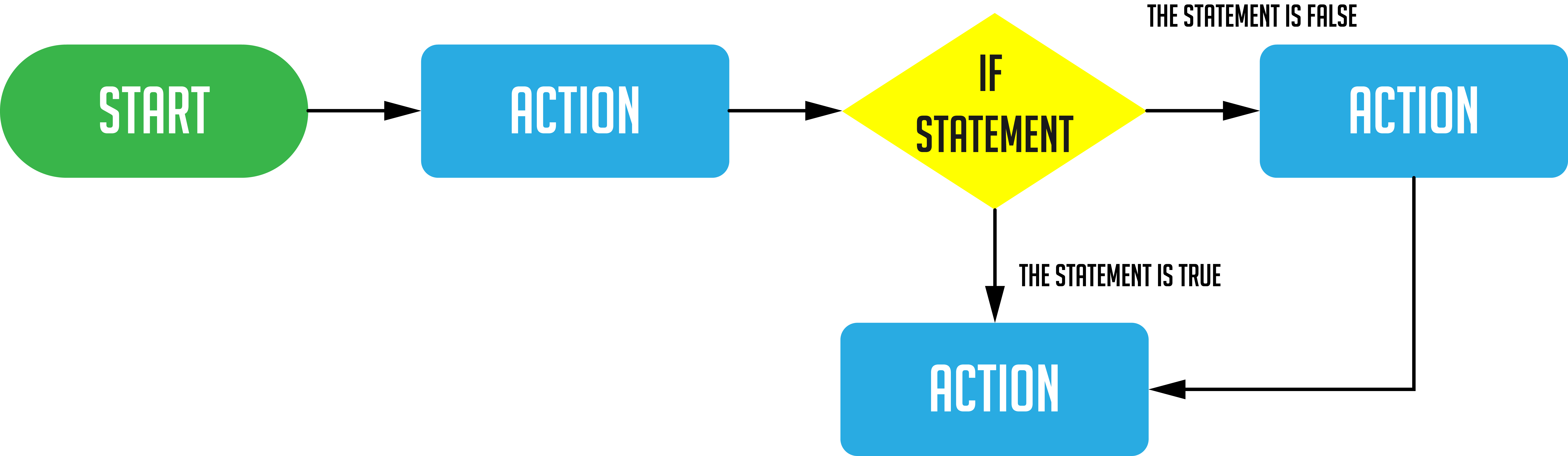
This diagram is expanded on, in the presentation and below, to show the different actions that can occur.
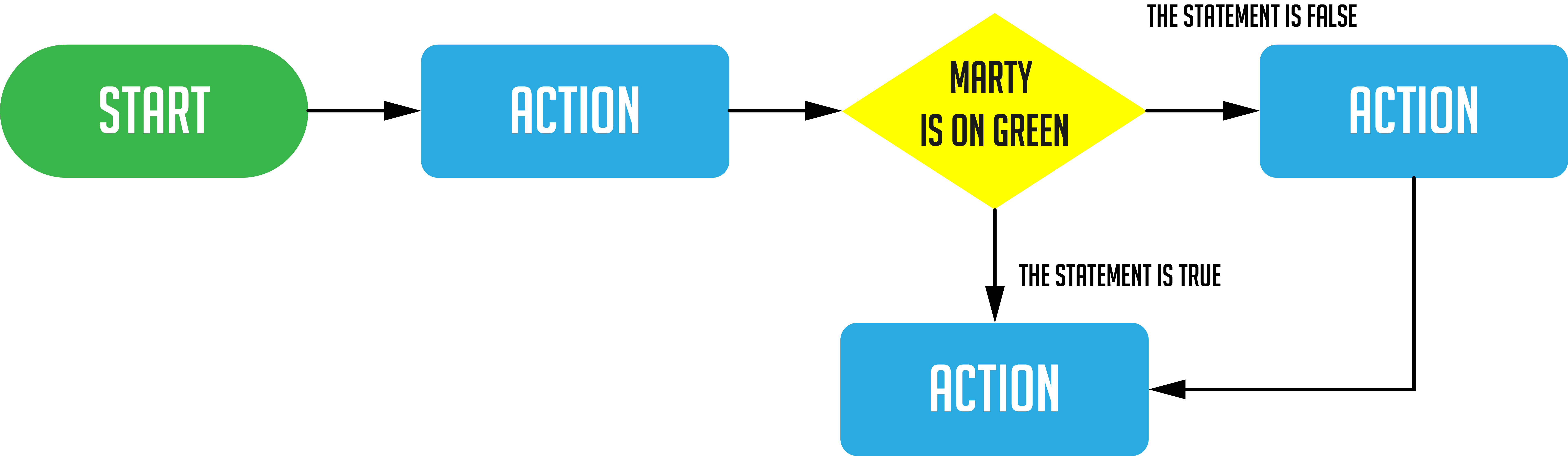
The program here has Marty take two steps and then presents a condition, Marty is on green: does the color sensor detect green? If the color sensor detects green then the answer is yes, or the statement, 'Marty is on green' is true, then Marty will dance and following that, Marty will take two steps. If the answer is no, or the statement, 'Marty is on green' is false, Marty will not dance but will still take the two steps forward.

Cool down

TimingActivityPossible adaptations
Timing—

Cool Down:

Bring learners back together to discuss the challenges they faced and overcame. Have groups share their instructions for getting a reaction from Marty. What actions did they choose, and what were the associated conditions?

Suggested questions you might ask:

  • Do you prefer using if statements in your code or not?
  • What benefits or challenges do you see for using if statements?
  • What did you think of, when you wanted to have Marty check the color again?

Carry out any end of lesson routines.

Log off devices and clear everything away.

Possible adaptations—

Show how Blocks presents this code on the workspace:
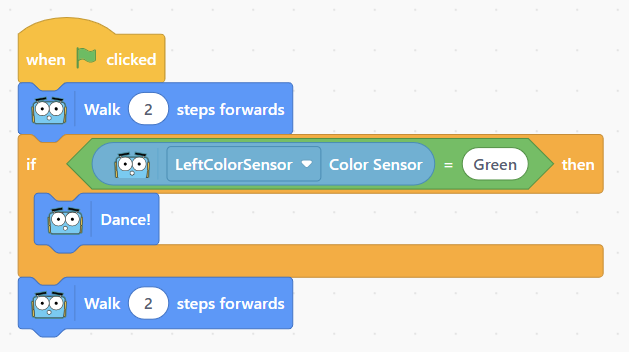
Explain to learners the need for something to be true or false. For Marty, this needs to be 'sensed'. Learners will need to visit a few different sections in the Blocks environment to set this up:

  • the if then block is in the control section
  • the = block is in the operators section
  • the left color sensor block is in the sensing section
  • the dance block is in the motion section

The building of the code block is shown in the video below, while Marty executing the code is shown in the second video. Highlight that the text in the equality block must be changed from the default 50 to green. The reason should be clear but discuss what learners think will happen if the text remains as 50: will the color sensor ever be equal to 50?

Watch on YouTube

This video shows what happens when the conditional statement is true and when it is false.

Watch on YouTube

Have learners list a number of actions that Marty could perform after a condition is met. Record these somewhere so that there is a bank from which learners can draw. Tell learners that they will be writing instructions for Marty to perform one or more of these actions using the if-then blocks.

Possible adaptations—
Timing—

Time for Practice

At this point, learners should have Marty connected and be in Blocks.

Once learners have seen Marty move and react, and have seen how to create the code for one condition, have learners talk in their groups about 1) what the condition will be and 2) what the result of the condition being met will be. There is space in their workbook for learners to plan their ideas. It is recommended that you show the diagram from the presentation that developers use when planning their code, this is highlighted in the workbook.

Learners need to experiment with their movements to give Marty something interesting to do. Ideally, they should be able to have Marty visit an if-then block more than once. The initial video of Marty moving featured 3 color cards and Marty responded to each one differently. The starter video had Marty react to one color card only. Challenge learners to think about how they can move from a starting color to another, or more than one other, color.

Possible adaptations

Support:

  • The rhombus is sometimes tricky to draw. It may help to have physical 2D shapes that learners can use to draw around.
  • The idea of a choice for a computer is slightly different than it is for people. When we are presented with options, we get to decide what to do. A robot or computer can only perform as instructed. This is important to communicate. Make some funny examples to illustrate this clearly. This should support all learners to see how strict the 'if then' block really is.

Further challenge ideas

Extend:

  • Have learners explore the control blocks to see what it was that the initial video used to instruct Marty to stop and move no further, when on red.
  • Additionally, have learners have multiple actions for each color.
