Let's give Marty a choice

Educator’s Guide
15 of 15 linked standards shown.
| Curriculum area | Linked standards |
|---|---|
| Digital Technologies, Design & technologies: Design & Technologies | |
| Digital Technologies, Design & technologies: Digital Technologies |
Select a code to read the full standard.
| Curriculum area | Linked standards |
|---|---|
| General standards |
Select a code to read the full standard.
| Curriculum area | Linked standards |
|---|---|
| Health and Wellbeing: Mental, Emotional, Social and Physical Wellbeing | |
| Literacy & English: Listening and Talking | |
| Literacy & English: Writing | |
| Technologies: Computing Science |
Select a code to read the full standard.
| Curriculum area | Linked standards |
|---|---|
| Computing, Design and Technology: Computing |
Select a code to read the full standard.
| Curriculum area | Linked standards |
|---|---|
| International Society for Technology in Education (ISTE) |
Select a code to read the full standard.
Learners will get their first taste of giving a 'choice' to Marty. This is not quite the same as when we have a choice, it is really more about telling Marty if one thing is true, then an action will occur; if the thing is not true, the action is skipped.
Writing instructions, awareness of some MartyBlocks
I can instruct Marty to perform an action if something else is true
Share with learners the lesson objectives and success criteria from the presentation. The story text is presented with the PowerPoint so that learners can see video and graphics of Marty performing a variety of the tasks.
The following parts of the lesson occur after the first part of the story. It is suggested that you continue the presentation until after learners have seen Marty act based on conditional statements and see where to access the blocks they will need for their program.
Ask learners, "Who has ever been told something like, if you get ready really quickly, we might go somewhere nice, or exciting?" This idea that an action will occur if an earlier action occurs is instrumental to computational thinking and coding. The symbol that people in computing use to indicate that there are different possibilities in code is the same as the one for the repeat block. It is in the presentation and below. Encourage learners to use this symbol when they are planning their code. They can practice drawing it at the start of their workbooks and then use it again as part of their plan. This plan has an action that occurs before the if statement and then an action that occurs after the statement is true and a further action that occurs whether the if statement is true or false.
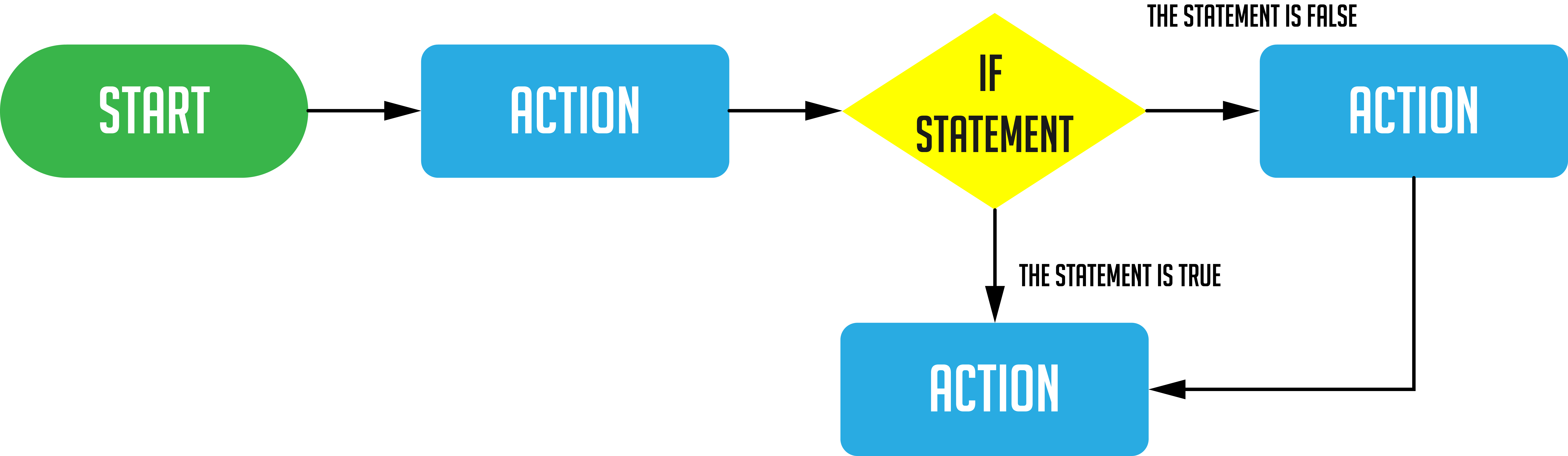
This diagram is expanded on, in the presentation and below, to show the different actions that can occur.
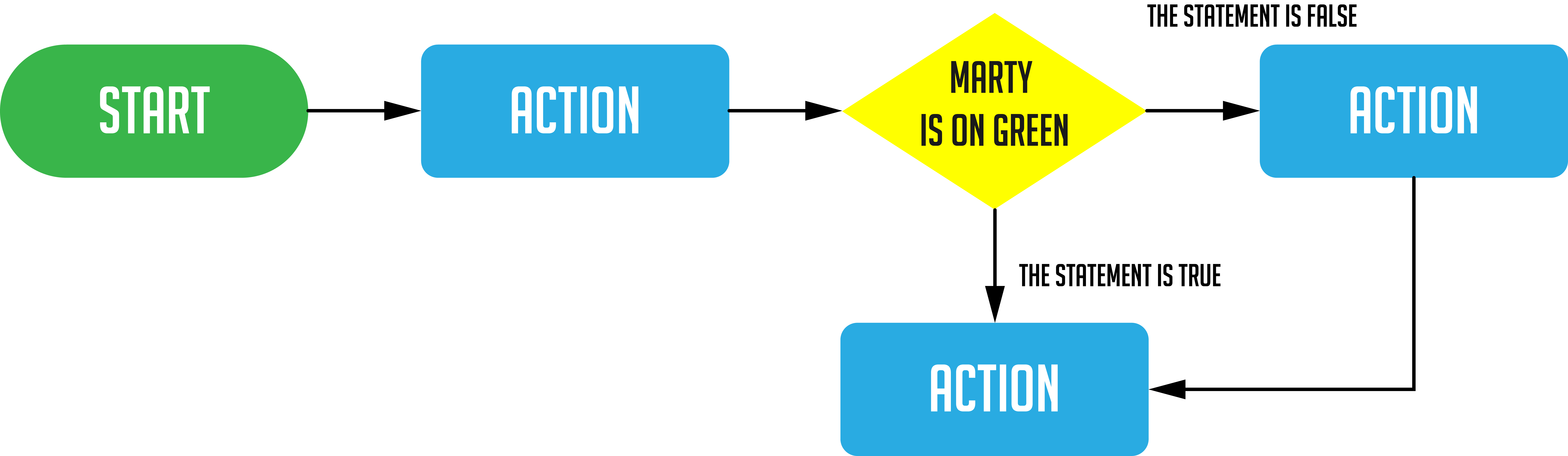
The program here has Marty take two steps and then presents a condition, Marty is on green: does the color sensor detect green? If the color sensor detects green then the answer is yes, or the statement, 'Marty is on green' is true, then Marty will dance and following that, Marty will take two steps. If the answer is no, or the statement, 'Marty is on green' is false, Marty will not dance but will still take the two steps forward.
Show how MartyBlocks presents this code on the workspace:
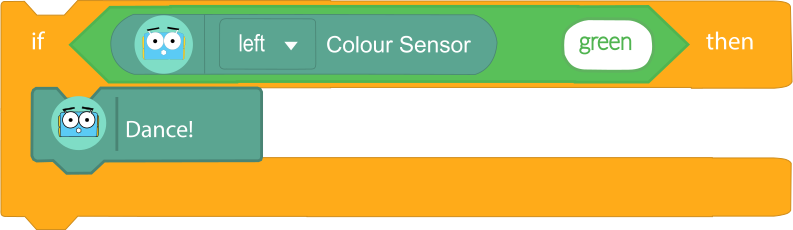
Explain to learners the need for something to be true or false. For Marty, this needs to be 'sensed'. Learners will need to visit a few different sections in the MartyBlocks environment to set this up:
The above locations are modeled in a video, within the presentation; the walk forward blocks, from the video of Marty and the planning slide, are not included in this video but learners should know where to find that. Additionally, highlight that the text in the equality block must be changed from 50 to green. The reason should be clear but discuss what learners think will happen if the text remains as 50: will the color sensor ever be equal to 50?
This video shows what happens when the conditional statement is true and when it is false.
Have learners list a number of actions that Marty could perform after a condition is met. Record these somewhere so that there is a bank from which learners can draw. Tell learners that they will be writing instructions for Marty to perform one or more of these actions using the if-then blocks.
At this point, learners should have Marty connected and be in Martyblocks.
Once learners have seen Marty move and react, and have seen how to create the code for one condition, have learners talk in their groups about 1) what the condition will be and 2) what the result of the condition being met will be. There is space in their workbook for learners to plan their ideas. It is recommended that you show the diagram from the presentation that developers use when planning their code, this is highlighted in the workbook.
Learners need to experiment with their movements to give Marty something interesting to do. Ideally, they should be able to have Marty visit an if-then block more than once. The initial video of Marty moving featured 3 color cards and Marty responded to each one differently. The starter video had Marty react to one color card only. Challenge learners to think about how they can move from a starting color to another, or more than one other, color.
Bring learners back together to discuss the challenges they faced and overcame. Have groups share their instructions for getting a reaction from Marty. What actions did they choose, and what were the associated conditions?
Suggested questions you might ask:
Carry out any end of lesson routines.
Log off devices and clear everything away.
