Use variable alongside Marty's light sensors to make better use of stored values
22 of 22 linked standards shown.
| Curriculum area | Linked standards |
|---|---|
| Digital Technologies, Design & technologies: Design & Technologies | |
| Digital Technologies, Design & technologies: Digital Technologies |
Select a code to read the full standard.
| Curriculum area | Linked standards |
|---|---|
| General standards |
Select a code to read the full standard.
| Curriculum area | Linked standards |
|---|---|
| Health and Wellbeing: Mental, Emotional, Social and Physical Wellbeing | |
| Literacy & English: Listening and Talking | |
| Literacy & English: Writing | |
| Technologies: Computing Science | |
| Technologies: Craft, Design, Engineering and Graphics |
Select a code to read the full standard.
| Curriculum area | Linked standards |
|---|---|
| Computing, Design and Technology: Computing | |
| Computing, Design and Technology: Design and Technology |
Select a code to read the full standard.
| Curriculum area | Linked standards |
|---|---|
| International Society for Technology in Education (ISTE) |
Select a code to read the full standard.
In this lesson learners use light sensors to trigger function calls. Functions are different than the flag event block because they don't start on the flag button, they have to be triggered by something in the code.
Learners will have an opportunity to reflect on a preference between creating specific function blocks or standard event blocks.
Please read the knowledge base article about the light sensor addon, if you haven't already.
Experience using sensors, variables and functions
| Timing | Activity | Possible adaptations |
|---|---|---|
| — | Warm upAsk learners to remind you of the light sensor lesson they had in the past. They may recall the light sensor returned different actions depending on the level of light that was sensed. They may recall that this required conditional statements and they may remember that the conditional statements needed a loop so that the code kept running, stopping only when the light was low enough. Show the video below if you think a refresh would be worthwhile. Open the presentation and share the objectives and success criteria. Inform learners that today, Marty's will follow a similar procedure to the last light sensor lesson but will include functions in the code rather than a single event block. Share the video below of Marty responding to the light sensor. Discuss what learners think has happened. Record the ideas that they share. It could be that they think the code is very similar to what we have already used, which is fine. |
| Timing | Activity | Possible adaptations |
|---|---|---|
| — | Get LearningRemind learners of where to find the block for new functions and walk through how to create one. Remind learners that they will be using a light sensor today and that it makes sense to name the block appropriately so as to give other programmers an idea as to the purpose of the function. image of function block, then naming it, then the result Display the brief display of Marty running the code featuring functions and the light sensor block. 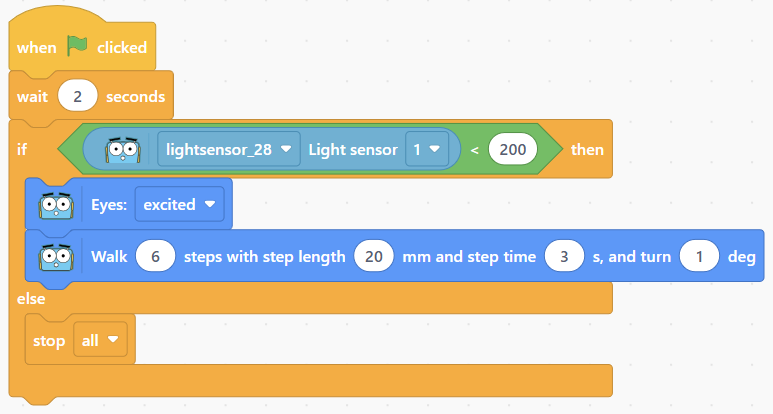 The range for the light is quite big, allowing for the if statement to return true and result in the function running; additionally, the comparison value in the code is fixed. (Learners could be challenged to think about how they could make the conditional value dependent on the level of light at the start of the lesson.) Draw attention to the code highlighting the different blocks at different times: initially, the event block with the flag is highlighted. When the condition is met, the light_action function block is highlighted. After that, the code stops. Are there any ways that we could have it run again, depending on the light? |
| Timing | Activity | Possible adaptations |
|---|---|---|
| — | Cool DownBring learners back together to discuss the challenges they faced and overcame. Have groups model their creations and explain what is happening, when. Encourage other groups to ask questions to deepen the understanding of the processes. Suggested questions you might ask:
Carry out any end of lesson routines. Log off devices and clear everything away. | — |
Remind learners about the concept of functions and why we use them in programming. To make the code we write reusable, rather than having to write the same blocks again and again, we write and call functions depending on certain situations. This can be particularly useful with parallel blocks of code.
To give context, ask learners if they have routines that they complete at certain times of the day, week, month or year. Ask if these routines change or are fairly static. Offer the idea of brushing teeth. This is something they all know how to do and hopefully brush at least twice, daily. The code to tell something to brush teeth would need to be written at least twice for each day, at least 14 times for a week, at least 56 times for a month (February, of course), etc. If we wrote a function for brushing teeth, we would only need to call the function each time we needed it to run rather than writing out the code over and over.
Have learners think of other examples where a function could simplify a daily or weekly task. Have learners record some ideas in their workbooks.
| — |
Functions may not seem like much to learners, just now, but what if there were occasions where the light_action function block were called more than once. The savings in both time to write, time to later read and debug, and the load on Marty to process the code can be substantial.
Task learners to think about what different function blocks they could create based on the level of light that Marty senses, thinking particularly about running functions multiple times.
| — |
| — | Time for PracticeRemind learners that they have free choice as to the values in the conditional statement as well as free choice as to what Marty will do within the function blocks. Encourage group planning prior to writing any code so that everyone is clear on the intended results of the conditional statements. | SupportHave physical code cards available for learners to use, when building their scripts:
Have a print out of the basic function statements, using the event block and 'light_action' block. |
In the example video, Marty's walking speed is reliant on the level of light. There is fast and there is slow.
