Skip to content
Learning Site
Home

About

  • About Robotical
  • Case Studies
  • Meet the Team
  • Blog
  • Contact Us

Our Products

  • Marty the Robot
  • Axiom
  • Cog

Teach

  • Lessons & Resources
  • Marty for Educators
  • Funding & Grants
  • Professional Development
  • Why Teach STEM?
  • Coding Environments
  • Student Led Learning

Let's Code

  • Marty the Robot
  • Code Online
  • Marty Apple App
  • Marty Android App
  • Update your Marty
  • Cog
  • Code Online
  • Cog iOS App
  • Cog Android App
  • Axiom
  • Axiom Science

Support

  • Marty Get Started
  • Cog Quick Start Guide
  • Axiom Science Quick Start Guide
  • Support & FAQs
  • Marty V2 User Guides
  • Marty V1 Resources
  • Request Support
  • Request Top-Up Training

Shop

  • Marty the Robot and Physical Computing
  • Class Packs
  • Add Ons & Extras
  • Account
  • Shipping, Returns & Cancellations
  • Distributors
HomeLessonsUnits of workCurriculum standardsTutorials

Information

  • Lessons & Resources
  • Knowledge Base & User Guides
  • About Us
  • Shipping, Returns & Cancellation
  • Privacy Policy
  • Learning site privacy
  • Terms of Service
  • Partner Hub

Support & Help

  • Support & Help Center
  • Getting Started with Marty V2
  • Getting Started with Marty V1

Learning, Resources & Guides

  • Marty V2 Lessons Site
  • Marty V1 Lessons Site

Contact Us in the UK

Stanhope House,12 Stanhope Place,Edinburgh,United Kingdom,EH12 5HH
(+44) 0131 564 0922
hello@robotical.io
Contact Us

Contact Us in the US

2810N Church St, PMB 61694,Wilmington,Delaware,USA19802-4447
(+1) 833 886 1661
hello@robotical.io
Contact Us

Why not join our mailing list?

For News, New Products and Special Offers

Join mailing list

Copyright 2016-2026 © Robotical Ltd

All lessons
Marty app
CurrentPrevious

3.04: Light Sensors with Function Blocks

Use variable alongside Marty's light sensors to make better use of stored values
3.04: Light Sensors with Function Blocks
Estimated time
45 minutes
Difficulty
Advanced
Products
Marty V2

On this page

  1. Lesson overview
  2. Objectives & resources
  3. Key vocabulary
  4. Lesson plan
  5. Extensions and challenges
  6. Additional reading
  7. Curriculum standards

Extensions and challenges

Extend

In the example video, Marty's walking speed is reliant on the level of light. There is fast and there is slow.

  • challenge learners to transition between the two: if Marty was walking slowly and then walks more quickly; learners will need to store a variable based on the last walking speed.

Support

Have physical code cards available for learners to use, when building their scripts:

  • if/then and if/then/else blocks
  • loops
  • light sensor blocks
  • operator blocks: <, >, =
  • a variety of movement blocks

Have a print out of the basic function statements, using the event block and 'light_action' block.

Additional reading

What is a light sensor?

Curriculum standards

22
Choose your curriculum to see the relevant standards.

22 of 22 linked standards shown.

Australian CurriculumAustralia4
Curriculum areaLinked standards
Digital Technologies, Design & technologies: Design & Technologies
Digital Technologies, Design & technologies: Digital Technologies

Select a code to read the full standard.

Digital Technologies, Design & technologies: Design & Technologies

  • ACTDEK031Analyse how motion, force and energy are used to manipulate and control electromechanical systems when designing simple, engineered solutions
  • ACTDEP039Use project management processes when working individually and collaboratively to coordinate production of designed solutions

Digital Technologies, Design & technologies: Digital Technologies

  • ACTDIP030Implement and modify programs with user interfaces involving branching, iteration and functions in a general-purpose programming language
  • ACTDIP031Evaluate how student solutions and existing information systems meet needs, are innovative, and take account of future risks and sustainability
CSTA Education StandardsUSA2
Curriculum areaLinked standards
General standards

Select a code to read the full standard.

  • 2-AP-14Create procedures with parameters to organize code and make it easier to reuse.
  • 2-AP-16Incorporate existing code, media, and libraries into original programs, and give attribution.
Curriculum for ExcellenceScotland11
Curriculum areaLinked standards
Health and Wellbeing: Mental, Emotional, Social and Physical Wellbeing
Literacy & English: Listening and Talking
Literacy & English: Writing
Technologies: Computing Science
Technologies: Craft, Design, Engineering and Graphics

Select a code to read the full standard.

Health and Wellbeing: Mental, Emotional, Social and Physical Wellbeing

  • HWB 0-11a / HWB 1-11a / HWB 2-11a / HWB 3-11a / HWB 4-11Social wellbeing
  • HWB 0-14a / HWB 1-14a / HWB 2-14a / HWB 3-14a / HWB 4-14aSocial wellbeing

Literacy & English: Listening and Talking

  • LIT 3-02aTools for listening and talking
  • LIT 3-05a / LIT 4-05aFinding and using information
  • LIT 3-07aUnderstanding, analysing and evaluating

Literacy & English: Writing

  • LIT 3-20a / LIT 4-20aEnjoyment and choice
  • LIT 3-23aTools for writing
  • LIT 3-28aCreating texts

Technologies: Computing Science

  • TCH 3-14bUnderstanding and analysing computing technology
  • TCH 3-15aDesigning, building and testing computing solutions

Technologies: Craft, Design, Engineering and Graphics

  • TCH 3-12aApplication of Engineering
England's National CurriculumEngland2
Curriculum areaLinked standards
Computing, Design and Technology: Computing
Computing, Design and Technology: Design and Technology

Select a code to read the full standard.

Computing, Design and Technology: Computing

  • ✔️Understand what algorithms are; how they are implemented as programs on digital devices; and that programs execute by following precise and unambiguous instructions

Computing, Design and Technology: Design and Technology

  • ✔️Design purposeful, functional, appealing products for themselves and other users based on design criteria
ISTEUSA3
Curriculum areaLinked standards
International Society for Technology in Education (ISTE)

Select a code to read the full standard.

International Society for Technology in Education (ISTE)

  • 1dStudents understand the fundamental concepts of technology operations, demonstrate the ability to choose, use and troubleshoot current technologies and are able to transfer their knowledge to explore emerging technologies.
  • 4dStudents exhibit a tolerance for ambiguity, perseverance and the capacity to work with open-ended problems.
  • 5cStudents break problems into component parts, extract key information, and develop descriptive models to understand complex systems or facilitate problem-solving.

Resources

Learner resources

  • Workbook for Light Sensors with Function BlocksFile links loading

Educator resources

  • Teacher GuideFile links loading
  • Presentation for Light Sensors Function BlocksFile links loading

Lesson overview

In this lesson learners use light sensors to trigger function calls. Functions are different than the flag event block because they don't start on the flag button, they have to be triggered by something in the code.

Learners will have an opportunity to reflect on a preference between creating specific function blocks or standard event blocks.

Please read the knowledge base article about the light sensor addon, if you haven't already.

Prerequisite knowledge

Experience using sensors, variables and functions

Learning objectives

  • I can read and use the output from a sensor
  • I can create clearly titled function blocks that carry out a specific action.

Resources and equipment

  • Marty the Robot V2
  • Marty Workbook
  • Tablets
  • Access to the MartyBlocks editor
  • Light Sensor add on for Marty v2

Key vocabulary

  • sensor
  • loop
  • if statement (conditional)
  • function

Lesson plan

Warm up

Ask learners to remind you of the light sensor lesson they had in the past. They may recall the light sensor returned different actions depending on the level of light that was sensed. They may recall that this required conditional statements and they may remember that the conditional statements needed a loop so that the code kept running, stopping only when the light was low enough.

Show the video below if you think a refresh would be worthwhile.

Watch on YouTube

Open the presentation and share the objectives and success criteria. Inform learners that today, Marty's will follow a similar procedure to the last light sensor lesson but will include functions in the code rather than a single event block.

Share the video below of Marty responding to the light sensor.

Watch on YouTube

Discuss what learners think has happened. Record the ideas that they share.

It could be that they think the code is very similar to what we have already used, which is fine.

Remind learners about the concept of functions and why we use them in programming. To make the code we write reusable, rather than having to write the same blocks again and again, we write and call functions depending on certain situations. This can be particularly useful with parallel blocks of code.

To give context, ask learners if they have routines that they complete at certain times of the day, week, month or year. Ask if these routines change or are fairly static. Offer the idea of brushing teeth. This is something they all know how to do and hopefully brush at least twice, daily. The code to tell something to brush teeth would need to be written at least twice for each day, at least 14 times for a week, at least 56 times for a month (February, of course), etc. If we wrote a function for brushing teeth, we would only need to call the function each time we needed it to run rather than writing out the code over and over.

Have learners think of other examples where a function could simplify a daily or weekly task. Have learners record some ideas in their workbooks.

Get Learning

Remind learners of where to find the block for new functions and walk through how to create one. Remind learners that they will be using a light sensor today and that it makes sense to name the block appropriately so as to give other programmers an idea as to the purpose of the function.

image of function block, then naming it, then the result

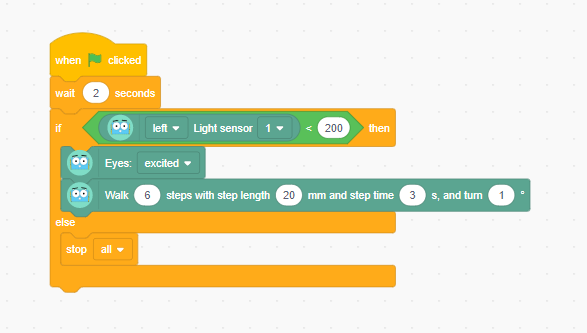
Display the brief display of Marty running the code featuring functions and the light sensor block.
Watch on YouTube

The range for the light is quite big, allowing for the if statement to return true and result in the function running; additionally, the comparison value in the code is fixed. (Learners could be challenged to think about how they could make the conditional value dependent on the level of light at the start of the lesson.) Draw attention to the code highlighting the different blocks at different times: initially, the event block with the flag is highlighted. When the condition is met, the light_action function block is highlighted. After that, the code stops. Are there any ways that we could have it run again, depending on the light? A second function block, perhaps.

Functions may not seem like much to learners, just now, but what if there were occasions where the light_action function block were called more than once. The savings in both time to write, time to later read and debug, and the load on Marty to process the code can be substantial.

Task learners to think about what different function blocks they could create based on the level of light that Marty senses, thinking particularly about running functions multiple times.

Time for Practice

Remind learners that they have free choice as to the values in the conditional statement as well as free choice as to what Marty will do within the function blocks.

Encourage group planning prior to writing any code so that everyone is clear on the intended results of the conditional statements.

Cool Down

Bring learners back together to discuss the challenges they faced and overcame. Have groups model their creations and explain what is happening, when. Encourage other groups to ask questions to deepen the understanding of the processes.

Suggested questions you might ask:

  • How did you determine what values to use for the conditional statements?
  • How did you manage to run your functions more than once?
  • How many functions were you able to run at the same time?

Carry out any end of lesson routines.

Log off devices and clear everything away.
