Skip to content
Learning Site
Home

About

  • About Robotical
  • Case Studies
  • Meet the Team
  • Blog
  • Contact Us

Our Products

  • Marty the Robot
  • Axiom
  • Cog

Teach

  • Lessons & Resources
  • Marty for Educators
  • Funding & Grants
  • Professional Development
  • Why Teach STEM?
  • Coding Environments
  • Student Led Learning

Let's Code

  • Marty the Robot
  • Code Online
  • Marty Apple App
  • Marty Android App
  • Update your Marty
  • Cog
  • Code Online
  • Cog iOS App
  • Cog Android App
  • Axiom
  • Axiom Science

Support

  • Marty Get Started
  • Cog Quick Start Guide
  • Axiom Science Quick Start Guide
  • Support & FAQs
  • Marty V2 User Guides
  • Marty V1 Resources
  • Request Support
  • Request Top-Up Training

Shop

  • Marty the Robot and Physical Computing
  • Class Packs
  • Add Ons & Extras
  • Account
  • Shipping, Returns & Cancellations
  • Distributors
HomeLessonsUnits of workCurriculum standardsTutorials

Information

  • Lessons & Resources
  • Knowledge Base & User Guides
  • About Us
  • Shipping, Returns & Cancellation
  • Privacy Policy
  • Learning site privacy
  • Terms of Service
  • Partner Hub

Support & Help

  • Support & Help Center
  • Getting Started with Marty V2
  • Getting Started with Marty V1

Learning, Resources & Guides

  • Marty V2 Lessons Site
  • Marty V1 Lessons Site

Contact Us in the UK

Stanhope House,12 Stanhope Place,Edinburgh,United Kingdom,EH12 5HH
(+44) 0131 564 0922
hello@robotical.io
Contact Us

Contact Us in the US

2810N Church St, PMB 61694,Wilmington,Delaware,USA19802-4447
(+1) 833 886 1661
hello@robotical.io
Contact Us

Why not join our mailing list?

For News, New Products and Special Offers

Join mailing list

Copyright 2016-2026 © Robotical Ltd

All lessons
Marty app
CurrentPrevious

Trial Lesson Middle Elementary 45 minutes -Let's Repeat Again

Learn how loops work and program Marty to repeat moves again and again and again...
Trial Lesson Middle Elementary 45 minutes -Let's Repeat Again
Age / stage
5 - 7
Estimated time
45 minutes
Difficulty
Beginner
Products
Marty V2

On this page

  1. Lesson overview
  2. Before you begin
  3. Warm-up
  4. Get learning
  5. Further challenge ideas
  6. Cool down
  7. Additional reading
  8. Curriculum standards

Lesson overview

In this lesson, students will continue to build upon their programming knowledge with the introduction of loops in the MartyBlocks environment. Students should be able to understand that they can use loops to reduce the number of lines of code that they have to write by the end of the lesson using computational thinking.

Learning objectives

  • Identify a repeat block
  • Use a repeat block to make my program smaller

Key vocabulary

  • Loops
  • Repetition

Prior learning

Knowledge of block names

Cross-curricular links

Drama - organising movements; Literacy - writing instructions

Before you begin

Equipment

  • Marty the Robot v2
  • Tablets
  • Access to the Blocks editor or just the workbooks

Warm-up

Additional reading

  • Marty the Robot Educator Guide
  • Educator FAQ

Curriculum standards

18
Choose your curriculum to see the relevant standards.

18 of 18 linked standards shown.

Australian CurriculumAustralia3
Curriculum areaLinked standards
Digital Technologies, Design & technologies: Design & Technologies
Digital Technologies, Design & technologies: Digital Technologies

Select a code to read the full standard.

Digital Technologies, Design & technologies: Design & Technologies

  • ACTDEP025Generate, develop and communicate design ideas and processes for audiences using appropriate technical terms and graphical representation techniques

Digital Technologies, Design & technologies: Digital Technologies

  • ACTDIP010Define simple problems, and describe and follow a sequence of steps and decisions (algorithms) needed to solve them
  • ACTDIP011Implement simple digital solutions as visual programs with algorithms involving branching (decisions) and user input
CSTA Education StandardsUSA2
Curriculum areaLinked standards
General standards

Select a code to read the full standard.

  • 1B-AP-10Create programs that include sequences, events, loops, and conditionals.
  • 1B-AP-11Decompose (break down) problems into smaller, manageable subproblems to facilitate the program development process.
Curriculum for ExcellenceScotland7
Curriculum areaLinked standards
Health and Wellbeing: Mental, Emotional, Social and Physical Wellbeing
Literacy & English: Listening and Talking
Literacy & English: Writing
Technologies: Computing Science

Select a code to read the full standard.

Health and Wellbeing: Mental, Emotional, Social and Physical Wellbeing

  • HWB 0-14a / HWB 1-14a / HWB 2-14a / HWB 3-14a / HWB 4-14aSocial wellbeing

Literacy & English: Listening and Talking

  • LIT 1-07aUnderstanding, analysing and evaluating
  • LIT 1-09aCreating texts

Literacy & English: Writing

  • LIT 1-23aTools for writing
  • LIT 1-26aOrganising and using information

Technologies: Computing Science

  • TCH 1-14aUnderstanding and analysing computing technology
  • TCH 1-15aDesigning, building and testing computing solutions
England's National CurriculumEngland2
Curriculum areaLinked standards
Computing, Design and Technology: Computing
Computing, Design and Technology: Design and Technology

Select a code to read the full standard.

Computing, Design and Technology: Computing

  • ✔️Understand what algorithms are; how they are implemented as programs on digital devices; and that programs execute by following precise and unambiguous instructions

Computing, Design and Technology: Design and Technology

  • ✔️Design purposeful, functional, appealing products for themselves and other users based on design criteria
ISTEUSA2
Curriculum areaLinked standards
International Society for Technology in Education (ISTE)

Select a code to read the full standard.

International Society for Technology in Education (ISTE)

  • 1dStudents understand the fundamental concepts of technology operations, demonstrate the ability to choose, use and troubleshoot current technologies and are able to transfer their knowledge to explore emerging technologies.
  • 4cStudents develop, test and refine prototypes as part of a cyclical design process.
TEKSUSA2
Curriculum areaLinked standards
Elementary Technology Applications: Grade 3 to Grade 5

Select a code to read the full standard.

Elementary Technology Applications: Grade 3 to Grade 5

  • 2.ACommunication and collaboration. The student collaborates and communicates both locally and globally using digital tools and resources to reinforce and promote learning. The student is expected to: draft, edit, and publish products in different media individually and collaboratively;
  • 6.ATechnology operations and concepts. The student demonstrates knowledge and appropriate use of technology systems, concepts, and operations. The student is expected to: demonstrate an understanding of technology concepts, including terminology for the use of operating systems, network systems, virtual systems, and learning systems appropriate for Grades 3-5 learning;

Resources

Learner resources

  • Workbook for Let's Repeat AgainFile links loading

Educator resources

  • Teacher GuideFile links loading
  • Presentation for Let's Repeat AgainFile links loading
  • Presentation textFile links loading

Get learning

Extend

Have learners think about how they might have two Martys use different repeat blocks to create a routine together: as one takes 3 steps forward, the other takes three steps back; as one takes three steps to the right, one takes three steps to the left, etc.

The discussion should be timed properly: starting at the same time and keeping the movements synchronized.

Cool down

Activity

Warm up

Share the objectives and success criteria from the presentation (slides 2 and 3).

Play a game of fizz buzz starting with just the 3 times tables and, if confident, extending to the 3 and 5 times tables.

Below is a reminder of the game.

  1. Learners will stand in a circle and start to count from 1: 1, 2, buzz, 4, 5, buzz, 7, 8, buzz.
  2. This will repeat every three numbers.
  3. To increase the challenge, you could have fizz for 3 and buzz for 5; at 15, learners would say fizz buzz.
  4. This can be done for individual learners or spoken as a whole class.

The reason for this game is to introduce the idea of repeated actions: something happens every three, or five, numbers.

Activity

Get Learning

Read the text from the presentation from slides 4 to 8 to share a scenario where a group of children are using the Blocks environment. The key takeaway from the text from the slides is that the repeat block removes the need to use the same blocks over and over, in a program. If you have had a chance to look at Blocks Jr, the presentation provides an opportunity to compare the two. It is valuable to talk about the comparison between the two environments, if you have used Blocks Jr.

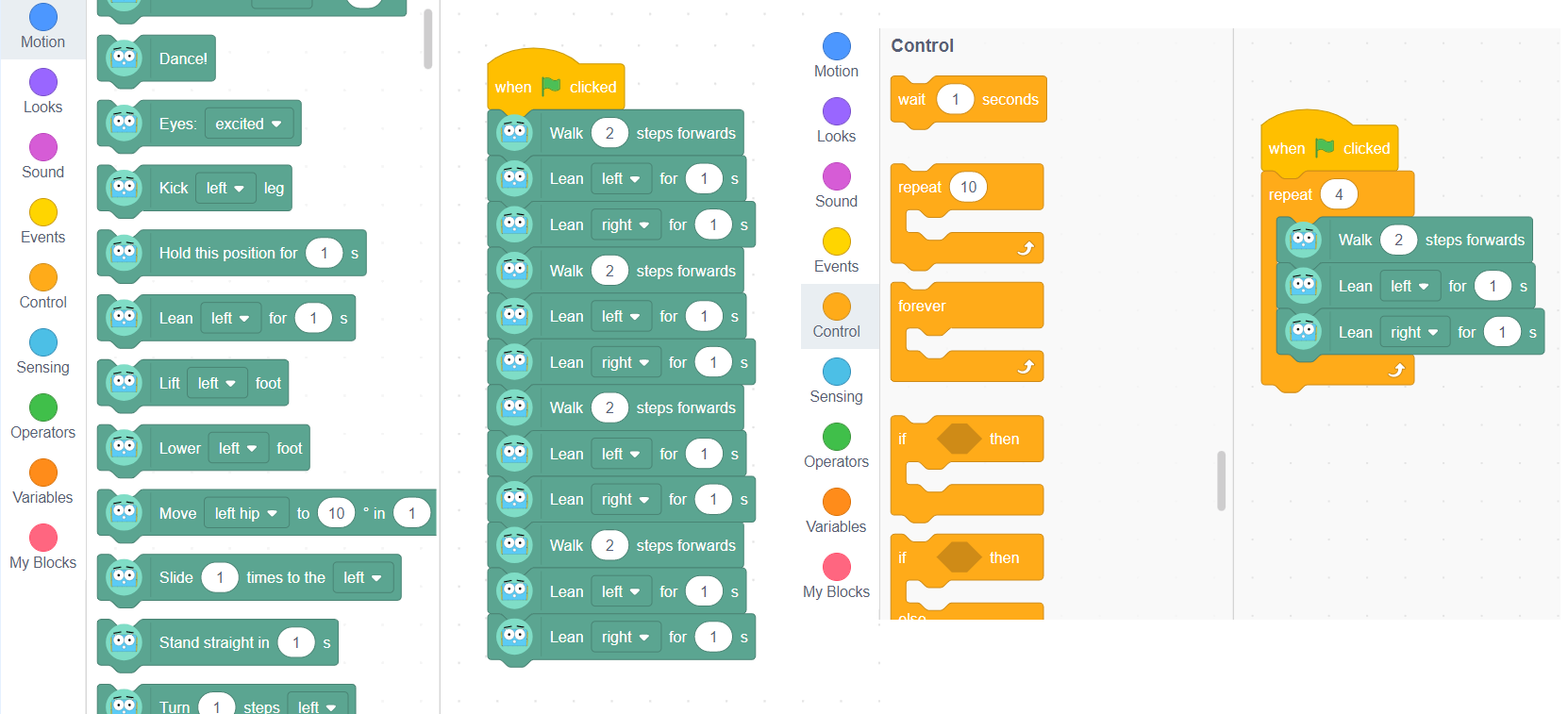
Take time to discuss the video, from slide 6, that shows two Marty's doing exactly the same thing. It is important that learners see that there is nothing different about what they are doing and they might not believe you when you say that they are not using the same code. There are notes on slides 6 and 7 to support this.

Below is a video of the two Martys and the code for comparison.
Watch on YouTube

Time for Practice

Slide 9 shows videos of Marty performing four separate actions, each of which have a repeating element. If you want, feel free to use the code in the teacher guide that will instruct Marty to perform as in the video, use the videos to show the movements again, if you choose to create the code for the class Marty.

Learners need to decide which of the actions repeat, from Marty's movements, and create a plan with a repeat block; there is a section in the workbook where learners can work in groups and record their thoughts or this could be completed as a whole class activity; alternatively, resources permitting, groups could create the code in Blocks to share with the class. Learners need to be specific about how many times the code will run and if there are any actions that don't repeat.

Support

Take time to repeat the steps that make up an action. Display some ideas to groups, depending on the ideas that learners suggest. Ask for whole-class support in breaking down the steps and either illustrate them or use text to describe them for groups to consult.

Activity

Cool Down

Bring learners back together to discuss the challenges they faced and overcame. Have groups share their code for a class discussion. It is likely that a lot of the creations will be similar. Encourage other groups to compare their work and ask questions to deepen their understanding of the processes.

Suggested questions you might ask:

  • Do you prefer the repeat block in Blocks or Blocks Jr (if applicable)?
  • Do you prefer shorter code that has the repeat block or longer code that does not have it?
  • What challenges did you face when thinking about the repeating parts of Marty's actions?
  • When do you think it might be best to use the forever block compared to the 'repeat a certain number of times block'?

Carry out any end of lesson routines.

Log off devices and clear everything away.