Learn how loops work and program Marty to repeat moves again and again and again...
Have learners think about how they might have two Martys use different repeat blocks to create a routine together: as one takes 3 steps forward, the other takes three steps back; as one takes three steps to the right, one takes three steps to the left, etc.
The discussion should be timed properly: starting at the same time and keeping the movements synchronized.
Take time to repeat the steps that make up an action. Display some ideas to groups, depending on the ideas that learners suggest. Ask for whole-class support in breaking down the steps and either illustrate them or use text to describe them for groups to consult.
18 of 18 linked standards shown.
| Curriculum area | Linked standards |
|---|---|
| Digital Technologies, Design & technologies: Design & Technologies | |
| Digital Technologies, Design & technologies: Digital Technologies |
Select a code to read the full standard.
| Curriculum area | Linked standards |
|---|---|
| General standards |
Select a code to read the full standard.
| Curriculum area | Linked standards |
|---|---|
| Health and Wellbeing: Mental, Emotional, Social and Physical Wellbeing | |
| Literacy & English: Listening and Talking | |
| Literacy & English: Writing | |
| Technologies: Computing Science |
Select a code to read the full standard.
| Curriculum area | Linked standards |
|---|---|
| Computing, Design and Technology: Computing | |
| Computing, Design and Technology: Design and Technology |
Select a code to read the full standard.
| Curriculum area | Linked standards |
|---|---|
| International Society for Technology in Education (ISTE) |
Select a code to read the full standard.
| Curriculum area | Linked standards |
|---|---|
| Elementary Technology Applications: Grade 3 to Grade 5 |
Select a code to read the full standard.
In this lesson, students will continue to build upon their programming knowledge with the introduction of loops in the MartyBlocks environment. Students should be able to understand that they can use loops to reduce the number of lines of code that they have to write by the end of the lesson using computational thinking.
Knowledge of block names
Drama - organising movements; Literacy - writing instructions
Share the objectives and success criteria from the presentation (slides 2 and 3).
Play a game of fizz buzz starting with just the 3 times tables and, if confident, extending to the 3 and 5 times tables.
Below is a reminder of the game.
The reason for this game is to introduce the idea of repeated actions: something happens every three, or five, numbers.
Read the text from the presentation from slides 4 to 8 to share a scenario where a group of children are using the MartyBlocks environment. The key takeaway from the text from the slides is that the repeat block removes the need to use the same blocks over and over, in a program. If you have had a chance to look at MartyBlocks Jr, the presentation provides an opportunity to compare the two. It is valuable to talk about the comparison between the two environments, if you have used MB Jr.
Take time to discuss the video, from slide 6, that shows two Marty's doing exactly the same thing. It is important that learners see that there is nothing different about what they are doing and they might not believe you when you say that they are not using the same code. There are notes on slides 6 and 7 to support this.
Below is a video of the two Martys and the code for comparison.
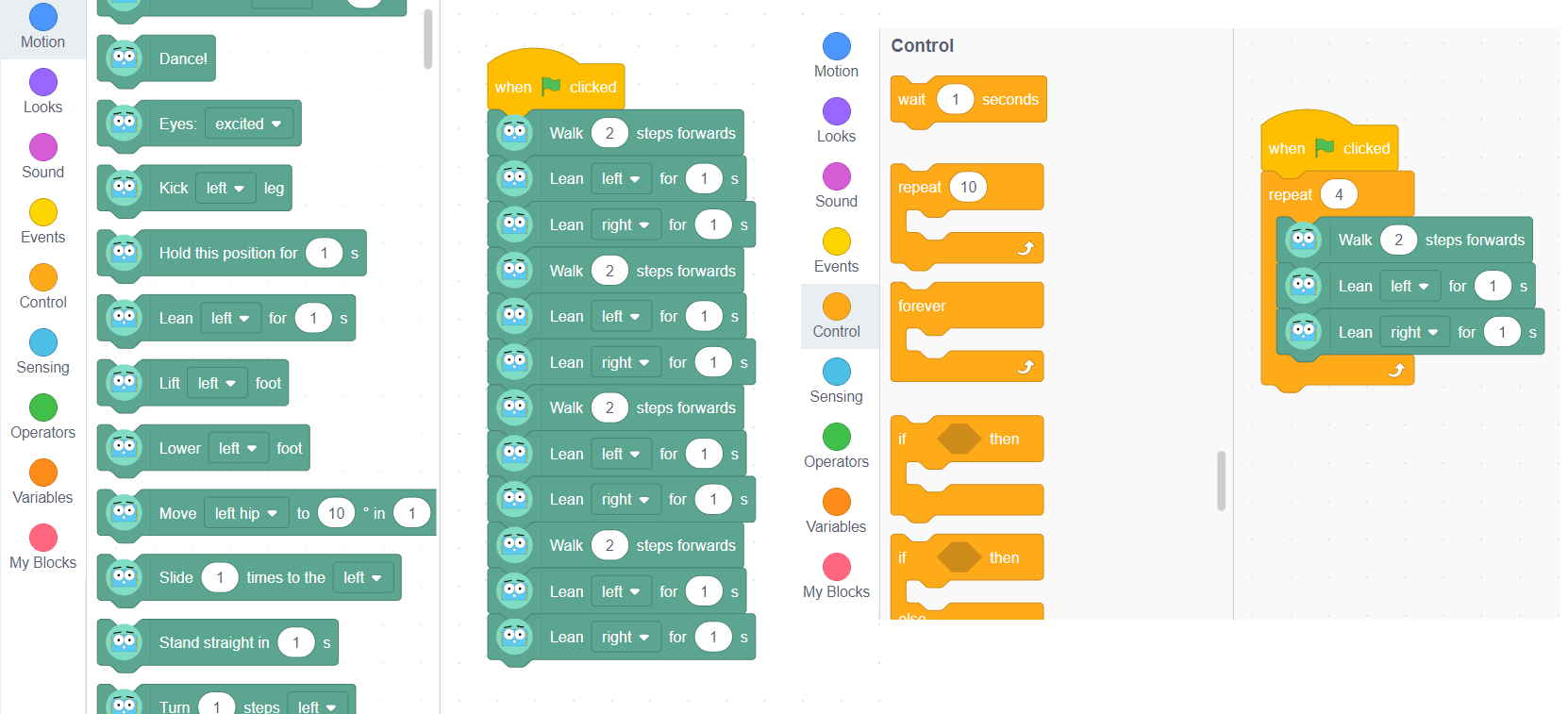
Slide 9 shows videos of Marty performing four separate actions, each of which have a repeating element. If you want, feel free to use the code in the teacher guide that will instruct Marty to perform as in the video, use the videos to show the movements again, if you choose to create the code for the class Marty.
Learners need to decide which of the actions repeat, from Marty's movements, and create a plan with a repeat block; there is a section in the workbook where learners can work in groups and record their thoughts or this could be completed as a whole class activity; alternatively, resources permitting, groups could create the code in MartyBlocks to share with the class. Learners need to be specific about how many times the code will run and if there are any actions that don't repeat.
Bring learners back together to discuss the challenges they faced and overcame. Have groups share their code for a class discussion. It is likely that a lot of the creations will be similar. Encourage other groups to compare their work and ask questions to deepen their understanding of the processes.
Suggested questions you might ask:
Carry out any end of lesson routines.
Log off devices and clear everything away.